

QUICK ANSWER
For executive slides, neither Copilot nor ChatGPT produces consistently better content. The real difference is workflow. Copilot wins when your deck lives inside Microsoft 365 and you need slide-level editing without context-switching. ChatGPT wins when you want deeper reasoning passes before building slides. Most senior leaders end up using both — ChatGPT for the thinking, Copilot for the drafting — and the decision is about which one carries the most value at your stage of preparation, not which one is smarter.
If you want the framework that makes both tools genuinely useful
The AI-Enhanced Presentation Mastery course is a self-paced Maven programme covering how to use AI (including both Copilot and ChatGPT) for executive-grade presentation work.
JUMP TO
Rafaela, a chief of staff at a mid-sized insurance group, told me last month she had run the same executive brief through both Copilot and ChatGPT and could not tell which was which. Her frustration was not that the output was bad. It was that both looked competent and neither felt right. She wanted a clear answer to a clear question — which one is better for executive slides — and she was not getting one.
She is not alone. Senior leaders across financial services, pharma, and tech keep asking the same version of this question. Part of what makes it hard to answer is that the honest response is “it depends on your workflow, not on the model.” That is an unsatisfying answer, so people keep looking for a cleaner one. There is not one. But there is a useful structure for thinking about when each tool earns its place in executive preparation.
The question senior leaders are actually asking
Under the surface question — which tool writes better boardroom-ready content — there is usually a more specific question. Senior leaders are trying to decide whether to pay for a ChatGPT subscription when their company already provides Copilot. They are trying to work out whether switching tools mid-workflow costs them more time than it saves. They are wondering if choosing the “wrong” AI will make their slides worse.
The honest answer to each of those questions is the same. Output quality between Copilot and ChatGPT on executive presentation work, holding the prompt constant, is close enough that it stops being the deciding factor. What differs is the surrounding workflow: where the tool sits, what it connects to, and what friction it removes or adds as you move from strategic thinking to slide drafting.
Once you stop comparing on output quality and start comparing on workflow fit, the choice gets simpler. So does the decision to use both.
BEYOND “WHICH TOOL IS BETTER”
Learn the prompt and workflow framework that turns AI into a presentation partner
AI-Enhanced Presentation Mastery is a self-paced Maven programme — 8 modules, 83 lessons covering prompt design, Copilot and ChatGPT workflows, and the editorial judgement that separates usable output from generic AI drafts. 2 optional live coaching sessions, fully recorded. Monthly cohort enrolment; lifetime access.
- 8 modules, 83 lessons — self-paced
- Prompt patterns that work across Copilot and ChatGPT
- Workflow templates for executive slide preparation
- 2 optional recorded coaching sessions with Mary Beth
- Lifetime access to materials
£499, lifetime access to all course materials.
Explore AI-Enhanced Presentation Mastery →
Designed for senior professionals using AI to produce executive-grade presentations.
Where Copilot wins for executive slides
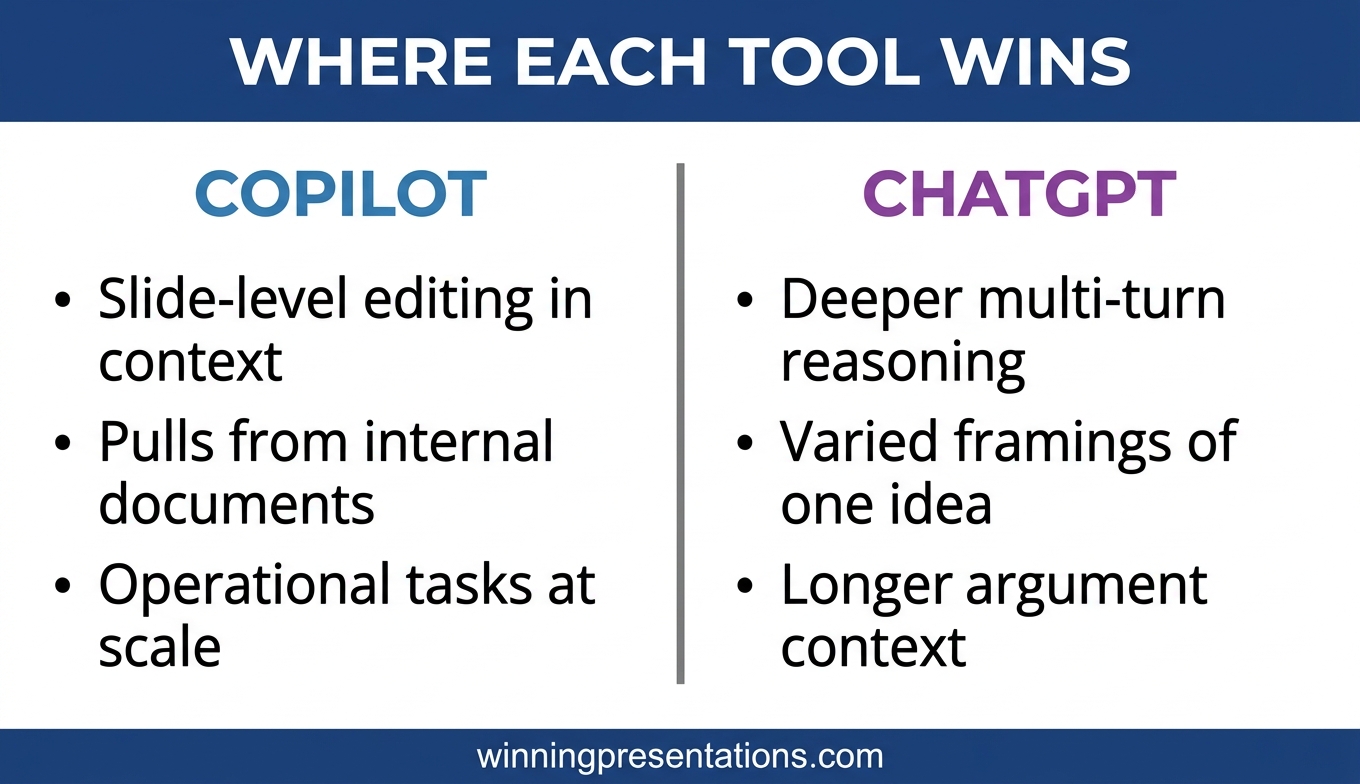
Copilot’s natural advantage is context. It lives inside PowerPoint, reads the slides you are already building, and can operate on them directly. When the question is “rewrite this title slide to be punchier” or “turn these three bullets into a two-sentence summary in the same tone as slide 4”, Copilot does not need the context explained. It has it. ChatGPT would require copy-paste in both directions.
That matters more than it sounds. Senior leaders editing executive decks at the detail level make hundreds of small adjustments. Every context-switch — copy the slide, paste into ChatGPT, edit prompt, copy output, paste back — costs attention. Multiply by thirty adjustments and the workflow friction becomes the dominant cost. Copilot in PowerPoint removes that friction.
Copilot also wins when the deck draws on internal documents or email threads. If your proposal references last quarter’s board minutes, an earlier project brief, and a recent executive memo, Copilot (with tenant-level permissions) can pull from those directly. ChatGPT cannot, unless you paste the relevant content in.
Where Copilot’s natural advantage ends is in deeper reasoning. Copilot is tuned for task completion within Microsoft 365, which means it tends to produce shorter, more tactical responses. For “help me think through the argument structure” work, it is less useful than ChatGPT.
Where ChatGPT wins for executive slides
ChatGPT’s natural advantage is depth of reasoning in a single conversation. For the strategic thinking that has to happen before you start building slides — what is the actual argument, who is the audience, what counter-arguments need addressing, what is the strongest one-sentence answer — ChatGPT is usually the better environment. You can run several iterations of thinking, push back, add new constraints, and work through to a structured answer before you open PowerPoint.
It also wins when you want to explore multiple framings of the same idea. “Give me three different ways to open this proposal” produces more varied output on ChatGPT than on Copilot, which tends to converge quickly on a single patterned response.
For the predicted-question close of a board deck — anticipating the hardest questions and drafting concise answers to each — ChatGPT’s longer reasoning window means it can hold the full context of the argument while generating the Q&A material. Copilot, working slide by slide, loses that context between turns. For the underlying approach see Copilot PowerPoint for board presentations, which covers the three-prompt framework that makes either tool more useful.
Where ChatGPT ends is in operational tasks. “Apply this design change to every slide in the deck” is not ChatGPT’s work. That is Copilot’s.
Is the output quality genuinely different?
This is where most comparison articles fall apart. They run the same prompt through both tools, compare the output, and declare a winner. The test is misleading because it holds the prompt constant but ignores workflow. A prompt that is optimal for Copilot (slide-level, context-aware, short) is not optimal for ChatGPT (multi-turn, reasoning-rich, longer). The reverse is also true.
When you prompt each tool in the way that suits it, the output on executive presentation work is close. There are tonal differences — Copilot tends toward corporate and compact; ChatGPT tends toward considered and longer — and those differences matter for taste more than they matter for quality. Neither produces a finished executive deck from a generic prompt. Both produce useful drafts when prompted with the strategic context the presenter supplies.
The useful question is not “which one is better?” It is “which one removes friction at the stage of preparation I am currently in?” Strategic thinking stage — ChatGPT. Slide-level drafting and editing stage — Copilot. Most executive decks benefit from both.
Ready-made prompts for both tools
The Executive Prompt Pack contains 71 ChatGPT and Copilot prompts for PowerPoint work — including strategic-thinking prompts for ChatGPT and slide-level operational prompts for Copilot. £19.99, instant download.
How to use both without duplicating effort
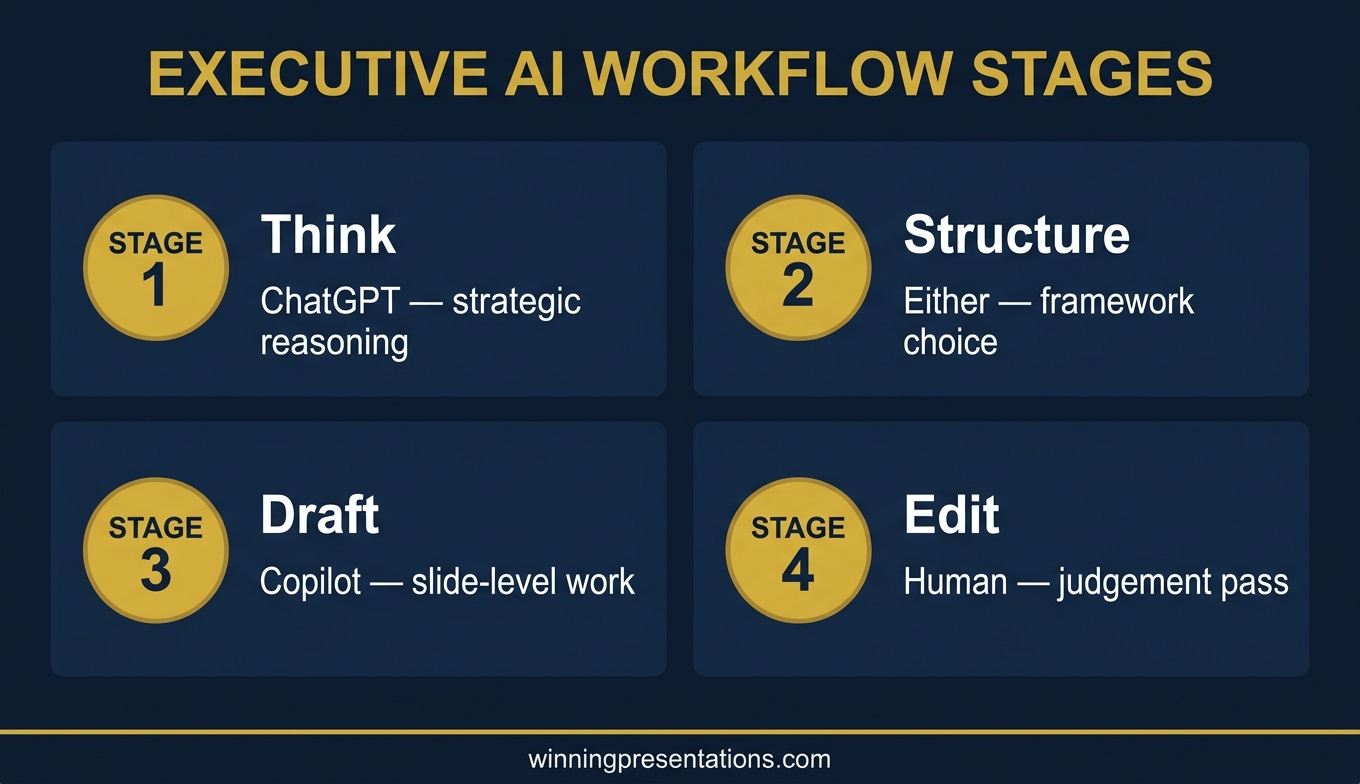
The senior leaders who get the most from both tools run a simple two-stage workflow. Thinking in ChatGPT first. Drafting and editing in Copilot second. The stages rarely overlap. When they do, the result is usually worse than using one tool cleanly.
Stage one: open ChatGPT. Work out the argument. What is the one-sentence answer? Who is the most influential decision-maker and what is their quiet concern? What are the two realistic options the audience is choosing between? What is the strongest argument against the recommended option? What are the three hardest questions?
Stage two: open PowerPoint with Copilot active. Start building. Feed Copilot the output from stage one as slide-level prompts. Let Copilot draft titles, bullets, and summaries. Edit directly on the slides. Use Copilot for design-level adjustments and cross-slide consistency.
The handoff from stage one to stage two takes about a minute. The total time from blank deck to editable first draft usually drops to 30 to 40 minutes for a 10 to 12 slide board update. That is with both tools doing the work each is suited for. It compares well to the two to three hours most senior leaders spend when using a single tool for everything.
For the full landscape on executive AI presentation work see ChatGPT for PowerPoint presentations. For the editing pass that cleans up AI drafts before they reach a board, see the best Copilot PowerPoint prompts.
Frequently asked questions
Is Copilot included free with Microsoft 365?
Microsoft 365 Copilot is a paid add-on for most business tiers. Your organisation may or may not have provided access. If you already have it, start there — the integration advantages are real and there is no extra cost. If you do not, a ChatGPT subscription is usually the quicker path to improved executive presentation work because it does not require enterprise procurement.
Can I use ChatGPT plugins to edit PowerPoint directly?
Not in the same way Copilot does. Some ChatGPT integrations can generate a draft deck, but they do not read and operate on slides you are already building. For slide-level editing inside an existing deck, Copilot remains the more practical option in the Microsoft environment.
Does it matter which tool I use for the Q&A preparation?
Slightly. ChatGPT tends to produce more considered and varied possible questions because it holds the argument context over a longer conversation. Copilot produces tighter, more operational Q&A material. For hostile or complex board Q&A, ChatGPT is often the better starting point. For straightforward operational updates, either works.
Is it safe to paste confidential board material into ChatGPT?
Check your organisation’s AI policy first. Many organisations have approved Copilot because it runs within their Microsoft 365 tenant and keeps data inside the boundary. The same organisations often prohibit pasting confidential material into consumer ChatGPT. ChatGPT Enterprise or Team tiers address this concern but require an account at the organisational level.
Will this preference change as the models improve?
The integration advantages of Copilot and the reasoning advantages of ChatGPT are structural to where each tool sits. Model improvements will narrow the output-quality gap further, which makes workflow fit the dominant factor rather than the secondary one.
The Winning Edge
Weekly thinking for senior professionals on executive presentation craft — slide structure, Q&A, delivery, AI, and the judgement calls the frameworks do not cover.
Not ready for the full programme? Start here instead: download the free Pyramid Principle Template — the argument structure both Copilot and ChatGPT draft better output against.
Next step: pick the next executive deck on your calendar. Do the first 20 minutes of thinking in ChatGPT. Then open PowerPoint with Copilot and draft from that thinking. Notice whether the handoff felt cleaner than your usual single-tool workflow. The answer is usually yes.
For a related deep-dive on what to do when Copilot’s first draft does not hold up under boardroom scrutiny, see why Copilot’s first draft fails boardroom tests.
About the author
Mary Beth Hazeldine is Owner & Managing Director of Winning Presentations Ltd, a UK company founded in 1990. With 24 years of corporate banking experience at JPMorgan Chase, PwC, Royal Bank of Scotland, and Commerzbank, she advises senior professionals across financial services, healthcare, technology, and government on structuring presentations for high-stakes decisions.