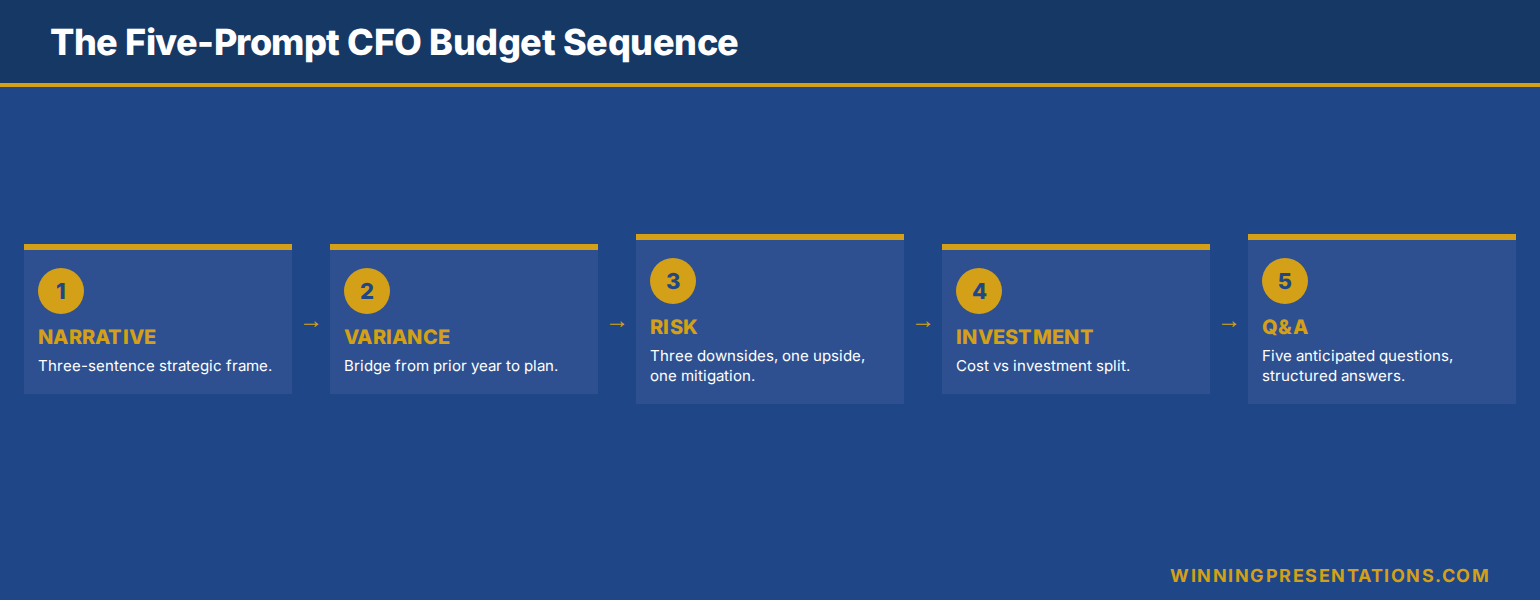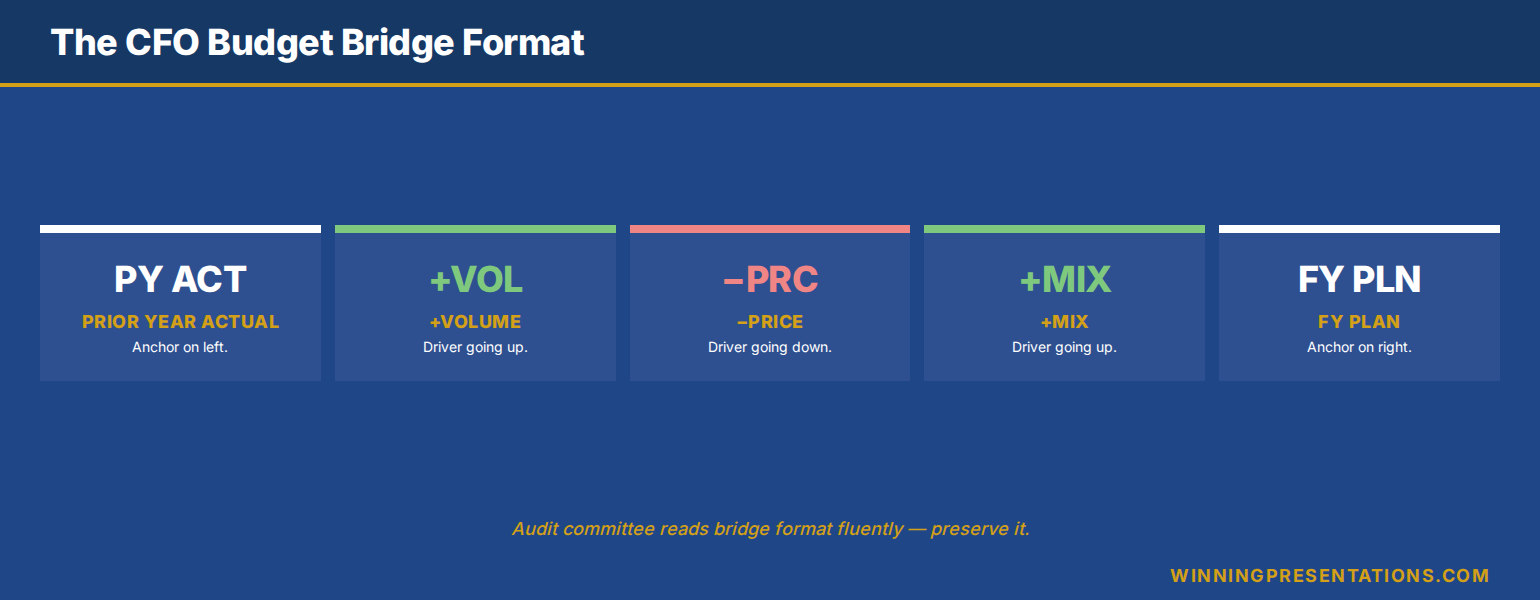
Quick answer: The board budget presentation that earns sign-off in under 20 minutes uses a six-slide structure that mirrors the way finance directors actually evaluate a request. Slide one frames the decision the board is being asked to make. Slide two states the prior-year baseline and the variance. Slide three names the three drivers that explain the variance and the proposed allocation. Slide four sets out the assumption set the numbers rest on. Slide five names the risk and the mitigation. Slide six asks for the specific approval. Boards reject budget presentations that bury the decision, smear the variance, or ask for approval before the assumptions have been seen. The six-slide format prevents all three.
JUMP TO:
- Why most board budget presentations fail at slide three
- The six-slide structure that holds up
- The variance slide: the move that decides whether the room stays
- The assumptions slide: the slide finance directors look for
- The risk and mitigation slide: pre-emptive, not defensive
- The 20-minute timing discipline
- Frequently asked questions
Henrik, finance lead at a Frankfurt-based asset manager, walked into a board meeting last quarter with a 22-slide budget deck that had taken three weeks to prepare. He had sense-checked every number, run two internal reviews, and rehearsed the timing. The chair gave him 18 minutes. He spent eleven of them working through the previous year’s spend by category before he reached the actual budget request. The independent director on the audit committee raised a hand at slide twelve and asked, politely, whether they could “skip ahead to what’s being asked”. Henrik did. The decision was deferred. The board’s feedback, relayed by the chair the next morning, was that the deck “felt like a finance team report rather than a board paper”.
The diagnosis was structural. The first eleven slides answered questions the board had not asked — they were the working that supported the budget, not the budget itself. The decision the board was being asked to make did not appear until slide eighteen. The assumptions the budget rested on were buried in an appendix. By the time Henrik reached the request, the room had spent its attention on the working and had nothing left for the question. The deferral was not about the numbers. It was about the order.
This piece walks through the board budget presentation format that earns sign-off in under 20 minutes — the six-slide structure finance directors expect, the variance slide that decides whether the room stays engaged past slide three, the assumption-set slide that pre-empts the audit committee’s first three questions, and the timing discipline that turns a 22-slide deck into a 20-minute decision. It applies whether the budget is for a single function, a divisional plan, or a whole-of-firm annual plan. The structure is the same; the rigour each slide carries scales with the size of the request.
Want a one-page reference of the questions a CFO asks every budget request?
The 10 Questions Every CFO Asks (+ Scripts) is a free one-page cheatsheet of the questions finance leaders use to test budget proposals — and the answer structure that survives each one. Free download.
Why most board budget presentations fail at slide three
Most board budget presentations fail at the same place. The first three slides set the wrong frame. Slide one is usually a cover; slide two is usually a recap of the prior year by category; slide three is usually a granular spend breakdown. By the time the presenter reaches the budget request — typically slide eight or nine — the room has spent its early attention on context and has begun to drift. The questions that come back are about line items rather than the strategic decision. The presenter then defends line items, the time runs out, and the request is deferred to the next meeting.
The structural error is treating the board as a finance team. A finance team wants the working. A board wants the decision. The board paper that lands has the decision visible by slide one and the working ordered behind it. A finance team report works backwards from the line items to the totals. A board paper works forwards from the decision to the assumptions that justify it. The same numbers, presented in the opposite order, produce two completely different meetings — one that decides, one that defers.
The 20-minute window also forces a discipline that 45-minute meetings did not. Boards in 2026 typically allocate 15 to 20 minutes for a budget item, not the 35 to 45 minutes that were standard a decade ago. The deck that worked at 45 minutes does not compress to 20 by speeding up the delivery. It compresses by cutting structure and re-ordering. The six-slide format is the structural answer. For the foundational discipline behind translating a finance brief into a board-ready slide structure, see the budget presentation template CFO-approved piece — it covers the slide-level discipline this 6-slide format builds on.
The six-slide structure that holds up
The six-slide structure runs as follows. Slide one is the decision slide — one sentence stating the budget total being requested, the period it covers, and the decision the board is being asked to make. Slide two is the variance slide — last year’s approved budget, this year’s request, and the difference, with the percentage variance named. Slide three is the drivers slide — the three reasons the variance exists, ordered by size, with the proposed allocation against each. Slide four is the assumptions slide — the three assumptions the request rests on, named explicitly. Slide five is the risk and mitigation slide — the two risks the board would otherwise raise, named pre-emptively, with the mitigations in plain text. Slide six is the request slide — the specific approval being asked for, with the alternative the board has if it declines.
The order is load-bearing. The decision slide first means the room knows what is being asked before the working is presented; questions that come back in the Q&A are about the decision, not about whether they understood it. The variance slide second means the financial shape of the change is on the table early; the room can hold the size of the request in mind while the rest of the deck explains it. The drivers slide third gives the room three concrete things to push back on, rather than a long list of line items. The assumptions slide fourth is the audit committee’s slide; it is what they will turn to if they ask the difficult question. The risk slide fifth pre-empts the question they would otherwise raise. The request slide sixth is where the chair calls the vote.
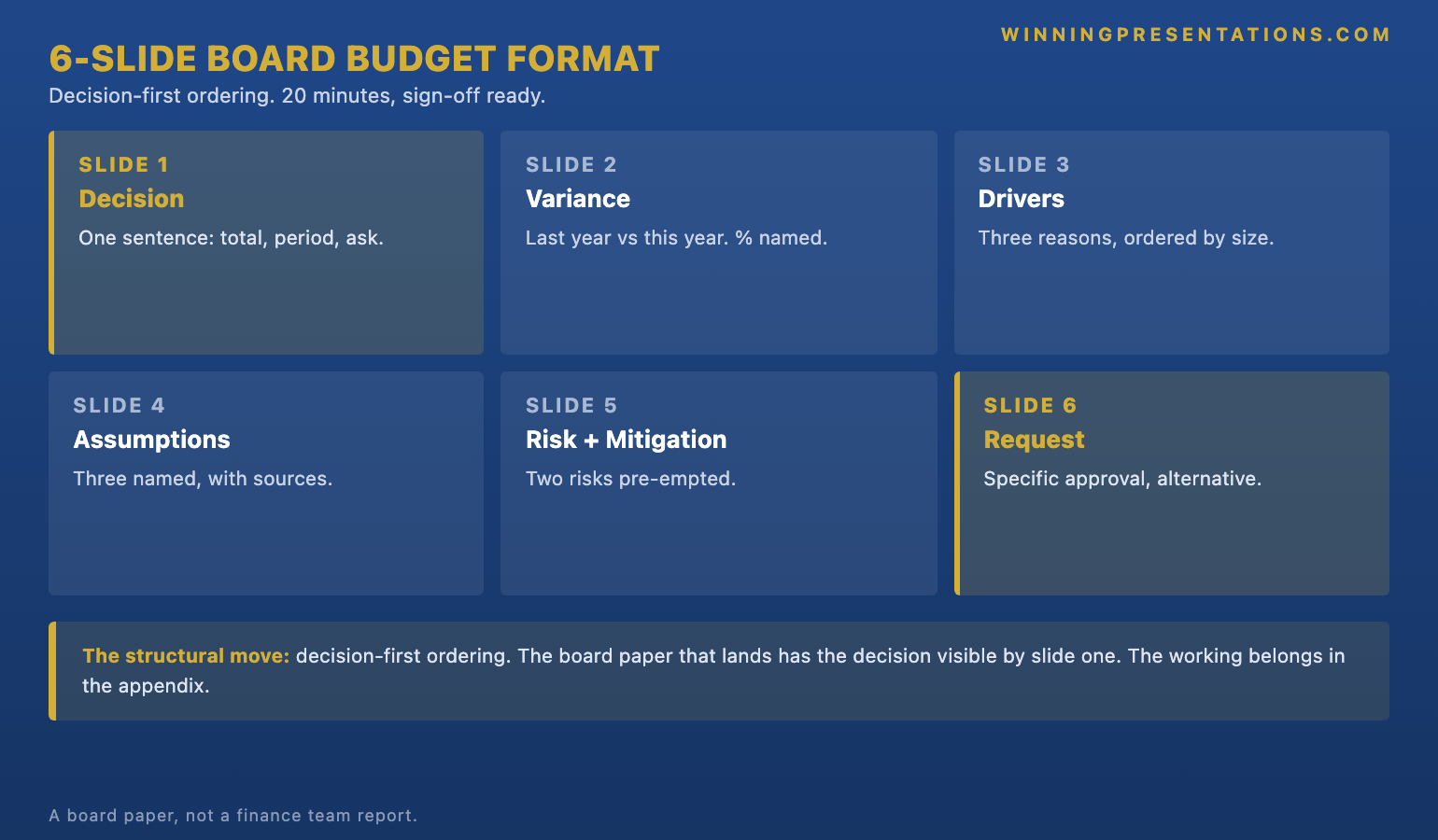
The compression matters. A 22-slide deck does not become a six-slide deck by deleting sixteen slides; the supporting material moves into an appendix that the board can request if needed. The cover slide goes; the agenda slide goes; the granular spend breakdown goes; the line-by-line variance analysis goes. None of these are wrong slides — they are working material. They belong in the appendix and in the supporting board paper, not in the live presentation. The board’s time is for the decision. The working is for the audit trail.
Build a board-ready budget deck on the slide structures finance committees actually accept.
The Executive Slide System is a structured library of templates, AI prompts, and scenario playbooks for executive slide work — including the budget, variance, and approval slide structures used in this six-slide format. Designed for senior professionals presenting to finance committees, audit committees, and full boards.
- 26 Executive Templates — including budget, variance, and approval-vote slide structures
- 93 AI Prompts for drafting board paper content fast
- 16 Scenario Playbooks — finance committee, audit committee, full board, exec sponsor
- 7 Checklists — pre-meeting review, slide-level structural check, and post-meeting follow-up
- £39, instant download, lifetime updates
The variance slide: the move that decides whether the room stays
The variance slide is the slide that decides whether the board stays with the deck. A weak variance slide buries the change inside a category-by-category breakdown. A strong variance slide names the change in one number, in plain text, at the top of the slide. The format that works has three lines. Last year’s approved budget. This year’s request. The difference, expressed both as an absolute number and as a percentage. Below those three lines, a single sentence naming what the variance pays for at the highest possible level. That is the entire slide.
The discipline is in what the slide does not contain. It does not contain a category-by-category breakdown — that is slide three’s job. It does not contain the assumptions — that is slide four. It does not contain a defence of the variance — the variance does not need defending until the room asks. The slide names the change and lets the room hold the number in their heads while the next two slides explain it. Boards that see a clean variance slide tend to engage with the deck constructively from that point on; boards that see a fifteen-row variance table tend to drift into line-item questions and miss the strategic shape.
The other variable is the comparison year. Most decks compare to last year’s budget. Stronger decks compare to last year’s actual spend, with budget shown alongside as a reference. The actual-spend comparison is a more honest baseline because it shows the board what was really used, not what was approved on paper. If the prior year underspent by 8 per cent, the variance against actual spend is the more meaningful number; if the prior year overspent, the deck has to reconcile that before the new request is credible. For the wider discipline behind defending a budget where the prior period overspent, see our budget overrun presentation guide.
The assumptions slide: the slide finance directors look for
The assumptions slide is the slide finance directors turn to when they want to test the deck. A budget request is only as credible as the assumptions it rests on; if the assumptions are hidden, the credibility of the whole request is in question. The slide that works names three assumptions — three, not five, not ten — in plain language, with the source of each assumption beside it. Volume growth assumption. Cost inflation assumption. Foreign exchange or interest rate assumption, as applicable. Each one a single line, each one with a number, each one with the source.
Three is the right number for a board paper because it is the number the audit committee will probe. Five is too many for the room to hold; ten reads as defensive listing rather than honest disclosure. The discipline is choosing the three assumptions that, if wrong, would change the request materially. A volume assumption that affects 4 per cent of the total is not a top-three assumption; an assumption about a single major contract that drives 30 per cent of the variance is. Choosing the three correctly is the work; once chosen, the slide writes itself.
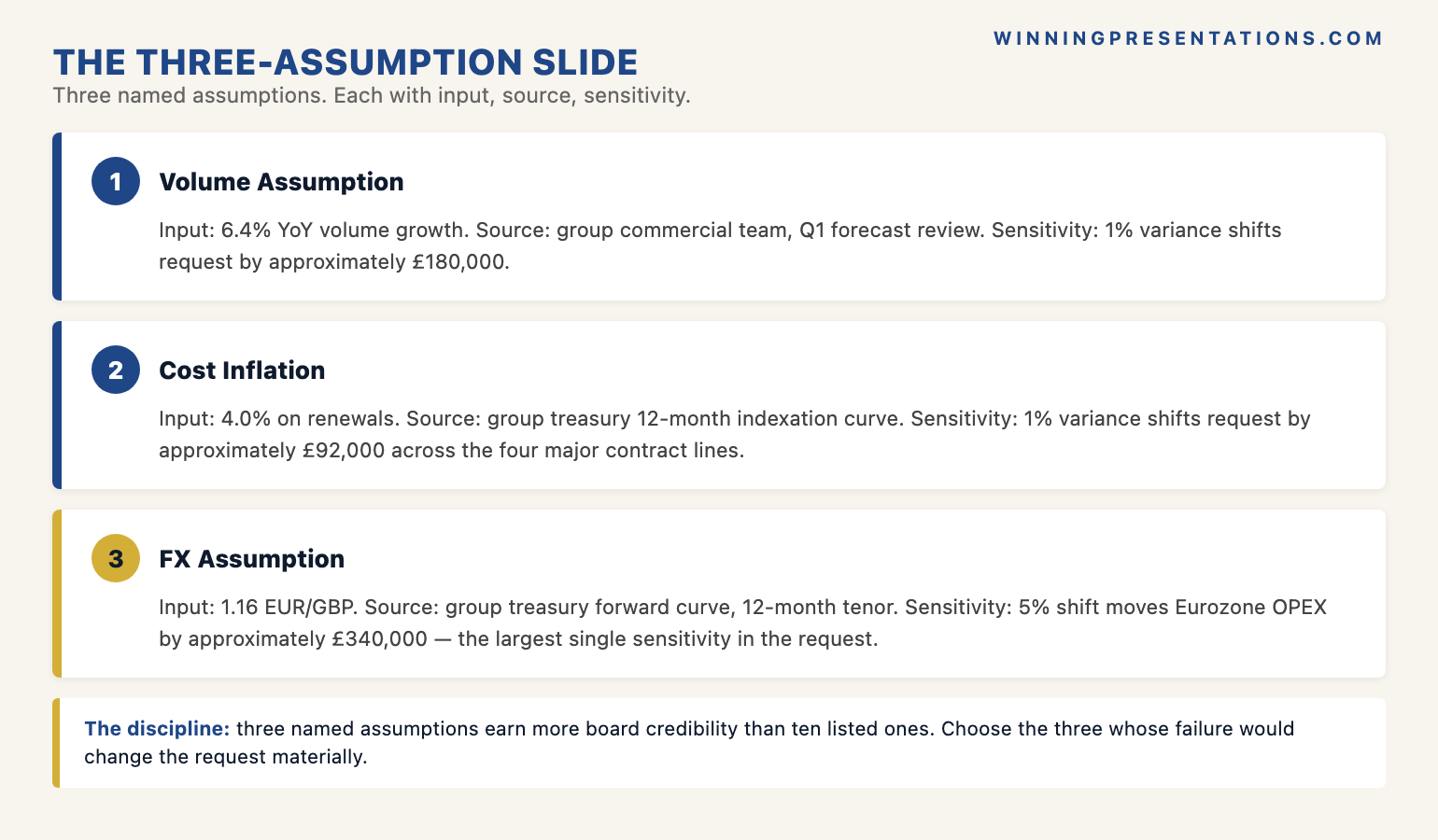
The slide gains further credibility when it includes a sensitivity line beside each assumption — what the budget would shift to if the assumption proves wrong by a stated percentage. A volume assumption that adds £200,000 to the request if it proves 10 per cent low is a number the audit committee can hold. The sensitivity transforms the slide from a list of inputs into an analytical position. Boards that see the sensitivity column ask harder questions but accept the request more readily; boards that do not see it tend to defer until the analysis is done.
The risk and mitigation slide: pre-emptive, not defensive
The risk and mitigation slide is the slide that pre-empts the board’s hardest questions. The discipline is to name the two risks the board would otherwise raise, before they raise them, with the mitigation already on the slide. Two risks, not five — the two that are real, that the board would identify themselves, and that have material implications if they materialise. Each one in one sentence; the mitigation in one sentence beside it. The slide is not a risk register. It is a pre-emption.
The reason this slide works is psychological as much as analytical. A board that is told the risk before they identify it perceives the presenter as honest and prepared; a board that identifies the risk first perceives the presenter as either unaware or evasive. The asymmetry is significant. The same risk, surfaced by the presenter on slide five, accelerates the decision; surfaced by the board in Q&A, it tends to defer it. Surfacing the risk pre-emptively is one of the highest-leverage moves in the entire deck.
The slide is also where boards form their judgement of the presenter as a future operator. A presenter who names the two real risks and has thought through the mitigations reads as someone the board can trust to manage the budget. A presenter who hides the risks reads as someone who has not yet thought through the year. The slide is functional in the meeting; the impression it leaves persists for several quarters. For the deeper discipline behind preparing for finance committee scrutiny, see our how to present to a CFO piece — it covers the questions that drive the risk slide’s content.
If you want the questions a CFO will actually ask alongside the slide structure:
10 Questions Every CFO Asks (+ Scripts) is a free one-page reference of the most common CFO questions on a budget request, with the response structures that hold up under scrutiny. Pairs with the six-slide format above.
The 20-minute timing discipline
The six-slide format compresses naturally to 20 minutes when the per-slide timing is set in advance. The decision slide takes 60 seconds — long enough to read the request aloud and pause. The variance slide takes 90 seconds — naming the three numbers and the one-line explanation. The drivers slide takes three minutes — the longest single slide because it carries the analytical content. The assumptions slide takes two minutes. The risk slide takes two minutes. The request slide takes 90 seconds — re-stating the decision and naming the alternative if the board declines. That leaves nine minutes for board discussion and questions, which is the right ratio for a 20-minute item.
The timing fails when the presenter treats the slides as equally weighted. They are not. The drivers slide is the analytical core; the others are framing. A presenter who allocates equal time to each runs out of time during the drivers and rushes the request. A presenter who treats the deck as one minute of decision, eleven minutes of analysis, and eight minutes of discussion lands the timing reliably. The discipline is to know which slide is doing the work and to give it the room.
The compression also forces honesty about what the board needs versus what the finance team wants to share. A finance team that has spent six weeks preparing the budget wants to show the working; a board that has fifteen items on the agenda wants to make the decision. The six-slide format is the answer to the second need, not the first. The working still exists — in the supporting board paper, in the appendix, in the model that sits behind the deck. It just does not appear on the live slides. The board paper, not the live slides, is where the working belongs. For a closely related piece on what survives the cut when a CFO reads the deck before the meeting, see our companion article on the finance deck CFOs read first.
Frequently asked questions
How long should a board budget presentation be in 2026?
Twenty minutes is the standard window for a board-level budget item in 2026, and that has compressed from 35 to 45 minutes a decade ago. The compression has been driven by board agendas that now routinely carry twelve to fifteen items in a half-day meeting and by a more general expectation that material be pre-read. The implication for the presenter is that the deck has to be a decision aid, not a finance team report — six slides, around 20 minutes of presented material, with the supporting work in the board paper and the appendix. Decks that try to deliver a full finance briefing in 20 minutes either get cut short or get deferred to the next meeting.
Should the variance slide compare to budget or to actual?
To both, with actual as the headline number. Comparing to budget alone hides the under or overspend that occurred during the year, which is information the board wants to weigh when assessing the credibility of the new request. The format that works has actual spend as the prior-year baseline, with the prior-year approved budget shown alongside in lighter weight as a reference. If the variance against budget is materially different from the variance against actual, the presenter should be ready to explain why in 30 seconds — that explanation is one of the most common follow-up questions a finance director will ask.
What goes in the appendix versus on the slides?
On the slides: the decision, the variance shape, the three drivers, the three assumptions, the two risks, and the request. In the appendix: the line-item breakdown, the prior-year reconciliation, the supporting model summary, the customer or contract concentration analysis, the assumption sensitivity tables, and any analytical detail that supports the slides without being needed for the decision. The board paper itself sits between the two — it is the written narrative that supports the slides, typically four to six pages, and it is the document the audit committee will read most carefully. The appendix is for the audit trail and for follow-up questions.
What if the board asks for a slide we did not include?
Have the appendix loaded and ready to flip to. The discipline is to keep the live deck to six slides and let the appendix carry the rest, but the appendix has to be navigable on the spot — typically organised in the same order as the live slides, with each slide’s supporting analysis grouped behind it. A presenter who can flip to the line-item breakdown when asked, without breaking the flow of the meeting, signals preparation and confidence. A presenter who has to apologise that the analysis is in a different document signals the opposite. The appendix is not a backup; it is the second half of the deck.
The Winning Edge — weekly newsletter
The Winning Edge is a weekly newsletter for senior professionals who present at the executive level. One short email a week, focused on the structural moves that separate decks committees back from decks they defer. Subscribe to The Winning Edge →
Not ready for the full Executive Slide System? Start here instead: download the free 10 Questions Every CFO Asks (+ Scripts) — a one-page reference of the questions every CFO will probe in a budget review, with the answer structure that holds up.
About the author
Mary Beth Hazeldine is Owner & Managing Director of Winning Presentations Ltd. With 25 years of corporate banking experience at JPMorgan Chase, PwC, Royal Bank of Scotland, and Commerzbank, she advises executives across financial services, healthcare, technology, and government on structuring presentations for high-stakes funding rounds, board approvals, and strategic decisions.