Quick Answer
Generative AI produces fast first drafts of executive presentations. It does not produce board-ready decks. The drafts carry signature patterns — even bullet lengths, abstract verbs, unsourced claims — that a board reads as opinion, not analysis. The fix is a structured editorial pass: six moves applied to every AI-drafted deck before it reaches a senior audience.
On this page
Henrik runs corporate development for a mid-cap European insurer. He fed eighteen pages of due-diligence notes into Copilot and asked it to draft a board presentation on a small bolt-on acquisition. Copilot produced fifteen slides in eight minutes. He read them. They looked complete.
His chair read them too. Forty minutes later the chair sent one line: “This reads like a McKinsey deck without the analysis. Where is your view?”
The deck had every section a board expects — executive summary, deal rationale, financial sensitivities, risk register, recommendation. The bullets were clean. The structure was logical. What it lacked was the editorial signal that a senior decision-maker had stress-tested every claim. Generative AI hides that signal precisely because it produces uniformly competent prose. Boards trust unevenness — the slide that has been thought about, broken, and rebuilt — more than they trust polish.
If your AI-drafted decks land flat in the boardroom
Senior audiences read AI tells inside the first three slides. The fix is not less AI. It is a structured editorial pass that turns the draft into something the board hears as your view, not the model’s.
What generative AI actually produces
Generative AI is excellent at structure. It understands the shape of a board paper, an investor pitch, an internal change communication. Given a brief and source material, it produces a coherent first draft fast. The reason it does not produce board-ready output has nothing to do with capability and everything to do with what makes prose read as authoritative.
Three structural patterns betray AI drafts to a senior reader:
Even bullet length. AI tends to produce four bullets where each runs to roughly the same word count. Human drafts have natural unevenness — a long bullet, two short, a longer one again. Even bullets read as a template that has been filled in. Uneven bullets read as ideas that earned their length.
Abstract verbs. AI defaults to “leverage,” “drive,” “enable,” “optimise,” “strengthen.” These verbs perform competence without committing to a specific action. Senior readers downgrade competence-performing prose to “this is what they wrote when they did not know what to say.”
Unsourced numbers. AI inserts numerical claims to make a draft feel substantive. Without an explicit source — pulled from the user’s own data, named in the prompt — those numbers are plausible-sounding fiction. Boards do not need to verify every number to detect the pattern; they will sense it within the first three slides.
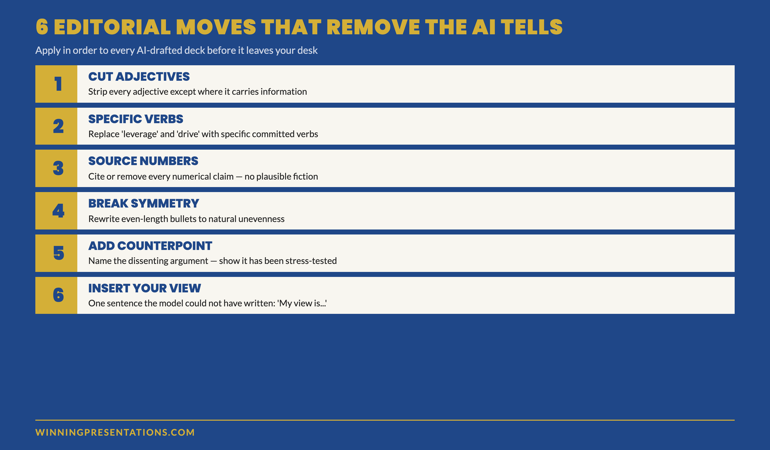
The six editorial moves that remove the AI tells
The fix is not to abandon AI. It is to apply a structured editorial pass to every AI-drafted deck before it leaves your desk. Six moves, applied in order:
1. Cut every adjective except where it carries information. “Strong financial performance” carries no information. “12% margin growth” does. AI loves adjectives because they signal effort without requiring evidence. Strip them. If the slide reads thinner afterwards, it was too thin to begin with.
2. Replace abstract verbs with specific ones. “Leverage market position” becomes “raise prices on three product lines.” “Drive engagement” becomes “increase weekly active users by 8%.” Specific verbs commit. Abstract verbs perform commitment without making one. A senior reader can tell the difference inside one bullet.
3. Source every number. Either the number was pulled from your own data — say so on the slide (“Source: 2026 Q1 management accounts”) — or it was estimated by AI from training material, in which case it must be removed. Numbers without provenance are a credibility tax that compounds across the deck.
4. Break bullet symmetry. Look at every list of three or four bullets. If the words-per-bullet count is within ±10%, the slide reads as AI-generated. Rewrite to natural unevenness — short, longer, very short, medium. The eye reads the variance and registers thought.
5. Add at least one counterpoint per major section. AI drafts present a one-sided case because that is the prompt. Senior readers expect the dissenting argument to be named and addressed. One sentence is enough: “The committee will likely raise X. Our response is Y.” Adding the counterpoint signals that the case has been stress-tested.
6. Insert your view. The single most missing element in AI-drafted decks is a sentence that begins with “I think” or “My view is” or “We recommend, despite X, because Y.” AI cannot supply this because it does not have one. Boards do not approve recommendations that lack a named human view; they approve summaries.
These six moves take roughly 35 minutes on a 15-slide deck. They are not optional. They are the editorial work that turns AI-as-drafting-tool into AI-as-presentation-partner.
Build executive-grade AI-assisted presentations
Move beyond basic AI usage to senior-level output
- 8 modules, 83 lessons of self-paced course content on AI-assisted executive presentations
- 2 optional live coaching sessions with Mary Beth — both fully recorded, watch back anytime
- Prompt and workflow framework for AI-drafted decks that survive senior review
- No deadlines, no mandatory session attendance — work at your own pace
Maven AI-Enhanced Presentation Mastery — £499, lifetime access to materials, monthly cohort enrolment open.
Designed for senior professionals using AI to build executive-grade output.
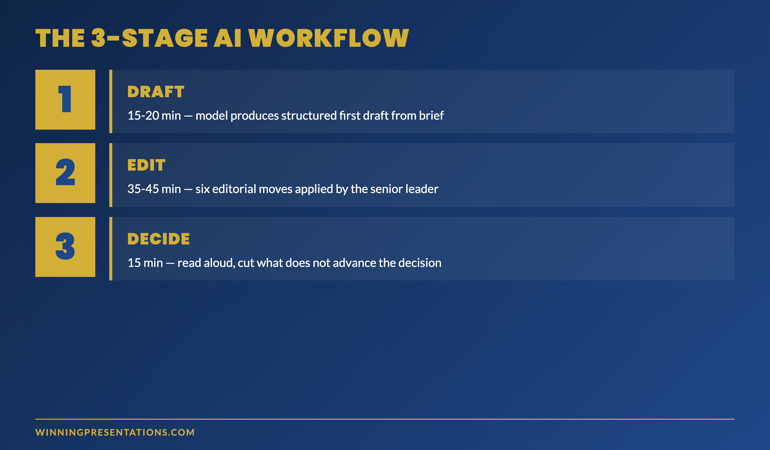
The senior-leader workflow: draft, edit, decide
The senior leaders who get the most out of generative AI for executive presentations follow a three-stage workflow that keeps the model in its strongest role and keeps the human in theirs.
Stage 1 — Draft (15–20 minutes). Feed the model your source material — meeting notes, financial extracts, research summaries — with explicit context: the audience (board, exec committee, investor panel), the decision required, the time budget for the meeting, the specific recommendation you are leaning towards. Ask for a structured first draft against the five-section frame (context, options, recommendation, risk, decision). Resist the urge to refine prompts more than twice; the model is producing a draft, not a final.
Stage 2 — Edit (35–45 minutes). Apply the six editorial moves above. This is where the senior judgement enters. The model cannot do this stage; it does not know which numbers came from your data and which it inferred. It does not know which counterpoint your specific board will raise. It does not have a view.
Stage 3 — Decide (15 minutes). Read the deck aloud, in the order it will be presented. Mark every slide that does not pass three tests: Does it advance the decision? Does it carry a specific commitment? Would I read this aloud to a sceptical board member without flinching? Cut or rewrite the slides that fail. The deck that survives is the one that goes to the meeting.
This workflow scales. A 15-slide board pack that took 4 hours to build by hand takes around 80 minutes with this approach. The quality is comparable. What matters is that the editorial pass is structured, not optional.
For senior professionals already using AI in their drafting workflow, the AI-Enhanced Presentation Mastery course covers the prompt patterns, editorial moves, and senior-judgement decisions that turn AI from a drafting tool into a partner.
When not to use AI on an executive deck
Three situations where the AI-drafted-deck workflow does more harm than good:
The decision is contested inside the room. When you know two board members have already taken opposing positions, the AI-drafted deck will land on neither. The structure will be balanced, the language even-handed, the recommendation will hedge. Contested decisions need a named human view from the first slide. Write that one yourself.
The credibility of the recommendation rests on the recommender. A board’s first investment in a strategic pivot rests on whether they trust the leader proposing it. AI prose neutralises voice. If the recommendation depends on the board hearing you, the model gets in the way. Use AI for the analysis pages; write the recommendation slide by hand.
The audience is hostile or sceptical. A regulator, a sceptical investor, a board member known to push back hard — these readers will probe the deck for AI tells precisely because the tells correlate with weak underlying analysis. You cannot afford to give them the surface signals. Hand-write the deck or apply a much heavier editorial pass than usual.
Frequently asked questions
Will my board be able to tell the deck was AI-drafted?
If the editorial pass has been done properly, no. The board may suspect AI was used somewhere in the workflow, and that is increasingly normal. What they will object to is unedited AI output — even bullets, abstract verbs, unsourced numbers, missing counterpoint. The six editorial moves remove the surface signals; senior judgement supplies the rest.
Should I disclose that AI helped draft the deck?
This is increasingly a board-by-board judgement. Some boards expect disclosure on AI-assisted output; some treat it as you would treat a junior team member’s drafting work — invisible by default. The trend in 2026 is towards quiet disclosure: a footnote line on the cover page noting “Drafted with AI assistance, edited by [name].” That tends to land better than an unprompted reveal mid-meeting.
What is the difference between a Copilot-drafted deck and a ChatGPT-drafted deck?
For executive presentations, the practical difference is data integration. Copilot in PowerPoint can pull from your own files; ChatGPT works from what you paste in. The drafting quality is comparable. The editorial pass is identical regardless of which tool produced the draft. Senior readers do not distinguish between the two; they distinguish between AI-edited and AI-unedited output.
How do I prompt the model to produce drafts that need less editing?
Be specific about audience, decision, and recommendation in the prompt. Provide source material rather than asking for general analysis. Ask for the draft against a named structure (the five-section frame). Refine the prompt no more than twice. The drafts will still need the six editorial moves, but they will start closer to publishable than a generic prompt produces.
The Winning Edge — weekly newsletter for senior presenters
One framework, one micro-story, one slide pattern — every Thursday morning, ten minutes’ read. Including the AI-era patterns I am field-testing this quarter that haven’t made it into the courses yet.
For the buyer-intent companion piece on the workflow itself, see using AI to build executive slide decks.
Mary Beth Hazeldine — Owner & Managing Director, Winning Presentations Ltd. With 24 years of corporate banking experience at JPMorgan Chase, PwC, Royal Bank of Scotland, and Commerzbank, she advises senior professionals across financial services, healthcare, technology, and government on AI-augmented presentation work, board paper structure, and high-stakes executive communication.