

Quick Answer
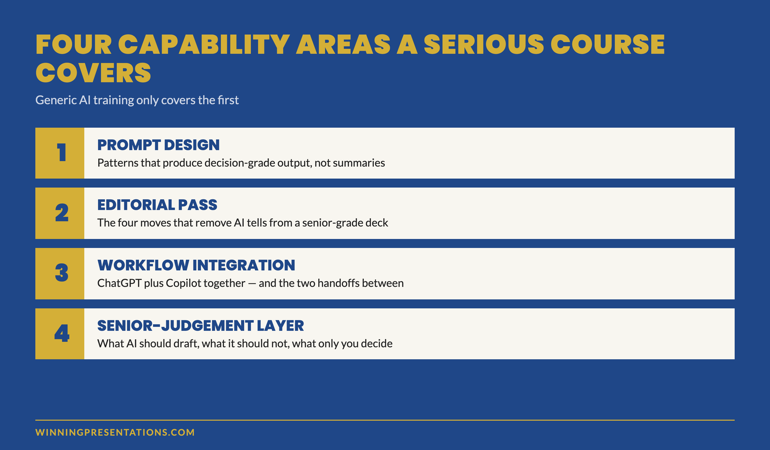
A generative AI for business presentations course earns its place in a senior leader’s calendar only if it covers four capability areas: prompt design that produces decision-grade output, the editorial pass that removes AI tells, the workflow integration across ChatGPT and Copilot, and the senior-judgement layer that decides what AI should and should not draft. Generic AI training covers the first; serious programmes cover all four. The structural questions below are how to tell them apart before paying.
On this page
Solveig had been a director of strategy at a Nordic energy group for nine years. She had attended three AI-for-business courses in the previous twelve months — one delivered by a global consultancy, one by an internal learning team, one by a well-known online platform. All three had been useful at the surface level. None had changed how she actually built her quarterly committee deck.
The fourth programme she signed up for landed differently. The difference was not the brand or the price. It was the curriculum’s centre of gravity. The first three courses had been about the AI tools. The fourth was about the work the AI tools were supposed to support — executive presentations to senior audiences. The structural difference is what made the programme worth her time.
This is the pattern senior leaders increasingly run into. The market is now full of generative AI courses. Most are tool-led. A small number are work-led. The work-led courses are the ones that move the needle for senior professionals already operating at executive level. The four capability areas below are the test that separates them.
If you have already done generic AI training and are still rewriting AI drafts by hand
The gap is not in the tool knowledge. The gap is in the senior-judgement layer that decides what AI should draft, what it should not, and what the editorial pass needs to do. That layer is what a serious course teaches.
Why most AI-for-presentations courses fail senior leaders
The standard generative AI course was designed for a wider audience than the senior leadership tier — knowledge workers across functions, with varying degrees of presentation work in their job. The curriculum reflects that. Most of the time is spent on the AI tools themselves: prompt structures, model differences, basic use cases. The presentation work is a thin layer at the end.
For a senior leader who already presents at executive level, this curriculum has three failure modes:
Tool fluency without senior context. The course teaches you how to write a prompt. It does not teach you how to write a prompt for a board update where the chair will tab the deck inside the first three minutes. The first half of the course is unnecessary; the second half is the part that was needed.
Generic editing rather than executive editing. Most courses cover “editing AI output” as a tonal exercise — make it sound less robotic. Senior audiences require more: removing the AI signature is one part; restoring the senior judgement that AI cannot supply is the larger part. Generic courses miss the second.
No workflow integration. The course teaches you AI tools in isolation. It does not address the integration with your existing presentation workflow — Copilot inside Microsoft 365, the handoff between drafting and slide layout, the source-provenance trail that senior audiences increasingly demand. The integration work is where most senior leaders get stuck after the course ends.
The market is starting to differentiate. The work-led programmes — the ones designed for senior leaders rather than for general knowledge workers — cover the four capability areas below. The tool-led programmes do not.
The four capability areas senior leaders need
Area 1 — Prompt design that produces decision-grade output
The base capability — but only the base capability. A senior leader does not need to learn what a prompt is or how to structure one. They need to learn the specific prompt patterns that produce drafts senior audiences engage with: the situation-complication-resolution prompt for board updates, the character-stake-shift prompt for keynotes, the data-to-decision prompt for committee papers.
The prompt design work is also where the editorial discipline begins. A weak prompt produces a draft that needs heavy editing; a strong prompt produces a draft that needs targeted editing. Senior leaders who have done generic AI training often plateau here — they can prompt the model, but their drafts still arrive needing 60% of the work re-done.
Area 2 — The editorial pass that removes AI tells
The editorial pass is the practice of taking an AI-drafted deck and removing the surface signals that mark it as AI-drafted. It is more than spell-check or tone-shifting. The senior-grade editorial pass has four moves: replace abstract verbs with source-document verbs, cut opening adjectives on bullets, add specific numbers that anchor the reader, rewrite the recommendation in your own voice.
A serious course teaches the editorial pass with examples — drafted-by-AI vs drafted-by-AI-and-edited side by side, so the senior leader can see the change in tone, density, and credibility that the editorial pass produces. Without that direct comparison, the editorial pass is hard to internalise.
Area 3 — Workflow integration across ChatGPT and Copilot
The third area is where the work moves from individual capability to integrated workflow. ChatGPT for structural and narrative drafting; Copilot for evidence extraction and slide layout; the handoff between the two. The course needs to teach the handoff explicitly — most senior leaders who learn the tools separately struggle to integrate them on real decks.
Workflow integration also means understanding which tool to use when, and when to use neither. A senior-grade course covers the situations where AI is the wrong choice — short decks, sensitive material, audiences of one — alongside the situations where the workflow earns its time saving.
Area 4 — The senior-judgement layer
The fourth area is the one most courses skip and the one that matters most for senior leaders. AI can draft a deck. AI cannot decide which recommendation is the right one for this audience at this moment. AI cannot weigh the political, organisational, and personal context of a senior leader’s situation. AI cannot substitute for the judgement that makes a recommendation defensible under board-level scrutiny.
The senior-judgement layer is the discipline of deciding, for any given deck, what AI should draft and what it should not. The recommendation slide — usually not. The risk framing — usually edited heavily. The evidence selection — yes, but with a verification pass. The opening — written by the senior leader.
This layer is what separates a course for senior leaders from a course for general knowledge workers. It is taught through case examples — real decks with the AI-drafted version, the senior-edited version, and the analysis of what the senior judgement added — rather than through theoretical principles.
Self-paced programme designed for senior professionals
AI-Enhanced Presentation Mastery — 8 modules, 83 lessons
- 8 self-paced modules covering all four capability areas — prompt design, editorial pass, workflow integration, senior-judgement layer
- 83 lessons with case examples — real executive decks at AI-drafted, senior-edited, and final stages
- 2 optional live coaching sessions with Mary Beth — both fully recorded so you can watch back anytime
- No deadlines, no mandatory session attendance — work through at your own pace
- New cohort opens every month — enrol whenever suits you
AI-Enhanced Presentation Mastery — £499, lifetime access to all course materials.
Enrol in AI-Enhanced Presentation Mastery →
Designed for senior professionals using AI to build executive-grade presentations.
The structural questions to ask before enrolling
Before paying for a generative AI for business presentations course, four questions separate the work-led programmes from the tool-led ones. Ask them on the sales call, in the FAQ, or by emailing the course director directly. The way the question is answered tells you as much as the answer itself.
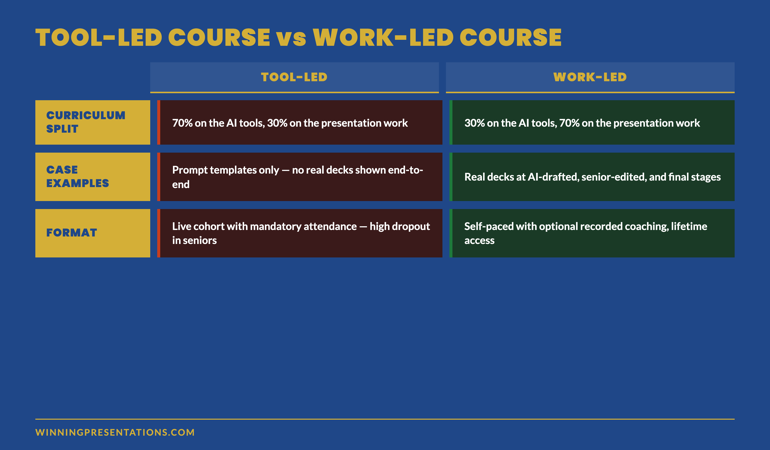
Question 1 — How much of the course is about the AI tools versus about the presentation work? A serious senior-leader course is roughly 30% on the tools and 70% on the work — the structural questions, the editorial discipline, the senior-judgement layer. A tool-led course is the inverse. If the answer is “we cover everything,” the course is tool-led with a thin presentation layer at the end.
Question 2 — Can I see a case example of a real deck before, during, and after the AI workflow? A work-led programme will show you. A tool-led programme will offer prompt templates instead. Prompt templates are useful; case examples teach the senior-judgement layer that prompt templates cannot.
Question 3 — Who is the course actually for? A serious senior-leader course will name a specific audience: directors, senior managers in financial services, executive leadership in regulated industries, partners in professional services. A generic course will say “anyone using AI for presentations.” The specificity of the audience definition reflects the depth of the curriculum.
Question 4 — What is the format, and is live attendance required? The trend in serious senior-level programmes is towards self-paced material with optional recorded coaching sessions. Senior professionals cannot reliably attend live sessions; courses that require live attendance signal a curriculum designed for a different audience. Watch out for the phrase “live cohort” — it usually means the course was designed around the trainer’s calendar rather than the senior learner’s calendar.
Format: live, self-paced, or hybrid?
The format question deserves its own treatment because the market signal is shifting fast. Three years ago, the default for senior-level training was “live cohort” — fixed weeks, mandatory attendance, scheduled coaching calls. Senior professionals could rarely attend the full programme; the dropout rate on live cohorts in senior segments has consistently been 35–55%.
The format that has displaced the live cohort for serious senior-level work is self-paced with monthly cohort enrolment. The programme is recorded; the materials are available indefinitely; coaching sessions, when they exist, are optional and recorded. The “cohort” is the enrolment batch — a community joining at the same time — not a live structured programme.
The advantage for senior leaders is real: you can engage with the material around your actual diary rather than around a fixed schedule. The advantage for the course is also real: completion rates rise sharply when senior professionals are not penalised for missing a Tuesday at 4pm. Programmes with this format report completion rates substantially higher than the live-cohort norm.
If a course markets itself as a “live cohort” with mandatory attendance, ask the structural question: who is this course actually for? It is rarely for senior leaders, regardless of how the marketing presents it.
Want to start with the tactical layer rather than the full programme?
The Executive Prompt Pack covers Area 1 (prompt design) at the tactical level — 71 ready-to-use prompts for ChatGPT and Copilot, organised by presentation scenario. £19.99, instant access. Many senior leaders use the prompt pack first, then move to the full course once they have seen what stronger prompts produce.
Get the Executive Prompt Pack →
71 prompts for executive presentations — ChatGPT, Copilot, and Claude.
Frequently asked questions
How long does AI-Enhanced Presentation Mastery take to complete?
The programme is self-paced. Most participants work through the 8 modules and 83 lessons over four to ten weeks, fitting the material around their workload. There are no deadlines and no mandatory session attendance. New cohorts open every month for enrolment. Once enrolled, you have lifetime access to all course materials and can return to specific modules as needed before high-stakes meetings.
Are the live coaching sessions required?
No. The 2 live coaching sessions are optional and fully recorded. Senior professionals frequently cannot attend live; the recordings let you engage with the material on your own schedule. The course content stands independently — the coaching sessions add depth and community for those who can attend, but completion does not depend on them.
Is this aimed at executives or at people working towards executive level?
Both, but the framing differs. Senior leaders who already present at executive level use the programme to integrate AI into their existing workflow without losing the senior-judgement layer. People working towards executive level use it to build the workflow alongside the judgement that the senior tier requires. The material covers the same content; what changes is how each group uses it.
What if my organisation has not yet rolled out Copilot — does the course still work?
Yes. The workflow modules cover both the full ChatGPT-plus-Copilot stack and the ChatGPT-only fallback for organisations without enterprise Copilot deployment. The senior-judgement layer is tool-agnostic. Many participants begin the programme on ChatGPT alone and add the Copilot integration later as their organisation rolls out Microsoft 365 with Copilot. The material accommodates both paths.
The Winning Edge — weekly newsletter for senior presenters
One framework, one micro-story, one slide pattern — every Thursday morning, ten minutes’ read. For senior professionals presenting to boards, investment committees, and executive sponsors who want my best material before it appears anywhere else.
Not ready for the full programme? Start here: download the free Executive Presentation Checklist — a one-page reference for the structural questions every executive deck must answer.
For the matched workflow article, see the 2-tool ChatGPT and Copilot workflow for executive decks.
Mary Beth Hazeldine — Owner & Managing Director, Winning Presentations Ltd. With 24 years of corporate banking experience at JPMorgan Chase, PwC, Royal Bank of Scotland, and Commerzbank, she designs and delivers AI-Enhanced Presentation Mastery on Maven for senior professionals across financial services, biotech, technology, and government.