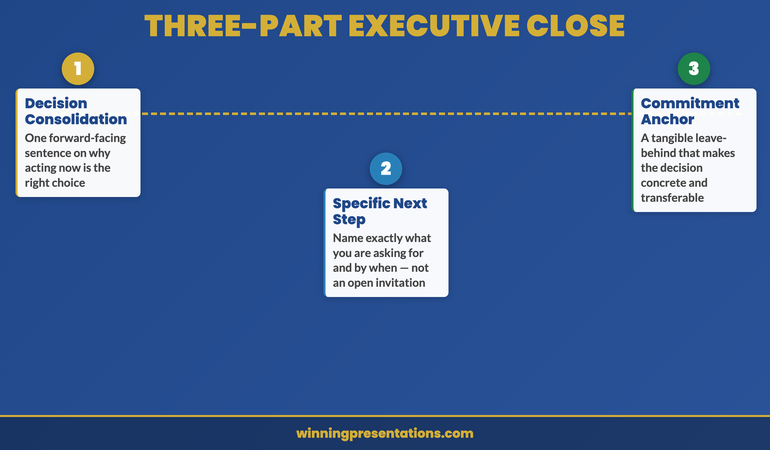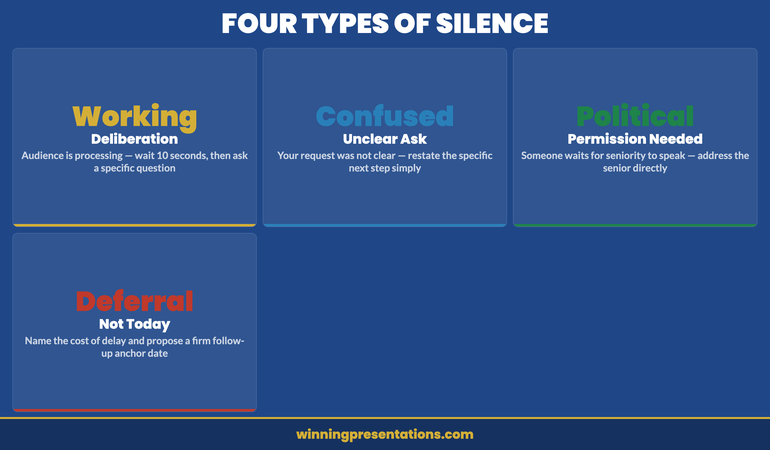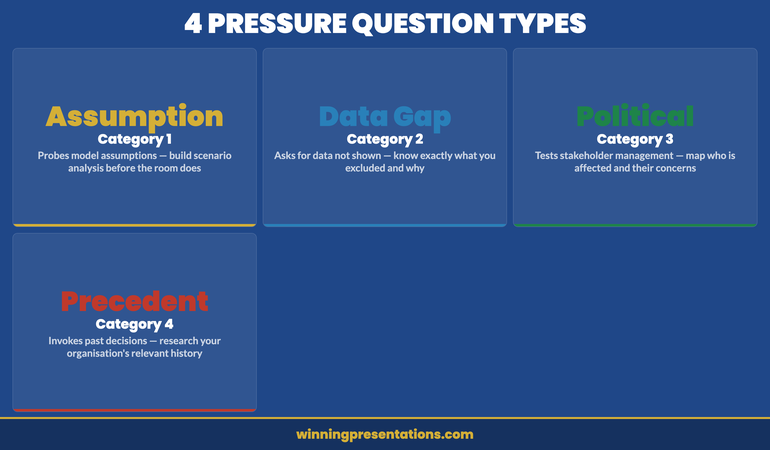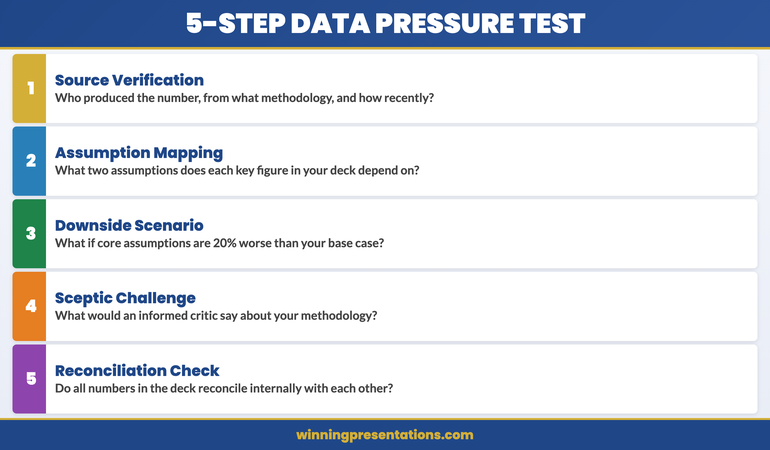
Category: Executive Presentations

10 Dec 2025
Executive summary slide template using the 4-Line Formula - Situation, Insight, Recommendation, Ask - get decisions in 10 seconds

The Executive Summary Slide: How to Write the Only Slide That Matters [2026]

📅 Updated: January 2026 | The slide that decides your outcome before you finish talking

Need a Faster Way to Build Executive Slides?

Most executives spend hours on slides that still miss the mark. The Executive Slide System gives you a structured framework for building slides that land with senior audiences — without starting from scratch every time.

Explore the System →

Quick Answer

An executive summary slide should contain four elements: situation (one sentence), recommendation (specific and actionable), key supporting points (three maximum), and your ask (what you need from them). Put your conclusion first. Executives decide in 60 seconds — give them what they need upfront, not buried on slide 15.

I learned this lesson the hard way at Commerzbank.

A senior VP asked me to present a £2.3M technology investment to the Executive Committee. I built a 28-slide deck. Comprehensive analysis. Beautiful charts. Ironclad logic building to my recommendation.

The CFO interrupted at slide 3: “What do you want us to approve?”

I fumbled to slide 24 where my recommendation lived. By then, I’d lost the room. The meeting ended with “let’s revisit this next quarter” — executive-speak for no.

Three months later, same ask, same committee. This time I led with a single executive summary slide. Sixty seconds in, the CFO said: “Makes sense. What’s the implementation timeline?”

Twenty minutes later, I had full approval.

The difference wasn’t the analysis — it was identical. The difference was giving executives what they needed in the first 60 seconds.

After 25 years presenting to C-suite leaders at JPMorgan, PwC, RBS, and Commerzbank, I’ve refined a formula for executive summary slides that works every time.

Why the Executive Summary Slide Decides Everything

Here’s what most presenters don’t understand: executives make decisions fast.

Senior leaders form initial judgments within seconds of seeing new information — experienced presenters know this instinctively. Everything after that either confirms or contradicts their first impression.

Your executive summary slide IS their first impression. Get it right, and the rest of your presentation is confirmation. Get it wrong, and you’re fighting uphill for the next 30 minutes.

I’ve seen this pattern hundreds of times:

Weak executive summary → Executives check phones → Questions become challenges → “Let’s table this”

Strong executive summary → Executives lean in → Questions become clarifications → “Walk us through implementation”

Same presenter. Same content. Different opening slide. Different outcome.

STOP REBUILDING DECKS FROM SCRATCH

The executive summary slide is the highest-leverage slide in any executive presentation toolkit — get this one right and you’ve already done 70% of the persuasion work.

Build executive slides that get past slide 3

The Executive Slide System gives you 26 templates, 93 AI prompts, and 16 scenario playbooks designed for senior presenters. Drop your content into a structure that already works — finance committees, board approvals, steering meetings, capital reviews. £39, instant access, lifetime updates.

Get the Executive Slide System →

£39, instant access. 26 templates, 93 AI prompts, 16 scenario playbooks. Designed for executive presenters.

The 4-Part Executive Summary Formula

Every effective executive summary slide contains exactly four elements. No more, no less.

The 4-Line Executive Summary Formula showing Situation, Insight, Recommendation, and Ask with real examples for each line

Part 1: Situation (One Sentence)

Ground everyone in the same reality. What’s happening? Why are we here?

Bad: “As you know, we’ve been evaluating our technology infrastructure across multiple dimensions including scalability, security, and cost efficiency, and have identified several areas of concern.”

Good: “Our customer platform will exceed capacity by Q3, risking £4M in annual revenue.”

One sentence. Quantified where possible. No preamble.

Part 2: Recommendation (Specific and Actionable)

What do you want them to do? Be precise enough that they could approve it right now.

Bad: “We recommend investing in technology improvements to address these challenges.”

Good: “Approve £1.2M to upgrade our customer platform, with completion by August 2026.”

Include the number. Include the timeline. Make it approvable as stated.

Part 3: Key Supporting Points (Three Maximum)

Why should they approve this? Give them three reasons — no more.

The human brain struggles to hold more than three to four items in working memory. Give executives five reasons and they’ll remember none. Give them three and they’ll remember all of them.

Example:

  • ROI: 180% over 3 years (payback in 14 months)
  • Risk mitigation: Prevents £4M revenue loss from capacity issues
  • Competitive: Matches capabilities our top 3 competitors launched last year

Each point should be scannable in under 5 seconds.

Part 4: The Ask (What You Need From Them)

Be explicit about what decision you need and when.

Bad: “We’d appreciate your input on next steps.”

Good: “I need budget approval today to meet the Q3 deadline. Implementation plan is ready.”

Executives respect clarity. They don’t respect hedging.

Want ready-made executive summary templates?

The Executive Slide System (£39, instant access) includes 26 executive templates with the 4-part formula built into every layout — plus 93 AI prompts and 16 scenario playbooks covering Board, Budget, QBR, and Strategy presentations.

Get the Executive Slide System →

For Senior Board-Level Approvals

The complete system for presenting decisions that get approved at senior levels

Executive Buy-In Presentation System — 7 self-paced modules, monthly cohort enrolment, optional recorded Q&A sessions. £499, lifetime access to materials.

Explore the Executive Buy-In System →

Executive Summary Slide Examples: Before and After

Let me show you how this works with real transformations from clients I’ve coached.

Example 1: Budget Request

BEFORE (Weak):

  • Title: “Technology Investment Proposal”
  • Content: Three paragraphs explaining background, four bullet points about challenges, reference to “detailed analysis in appendix”
  • No clear ask visible
  • Result: “Send us a summary” (rejected)

AFTER (Strong):

  • Title: “Request: £1.2M Platform Upgrade — 180% ROI”
  • Situation: Customer platform hits capacity Q3, risking £4M revenue
  • Recommendation: Approve £1.2M upgrade with August completion
  • Why: 180% ROI | Prevents £4M loss | Matches competitor capabilities
  • Ask: Budget approval needed today to meet deadline
  • Result: Approved in 20 minutes

Example 2: Strategic Initiative

BEFORE (Weak):

  • Title: “Market Expansion Analysis”
  • Content: Market size data, competitor overview, SWOT analysis summary, “recommendation on slide 18”
  • Result: Lost attention by slide 4

AFTER (Strong):

  • Title: “Recommendation: Enter DACH Market Q2 — £8M Opportunity”
  • Situation: UK growth slowing to 3%; DACH offers 12% growth with existing product fit
  • Recommendation: Launch DACH pilot Q2 with £400K investment
  • Why: £8M addressable market | 3 signed LOIs already | Existing team can execute
  • Ask: Approve pilot budget and hire 2 sales reps by March
  • Result: Approved with additional resources offered

Example 3: Project Status Update

BEFORE (Weak):

  • Title: “Project Phoenix Status Update”
  • Content: Timeline, milestones completed, milestones pending, budget status, team updates
  • Problem buried on slide 6
  • Result: Executives surprised and frustrated when issue finally surfaced

AFTER (Strong):

  • Title: “Project Phoenix: On Track, But Need Decision on Vendor Delay”
  • Situation: Phase 1 complete (on time, on budget). Phase 2 vendor delayed 3 weeks.
  • Recommendation: Accept delay (no cost impact) vs. switch vendors (£50K, saves 1 week)
  • Why: Delay acceptable — still hits Q3 deadline | Switching adds risk for minimal gain
  • Ask: Confirm we proceed with current vendor
  • Result: Decision made in 5 minutes, meeting ended early

Related: Executive Presentation Template: 12 Slides That Command the Room

Common Executive Summary Mistakes (And How to Fix Them)

Mistake #1: Burying the Lead

Your recommendation should be visible within 10 seconds of the slide appearing. If executives have to hunt for it, you’ve already lost.

Fix: Put your recommendation in the slide title or as the first bold line. “Request: £1.2M Platform Upgrade” tells them instantly what this is about.

Mistake #2: Too Many Supporting Points

Five bullet points means zero retention. Executives are processing dozens of decisions daily — they can’t hold your seven reasons in memory.

Fix: Force yourself to pick three. If you can’t decide which three matter most, you don’t understand your own argument well enough.

Mistake #3: Vague Language

“Significant investment” means nothing. “Improved efficiency” means nothing. “Strategic alignment” means nothing.

Fix: Use numbers. “£1.2M investment” is specific. “23% efficiency gain” is specific. “Supports Goal #2 in our 2026 strategy” is specific.

Mistake #4: No Clear Ask

If you don’t tell executives what you need, they’ll assume you don’t need anything — and they’ll move on.

Fix: End with an explicit ask. “I need approval today” or “I need a decision by Friday” or “I need you to choose between Option A and Option B.”

Mistake #5: Defensive Positioning

Starting with caveats, limitations, and “as you know” context signals insecurity. Executives smell fear.

Fix: Lead with confidence. State your recommendation directly. Address objections when asked, not before.

Related: The 3-Slide System That Gets Executive Decisions Fast

How to Write Your Executive Summary Slide (Step by Step)

Here’s my process for writing executive summary slides quickly and effectively.

Step 1: Start With the Ask

Write down: “At the end of this meeting, I need them to _______________.”

If you can’t complete that sentence, you’re not ready to present. Go back and figure out what you actually need.

Step 2: Write the Recommendation

Make it specific enough to approve as stated. Include amounts, timelines, and owners where relevant.

Test: Could they say “yes” to this exact sentence and know what happens next?

Step 3: Identify Three Supporting Points

Ask yourself: “If they push back, what are the three strongest reasons this makes sense?”

Those are your supporting points. Lead with the strongest.

Step 4: Write the Situation Line

One sentence that grounds everyone. Why are we here? What’s changed?

This often comes last because you need to understand your recommendation before you can frame the situation correctly.

Step 5: Cut Ruthlessly

Read your slide aloud. If it takes more than 45 seconds, cut something. The executive summary should be graspable in a single glance.

Using AI to Draft Your Executive Summary

AI tools like ChatGPT or Claude can accelerate your executive summary slide — if you prompt them correctly.

Effective prompt:

“I’m presenting to [audience] about [topic]. I need them to approve [specific ask]. Write an executive summary slide with: 1) one-sentence situation, 2) specific recommendation, 3) three supporting points (quantified where possible), 4) clear ask. Keep total word count under 75 words.”

What AI does well:

  • Structuring your thoughts into the 4-part format
  • Tightening wordy language
  • Suggesting quantified supporting points

What you must add:

  • Political context (what matters to THIS audience)
  • Accurate numbers from your analysis
  • Judgment about which supporting points will resonate

Related: Best Copilot PowerPoint Prompts That Actually Work

Executive Summary Slide Design Tips

Content matters most, but design affects comprehension.

Title: Make it active and outcome-focused. “Request: £1.2M Platform Upgrade” not “Platform Investment Overview”

Layout: Use visual hierarchy. Recommendation should be the most prominent element.

Font size: If executives are reading from 10 feet away (common in boardrooms), your key points should be readable. 24pt minimum for main text.

White space: Crowded slides signal disorganised thinking. If you can’t fit it with breathing room, you have too much content.

Colour: Use your corporate template. Don’t get creative with colours — it distracts from content.

When to Use an Executive Summary Slide

Not every presentation needs a formal executive summary slide. Here’s when to use one:

Always use one when:

  • Presenting to C-suite or board
  • Requesting budget or resources
  • Proposing a strategic decision
  • Presenting to time-pressed audiences
  • The meeting is 30+ minutes

Consider skipping when:

  • Informal team updates
  • Brainstorming sessions
  • Workshops where you’re facilitating, not recommending

When in doubt, include one. Executives never complain about getting to the point too quickly.

Related: Board Presentation Template: The Executive’s Complete Guide

Stop Rewriting the Proposal

Stop rewriting your proposal three times to hear “we’ll think about it”

The Executive Buy-In Presentation System teaches the structure that gets decisions, not delays — 7 self-paced modules with optional recorded Q&A calls. £499, lifetime access.

  • Decode stakeholder resistance before you build the slides
  • Sequence the case so the executive summary lands on the first attempt
  • Handle the objection your audience hasn’t raised yet

Explore the Executive Buy-In System →

Self-paced programme with monthly cohort enrolment — optional recorded Q&A calls available.

Frequently Asked Questions

How long should an executive summary slide be?

Under 75 words of actual content. It should be graspable in a single glance — roughly 30-45 seconds to read and understand. If you can’t read it aloud in under a minute, it’s too long.

Should the executive summary be slide 1 or slide 2?

Slide 1 in most cases. The only exception is if you need a single “context” slide to ground executives who aren’t familiar with the topic. Even then, keep the context slide to 30 seconds maximum before moving to your summary.

What if my recommendation is complex?

Simplify it for the executive summary, then expand in the supporting slides. “Approve the three-phase digital transformation programme” works on slide 1; the phases get their own slides later.

How do I handle multiple asks?

If you have more than one ask, you likely have more than one presentation. For genuinely related asks, bundle them: “Approve £1.2M budget AND two additional headcount for Q2 implementation.”

What if I don’t know what decision they’ll make?

Present options with a clear recommendation. “I recommend Option A for these three reasons. Option B is viable if timeline is the priority. I need you to choose today.”

Should I send the executive summary in advance?

Yes — 24-48 hours before the meeting if possible. Some executives prefer to form questions beforehand. Include it in the email body, not just as an attachment.

Ready for the deeper buy-in framework?

The Executive Buy-In Presentation System

A self-paced programme on Maven covering the structure, psychology, and stakeholder analysis behind senior approvals. 7 modules with optional recorded Q&A sessions — no deadlines, no mandatory attendance. £499, lifetime access to materials.

Explore the programme →

📧 The Winning Edge Newsletter

Weekly insights on executive presentations, slide design, and what’s actually working in boardrooms right now.

Subscribe Free →

Related Resources

🎁 Free: Executive Presentation Checklist

The 12-point checklist I use before every executive presentation — including the executive summary test. One page PDF.

Download Free Checklist →

No email required. Instant download.

About the Author

Mary Beth Hazeldine is Owner & Managing Director of Winning Presentations. With 25 years in corporate banking at JPMorgan Chase, PwC, Royal Bank of Scotland, and Commerzbank, she advises senior professionals across financial services, consulting, and technology on structuring executive summary slides and board approval presentations.

08 Dec 2025
The Story-First Dashboard Framework showing 5 steps: Lead with headline, show only what matters, add context, explain why, connect to the ask

Team Dashboards That Tell a Story (Not Just Show Numbers)

I once watched a VP present 47 metrics in 12 minutes.

Forty-seven. Charts in every corner. Trend lines crossing like spaghetti. Numbers I’m certain even he didn’t fully understand. When he finished, the CEO had one question:

“So… is the team on track or not?”

Twelve minutes of data, and leadership still didn’t know the answer to the only question that mattered.

I’ve sat through hundreds of these presentations over 25 years at JPMorgan Chase, PwC, Royal Bank of Scotland, and Commerzbank. The pattern is painfully predictable: charts, graphs, metrics — and leadership still asking “so what does this mean?” at the end.

A dashboard isn’t a data dump. It’s a story about performance, told through carefully chosen numbers. When your dashboard tells a story, leadership understands what’s working, what’s not, and what you need from them — in 60 seconds.

Here’s how to transform your team dashboard presentation from a numbers report into a narrative that drives action.

The Story-First Dashboard Framework showing 5 steps: Lead with headline, show only what matters, add context, explain why, connect to the ask
The framework that transforms dashboards from data dumps into decision drivers

Building a team dashboard presentation for leadership this week?

The Executive Slide System gives you dashboard and team update templates built for the structure above — with AI prompt cards so you can populate them from your actual metrics in under an hour.

If you want a ready-made framework for executive presentations: Explore The Executive Slide System →

Templates, AI prompts, and scenario playbooks for building board-ready slides.

Why Most Dashboards Fail

The typical dashboard looks like a spreadsheet converted to slides. Metrics everywhere. Charts in every corner. Numbers without narrative.

Leadership sees this and thinks: “Which of these 15 metrics actually matter? Is 73% good or bad? What am I supposed to do with this information?”

The problem isn’t the data. It’s that a dashboard without story forces leadership to do the interpretation work. They won’t. They’ll nod politely and move to the next agenda item — and you’ll wonder why nothing changes.

An effective dashboard does the interpretation for them. It says: here’s what happened, here’s what it means, here’s what we need.

The Story-First Framework That Works

Every effective team dashboard presentation follows a narrative structure. Not data-first — story-first, with data as evidence.

Step 1: Lead With the Headline

Start with a one-sentence summary of performance. Not “Q3 Team Dashboard” as your title — that tells leadership nothing.

Weak: “Q3 2025 Team Performance Dashboard”

Strong: “Team exceeded delivery targets while managing 20% headcount gap”

Your headline should answer “how are things going?” before leadership looks at a single number. If they only read the title and nothing else, they should understand the situation.

Step 2: Show Only Metrics That Matter

A dashboard with 15 metrics is a dashboard where nothing stands out. Choose 4-6 maximum — the ones that actually indicate performance.

For each metric, apply this filter:

  • Does leadership need this to understand team performance? (If no, cut it)
  • Can they take action based on this metric? (If no, question it)
  • Does it tell a different story than other metrics? (If no, it’s redundant)

More metrics doesn’t mean more insight. It means more confusion and less time on what matters.

Step 3: Add Context to Every Number

A number without context is meaningless. “Customer satisfaction: 78%” tells leadership nothing. 78% compared to what?

For every metric, provide:

  • Target: What were we aiming for?
  • Previous period: What was it last quarter?
  • Trend: Improving or declining?
  • Interpretation: Good news or concerning?

Example: “Customer satisfaction: 78% (target: 75%, up from 72% last quarter) ✓ On track”

Now leadership knows 78% is good news — above target and improving. No interpretation required.

Want the exact template?

The Executive Slide System includes a team dashboard template with this structure built in — metrics with context, visual status indicators, and narrative framing. The same templates clients have used to secure approvals totalling significant capital.

Step 4: Explain the Why Behind the Numbers

Don’t just report what happened — explain why.

Weak: “Delivery velocity decreased 15% this quarter.”

Strong: “Delivery velocity decreased 15% this quarter due to planned architecture refactoring. This short-term dip enables the 40% improvement projected for Q1.”

Leadership doesn’t just want to see numbers change. They want to understand the drivers. A dashboard that explains causation builds confidence in your grasp of the situation.

Step 5: Connect to What You Need

Every dashboard should end with implications and asks. What does this performance mean for decisions leadership needs to make?

Examples:

  • “Based on current trajectory, we’ll miss Q4 target without additional resources. Requesting approval for 2 contract developers.”
  • “Performance is strong. I recommend accelerating the Phase 2 timeline.”
  • “Team is on track. No decisions needed — I’ll flag if anything changes.”

A dashboard without implications is just information. A dashboard with implications drives action.

Side-by-side comparison of a data dump dashboard versus a story-first dashboard that gets decisions
The difference between “Is 78% good?” and “Got it. Approved. Next item.”

The One-Slide Version

Sometimes your entire update needs to fit on a single slide. Here’s the structure that works:

Section Content
Headline One sentence summarising overall performance
Key Metrics 4-6 metrics with target, actual, and status (✓ On track / ⚠ Watch / ✗ Off track)
What Changed 2-3 bullets on significant changes since last period
Watch Items Any metrics trending toward concern, with your mitigation plan
Ask / Implication What you need from leadership, or “No action required”

This single-slide structure tells the complete story in 30 seconds. Leadership can ask questions if they want depth, but they have the full picture immediately.

The one-slide team dashboard template showing headline, metrics, changes, watch items, and ask sections
Everything leadership needs to know — on one slide

If you need dashboard slides that tell a clear story to senior leadership, The Executive Slide System gives you 22 ready-made templates to start from.

5 Dashboard Mistakes That Lose Leadership

Mistake 1: Starting with the worst number. Leading with failures puts leadership in critical mode for everything that follows. They stop listening for solutions. Lead with a balanced headline, then address specifics.

Mistake 2: Showing every metric you track. Just because you track 30 metrics doesn’t mean leadership needs all of them. More data creates more confusion. Select ruthlessly — if it doesn’t change decisions, cut it.

Mistake 3: Charts without obvious takeaways. A dashboard full of complex charts looks sophisticated. But if leadership has to study a chart to extract the insight, you’ve failed. Every visualisation should have an obvious takeaway. If it doesn’t, replace it with a simple number and statement.

Mistake 4: Numbers without comparison. “Revenue: £2.3M” forces leadership to remember what’s normal. They won’t. Always include targets and trends so the number means something.

Mistake 5: Missing the “so what.” The most common failure: reporting numbers without implications. What does this performance mean? What should leadership do differently? If there’s no “so what,” leadership wonders why they’re looking at this.

5 dashboard presentation mistakes that lose leadership - infographic
Avoid these five mistakes and you’re already ahead of most presenters

The 60-Second Verbal Delivery

How you present the dashboard matters as much as the slide itself. Here’s a script that works:

“The team had a strong quarter — we exceeded delivery targets while managing a significant headcount gap.

Four metrics to highlight: [walk through each with status]. The velocity dip is planned — we’re investing in architecture that pays off next quarter.

One watch item: contractor costs are running above budget. We’ve implemented controls that should bring this in line by month-end.

No decisions needed today. I’ll flag if the cost situation doesn’t improve by our next check-in.”

That’s 60 seconds. Leadership has the full picture. They can ask questions or move on — but they’re not left wondering what you need from them.

Dashboard data is only as useful as the story you build around it.

The Executive Slide System includes team dashboard and status update templates — structured to turn your numbers into a narrative that drives the decisions you need.

Executive Slide System — £39, instant access.

Designed for directors and VPs who present team performance to senior leadership.

Frequently Asked Questions

How often should I update my dashboard?

Match your organisation’s rhythm. Monthly for most teams, weekly for fast-moving projects, quarterly for stable operations. Your dashboard should show meaningful change — if metrics barely move between updates, you’re reporting too frequently.

What if my numbers are bad?

A dashboard with bad numbers should still lead with an honest headline, explain the causes, and present your recovery plan. Leadership respects transparency and action plans. They don’t respect hiding problems in dense data or burying bad news on slide 12.

Should I show the raw data?

Show interpreted data — metrics with context. Have raw data available in an appendix if leadership wants to drill down, but don’t lead with it. Your job is to do the interpretation work so they don’t have to.

How do I handle metrics where we missed targets?

Acknowledge the miss, explain why, and show what’s being done. “Delivery: 82% (target: 90%) — missed due to unexpected security requirements. Mitigating with additional sprint capacity in Q4.” Don’t hide it; own it.

Get the Dashboard Template

The Executive Slide System includes the team dashboard template with this exact structure — headline, metrics with context, watch items, and implications. Turn your data dump into a story that drives decisions.

Clients have used these templates to secure approvals totalling significant capital. 10 templates. 30 AI prompts. Instant download.

GET INSTANT ACCESS →

30-day money-back guarantee • Instant PDF download • Use on unlimited presentations


Related: How to Create Executive Presentations That Get Approved in 2025

📧 The Winning Edge Newsletter

Weekly insights on executive presentations, QBR strategies, and what’s actually working in boardrooms right now.

Subscribe Free →
08 Dec 2025
The 60-Second Board Opening Framework showing the 4 elements: State Action Required, Establish Timeline, Preview Recommendation, Set Discussion Expectations

How to Open a Board Meeting So Everyone Knows What’s Expected

I watched a CFO lose a £4 million approval in eleven words.

“Let me walk you through our Q3 performance and then discuss…”

That was it. Eleven words. The moment he said “walk you through,” I saw three directors reach for their phones. By the time he got to his actual request — 22 minutes later — the room had mentally moved on. The board deferred his decision to next quarter. The delay cost his company £400K in interim licensing fees.

I’ve sat in hundreds of board presentations over 25 years at JPMorgan Chase, PwC, Royal Bank of Scotland, and Commerzbank. The pattern is unmistakable: presenters who open with context and background lose the room in 60 seconds. Those who open with clarity about what’s needed get decisions in 15 minutes.

Directors aren’t impatient — they’re fiduciaries with packed agendas. When you don’t establish expectations immediately, they spend your entire presentation wondering “what does this person actually want from me?”

That uncertainty kills decisions.

Here’s exactly how to open a board meeting so everyone knows what’s expected — and you walk out with the outcome you need.

The 60-Second Board Opening Framework showing the 4 elements: State Action Required, Establish Timeline, Preview Recommendation, Set Discussion ExpectationsThe 4-part framework that’s helped my clients secure board approvals for major strategic initiatives

Presenting to an open board meeting in the next 30 days?

The Executive Slide System includes board presentation templates built for open sessions — with AI prompt cards so you can customise the narrative for your specific proposal in under an hour.

If you want a ready-made framework for executive presentations: Explore The Executive Slide System →

Templates, AI prompts, and scenario playbooks for building board-ready slides.

Why the First 60 Seconds Determine Everything

Board meetings operate differently from other executive meetings. Directors carry fiduciary responsibility. They’re evaluating risk, thinking about governance implications, mentally categorising every agenda item as “decision required” or “information only.”

When you open with “Let me walk you through our Q3 performance,” directors enter passive information-receiving mode. They’ll listen, nod, ask polite questions. But they’re not primed to decide anything.

When you open with “I’m requesting board approval for a £2M infrastructure investment with expected 18-month payback,” the dynamic shifts entirely. Directors immediately know their role. They’re evaluating a specific decision with specific parameters. Questions become focused. Discussion becomes productive.

The way you open a board meeting establishes everything that follows.

The 4-Part Framework for Your First 60 Seconds

Your opening slide and opening words should cover four elements — in this order:

1. State the Board Action Required

Lead with exactly what you need. Not context. Not background. The action.

Weak: “Today I’ll be presenting our technology modernisation initiative and the progress we’ve made over the past quarter.”

Strong: “I’m requesting board approval for Phase 2 of our technology modernisation — a £2M investment over 18 months.”

When directors hear the action first, everything that follows supports a specific decision. They’re not wondering where you’re headed.

2. Establish the Timeline

Tell directors when you need the decision and why timing matters.

Example: “I’m requesting approval today because vendor contracts expire January 15th. Delaying this decision by one quarter costs approximately £400K in interim licensing.”

This isn’t manipulation — it’s information directors need to prioritise their attention. Without timeline clarity, the default response becomes “let’s revisit this next quarter.”

3. Preview Your Recommendation

Give away your conclusion immediately. Don’t make directors wait 20 minutes to discover what you think they should do.

Example: “My recommendation is to approve the full £2M investment with Vendor A, rather than the phased approach or Vendor B alternative. I’ll walk you through the analysis supporting this recommendation.”

This might feel counterintuitive — shouldn’t you build to your recommendation? No. When directors know your position upfront, they can evaluate your supporting evidence against a clear thesis. They’re engaged, not guessing.

4. Set Discussion Expectations

Tell directors how you’ve structured the presentation and where you want their input.

Example: “I’ll take 10 minutes to walk through the business case and risk assessment. I’d particularly value the board’s perspective on vendor selection criteria and implementation timeline. I’ve reserved 15 minutes for questions.”

This maintains your control of the discussion while inviting meaningful input exactly where you need it.

Want the exact template?

The Executive Slide System includes a board meeting template with this opening structure built in — plus 9 other executive presentation frameworks. The same templates clients have used to secure approvals totalling over

Side-by-side comparison showing a weak board meeting opening versus a strong opening that gets decisions
The difference between getting a decision and getting a deferral

The Complete 60-Second Script

Here’s the exact script I give my clients. Adapt it to your specific situation:

“Good morning. I’m here to request board approval for [specific action] — [financial amount or scope] with [timeline or payback period].

I’m requesting this decision today because [urgency/timeline driver]. Delaying would result in [cost of inaction].

My recommendation is [clear recommendation]. I’ll walk you through the business case and risk assessment in 10 minutes, then I’d welcome the board’s questions — particularly on [specific areas where you want input].

Let me start with [first section].”

That’s 45-60 seconds. Every director now knows exactly what’s expected. No confusion. No wondering what you want. Just clarity — and a room that’s ready to decide.

The 60-second board meeting opening script template with checklist
Save this script template — it works for any board presentation

If you want to start your board meetings with a slide deck that sets the right tone, The Executive Slide System gives you 22 ready-made templates to start from.

5 Opening Mistakes That Kill Decisions

After hundreds of board presentations, these are the patterns I see destroy momentum before it starts:

Mistake 1: Opening with context. “Let me give you some background…” signals a long presentation ahead. Directors mentally check out. Start with the action; add context only as needed to support your ask.

Mistake 2: Opening with an agenda slide. Directors don’t need to see “Background, Analysis, Options, Recommendation, Next Steps.” They need to know what you want them to decide. Use your first slide for the Board Action Requested, not a table of contents.

Mistake 3: Opening without a clear ask. “I wanted to share our progress on digital transformation” makes directors think: “Why is this at board level? What am I supposed to do with this?” Always connect to a decision — even if it’s “I’m seeking board feedback on our approach.”

Mistake 4: Opening with apologies. “I know you’re busy” or “I’ll try to keep this brief” undermines your authority before you’ve established it. Open with confidence and clarity, not apology.

Mistake 5: Not knowing your number. “Approximately £2 million” sounds unprepared. “£2.1 million over 18 months, with £800K in Year 1” sounds like someone who’s done the work. Know your numbers cold.

After the 5 mistakes section, before "Adapting the Framework for Different Scenarios"
Avoid these five mistakes and you’re already ahead of 80% of presenters

Adapting the Framework for Different Scenarios

Requesting budget approval: “I’m requesting board approval for [amount] to [purpose], with [payback period/ROI]. Decision needed by [date] because [timeline driver].”

Presenting strategic recommendations: “I’m seeking board endorsement of [strategic direction], which requires [resource/commitment]. This supports our [strategic priority] and positions us for [outcome].”

Reporting on progress: “I’m providing the quarterly update on [initiative]. We’re [on track/behind/ahead] with [key metric]. I’m seeking board feedback on [specific decision point] and requesting [any needed approvals].”

Presenting risk or bad news: “I need to bring a [risk/issue] to the board’s attention. [State the issue directly]. I’m recommending [mitigation approach] and requesting [any needed authorisation].”

Open board meetings are different. The templates need to be too.

The Executive Slide System includes board presentation templates structured for open sessions — with layouts for agenda framing, stakeholder Q&A, and decision slides.

Executive Slide System — £39, instant access.

Designed for executives presenting where decisions are made.

Frequently Asked Questions

What if I’m not requesting a decision — just providing an update?

Even updates need a point. Clarify what you want from directors: “I’m providing this update and seeking the board’s guidance on [specific question]” or “I’m sharing this for awareness and will return next quarter with a formal proposal.” Updates without purpose waste board time.

What if someone else chairs the meeting and introduces me?

Still lead with your own framing. After the introduction, say “Thank you. I’m here today to request…” Don’t rely on the chair to establish your purpose.

How detailed should my opening be?

Cover the four elements in 60 seconds or less. Details come in the body of your presentation. The opening establishes the frame — it doesn’t make the entire case.

What if I’m not sure the board will approve?

Still lead with a clear recommendation. Hedging your opening (“I wanted to explore whether the board might consider…”) signals uncertainty. If you’ve done the analysis and believe in your recommendation, present it with conviction. Let the board decide — that’s their job.

Get the Complete Board Presentation System

The Executive Slide System includes the board meeting template with this exact opening structure — plus the complete framework for business case, risk assessment, and recommendation slides.

Clients have used these templates to secure board approvals totalling over 10 templates. 30 AI prompts. Instant download.

GET INSTANT ACCESS →

30-day money-back guarantee • Instant PDF download • Use on unlimited presentations


Related: How to Create Executive Presentations That Get Approved in 2025

📧 The Winning Edge Newsletter

Weekly insights on executive presentations, QBR strategies, and what’s actually working in boardrooms right now.

Subscribe Free →