

SaaS Sales Presentation Templates: 7 Decks With 40%+ Close Rates
📅 Updated: December 2025

Quick Answer
The best SaaS sales presentations follow a consistent structure: Problem → Cost of Inaction → Solution → Proof → ROI → Next Step. This article breaks down 7 real deck templates from SaaS companies achieving 40%+ close rates, with specific slides you can adapt for your own sales process.
Contents
- What High-Converting SaaS Decks Have in Common
- Template 1: Problem-Cost-Solution (12 slides)
- Template 2: ROI-First (8 slides)
- Template 3: Competitive Displacement (10 slides)
- Template 4: Demo Deck (6 slides)
- Template 5: Executive Briefing (5 slides)
- Template 6: Proof-Heavy (10 slides)
- Template 7: Expansion Deck (7 slides)
- The Slide Most SaaS Decks Are Missing
- Frequently Asked Questions
A great pitch deck is only half the battle.
The deck gets you in the room — delivering it with authority wins the decision. The Complete Presenter is the full system: the Executive Slide System, storytelling, Q&A handling and delivery confidence. Seven products, £190+ value — £99 once, lifetime access.
Get The Complete Presenter (£99) →
Just need the slides? Start with the Executive Slide System (£39). Leading high-stakes pitches regularly? Maven Executive Buy-In Presentation System (£499).
🎁 FREE DOWNLOAD
Executive Presentation Checklist
The 12-point framework top SaaS sellers use before every demo. Use this BEFORE you build your deck.
No spam. Unsubscribe anytime.
A SaaS founder came to me last year with a problem: 47 demos, 3 closes.
His deck was 34 slides of features, screenshots, and integrations. Beautiful design. Consistent branding. Zero persuasion.
We rebuilt it using Template 1 below. His next quarter: 23 demos, 9 closes.
Same product. Different structure.

Most SaaS sales presentations fail for the same reason: they’re product tours disguised as pitches. Features. Screenshots. Integrations. Pricing. The prospect sits through 30 slides, says “this is really interesting,” and then ghosts you for three weeks.
I’ve reviewed hundreds of SaaS sales decks over 35 years of presentation training. The ones that close at 40%+ share a common structure — and it’s not what most sales teams are taught.
Here are 7 templates that actually work.
What High-Converting SaaS Decks Have in Common
Before the templates, the pattern:
They lead with the prospect’s problem, not the product. The first 3-5 minutes should make the prospect feel understood, not pitched.
They quantify the cost of doing nothing. “Your current process costs you £X per month” is more persuasive than “our product saves you time.”
They show proof before features. Case studies and results come early. Feature deep-dives come only if the prospect asks.
They end with a clear next step. Not “any questions?” but “based on what you’ve told me, here’s what I recommend we do next.”
Related: Sales Presentation Template: The Structure Top Performers Use
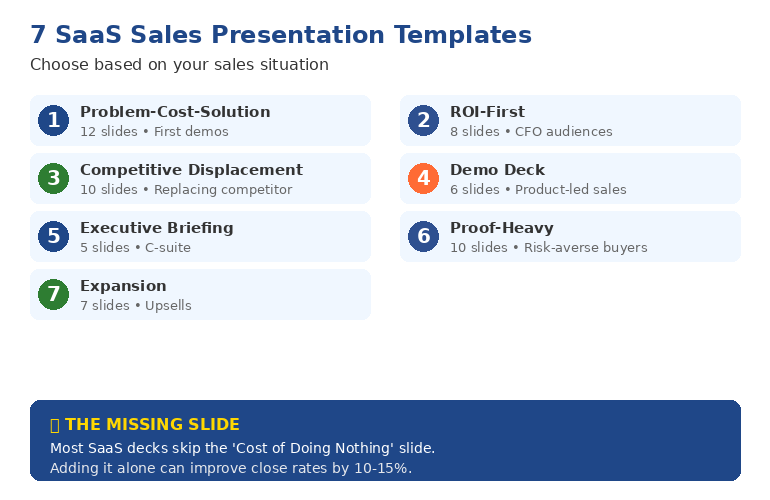
Template 1: The Problem-Cost-Solution Deck (12 slides)
Best for: First demo calls, discovery-heavy sales processes
Structure:
- Title slide — Company name, prospect name, date
- Agenda — What you’ll cover (sets expectations)
- Their world today — Describe their current process (shows you understand)
- The problem — What’s broken, with specific pain points
- Cost of inaction — Quantified: time, money, opportunity cost
- There’s a better way — Transition slide
- Solution overview — High-level, not features
- How it works — 3 steps maximum
- Proof — One case study, specific numbers
- ROI for you — Projected savings/gains for THIS prospect
- What others say — 2-3 testimonials
- Recommended next step — Specific action, not “any questions”
Why it works: The prospect sees themselves in the first 5 slides. By the time you show the product, they’re already convinced they need something to change.
This is the template that took my client from 6% to 39% close rate. The structure forces you to earn the right to talk about your product.

Template 2: The ROI-First Deck (8 slides)
Best for: CFO-heavy buying committees, enterprise deals
Structure:
- The number — Open with projected ROI: “£340K saved in year one”
- How we calculated it — Show your math (builds credibility)
- The 3 cost drivers — Where savings come from
- Proof it works — Similar company, similar results
- Implementation timeline — How fast they see value
- Investment required — Pricing in context of ROI
- Risk mitigation — Guarantees, pilot options
- Decision framework — What to consider, recommended path
Why it works: Finance buyers don’t care about features. They care about returns. This deck speaks their language from slide one.
I used this structure to help a fintech company close a £2.1M enterprise deal. The CFO later said: “You were the only vendor who showed us the math before showing us the product.”
Template 3: The Competitive Displacement Deck (10 slides)
Best for: Prospects using a competitor, replacement sales
Structure:
- What’s changed — Market shifts since they chose current vendor
- Where [Competitor] falls short — 3 specific gaps (based on discovery)
- What modern solutions do differently — Category evolution
- Our approach — How you solve those specific gaps
- Migration story — Company that switched, why, and results
- Side-by-side — Honest comparison (include where competitor wins)
- Switching cost analysis — Time to value, implementation support
- Customer success commitment — What happens after they sign
- Transition plan — Week-by-week for first 90 days
- Decision timeline — What needs to happen by when
Why it works: Switching vendors is risky. This deck acknowledges that risk and systematically removes objections.
Template 4: The Demo Deck (6 slides + live demo)
Best for: Product-led sales, technical buyers
Structure:
- What you told us — Recap discovery call priorities
- What we’ll show you — 3 things, tied to their priorities
- Quick context — 60-second company/product overview
- [LIVE DEMO] — Focused on their use case
- What you saw — Recap benefits (not features)
- Next steps — Trial, pilot, or procurement path
Why it works: Most demos are 45 minutes of clicking through features. This structure keeps the demo focused on what matters to THIS buyer.
Stop Rebuilding These From Scratch
You could recreate these 7 templates yourself — hours of work for each one. Or get them as editable PowerPoints, tested on real deals that closed £250M+, ready to customise in 10 minutes.
Template 5: The Executive Briefing Deck (5 slides)
Best for: C-suite presentations, board-level decisions
Structure:
- The strategic challenge — Business problem, not product category
- Market reality — What’s changed, why action is urgent
- Recommended approach — Your solution as strategy, not software
- Expected outcomes — Business metrics, not feature benefits
- Decision and next steps — What you need from them
Why it works: Executives have 15 minutes and zero patience for feature tours. This deck respects their time and frames your product as a strategic decision.
Related: Executive Presentation Template: 12 Slides That Command the Room
Template 6: The Proof-Heavy Deck (10 slides)
Best for: Risk-averse buyers, heavily regulated industries
Structure:
- Who we’ve helped — Logo slide with recognisable names
- Case study 1 — Similar company, specific results
- Case study 2 — Different use case, similar results
- Case study 3 — Their industry specifically
- The pattern — What these companies have in common
- How we do it — Brief methodology
- Security and compliance — Certifications, data handling
- Implementation approach — De-risked rollout plan
- Support structure — What happens when things go wrong
- Getting started — Low-risk first step (pilot, POC)
Why it works: Some buyers need overwhelming evidence before they’ll move. This deck provides it systematically.
Template 7: The Expansion Deck (7 slides)
Best for: Upsells, cross-sells, existing customer growth
Structure:
- Your results so far — What they’ve achieved with you
- What’s changed — New challenges, growth, market shifts
- The gap — What’s now possible that wasn’t before
- The opportunity — Specific expansion recommendation
- Expected additional value — Quantified improvement
- How others expanded — Similar customer story
- Recommended path — Timeline and investment
Why it works: Expansion deals should feel like a natural next step, not a new sale. This deck builds on the relationship you’ve already established.
The Slide Most SaaS Decks Are Missing
After reviewing hundreds of decks, the most common gap: the “Cost of Doing Nothing” slide.
Most SaaS sellers assume the prospect knows their problem is expensive. They don’t. Or they’ve normalised it.
Quantify the status quo:
- “Your team spends 12 hours/week on manual data entry. At £50/hour, that’s £31,200/year.”
- “You’re losing 23% of leads to slow response time. On your pipeline, that’s £180K in missed revenue.”
- “Compliance incidents cost £15K each to resolve. You had 4 last year.”
This slide alone can move close rates by 10-15%. It reframes your price as an investment, not a cost.
Related: Best Copilot PowerPoint Prompts That Actually Work
Which Template Should You Use?
- Discovery-heavy process? → Problem-Cost-Solution (Template 1)
- Selling to finance? → ROI-First (Template 2)
- Replacing a competitor? → Competitive Displacement (Template 3)
- Product-led sales? → Demo Deck (Template 4)
- C-suite audience? → Executive Briefing (Template 5)
- Risk-averse buyers? → Proof-Heavy (Template 6)
- Existing customers? → Expansion (Template 7)
Why the Free Checklist Isn’t Enough
The free checklist gives you the thinking framework. But frameworks without templates means hours of work building each deck from scratch.
| What You Get | DIY Approach | Executive Slide System |
|---|---|---|
| Time to create each deck | 4-6 hours | 10 minutes to customise |
| All 7 templates | Build yourself | ✓ Included |
| Tested on real deals | No | ✓ £250M+ closed |
| Frameworks included | Basic checklist | ✓ AVP, 132 Rule, S.E.E. |
| Updates | You maintain | ✓ Lifetime access |
| Investment | Your time (28-42 hours) | £39 |
📦 ALL 7 TEMPLATES + FRAMEWORKS
Executive Slide System
Every template from this article as editable PowerPoints. Plus the AVP framework, 132 Rule, and S.E.E. Formula that make them work.
Instant download. Lifetime access. 30-day refund guarantee.
Frequently Asked Questions
What should a SaaS sales deck include?
Every effective SaaS sales presentation needs: problem definition, cost of inaction, solution overview, proof (case studies with specific numbers), ROI projection for this specific prospect, and a clear next step. The exact structure depends on your buyer — see Templates 1-7 above for different situations.
How many slides should a SaaS sales deck have?
5-12 slides for most situations. Executive briefings can be as few as 5. Discovery-heavy demos might go to 12. Never more than 15 — if you need more slides, you need a clearer message. The 34-slide decks I see from most SaaS companies are why their close rates are under 20%.
What’s the difference between a pitch deck and a sales deck?
Pitch decks raise money (investor audience). Sales decks close customers (buyer audience). Investors evaluate market size, team, and return potential. Buyers evaluate problem fit, ROI, and implementation risk. The structure is different because the decision criteria are different. See our Investor Pitch Deck Template for the fundraising version.
How do I improve my SaaS demo close rate?
Three changes make the biggest difference: (1) Add a “Cost of Doing Nothing” slide that quantifies their current pain, (2) Show proof before features — case studies early, product deep-dives only if asked, (3) End with a specific next step, not “any questions?” These changes alone typically improve close rates by 10-20%.
The Winning Edge Newsletter
Weekly insights on presentations that close deals and advance careers.
Related Resources
- Sales Presentation Template: The Structure Top Performers Use
- Executive Presentation Template: 12 Slides That Command the Room
- Investor Pitch Deck Template: The Sequoia Format
- QBR Presentation Template: Quarterly Reviews That Retain Clients
- Best Copilot PowerPoint Prompts That Actually Work
About the Author
Mary Beth Hazeldine has trained sales teams on high-stakes presentations for 35 years. With 24 years in corporate banking at JPMorgan Chase, PwC, Royal Bank of Scotland, and Commerzbank, she’s seen what separates deals that close from those that stall. Her clients have closed over £250 million using her presentation frameworks. She teaches at Winning Presentations.