

AI Slides vs. AI Thinking: The Distinction That Changes Everything
“Make me a 10-slide presentation on Q3 results.”
That’s the prompt. And that’s the problem.
I watched a senior director spend 45 minutes “fixing” what AI had generated — adjusting layouts, rewriting headlines, deleting clip art nobody asked for. By the time he finished, he’d saved maybe 20 minutes compared to building it himself. And the result still felt… generic.
“AI presentations don’t work for executive content,” he told me afterwards. “They’re fine for internal updates, but anything important? I still have to do it myself.”
He was wrong. But not in the way he thought.
In 2026, the professionals pulling ahead aren’t the ones who’ve mastered AI slide generation. They’re the ones who’ve discovered that slides are the last thing AI should touch. The real leverage is upstream — in thinking, structure, and messaging. That’s the distinction nobody’s teaching.
Quick answer: “AI Slides” means using AI to generate visual outputs — layouts, formatting, design. “AI Thinking” means using AI as a strategic partner to clarify your message, structure your argument, and pressure-test your logic before you ever open PowerPoint. The distinction matters because AI is mediocre at slides but exceptional at thinking. Professionals who flip their workflow — thinking first, slides last — create presentations in half the time with dramatically better results.
Jump to section:
Three years ago, I was skeptical of AI for presentations. I’d seen too many executives embarrassed by obviously AI-generated decks — the telltale signs, the generic phrasing, the “this could be about any company” feel.
Then I started experimenting with a different approach. Instead of asking AI to make slides, I asked it to help me think. To challenge my structure. To find holes in my argument. To translate my jargon into language my audience would actually understand. I was using AI as a thinking partner for presentations — not a production tool.
The presentations got better. Not because the slides looked fancier — they didn’t. But because the thinking was sharper. The message was clearer. The structure was tighter.
That’s when I realised: we’ve been using the most powerful thinking tool in history to do graphic design. It’s like using a Formula 1 engine to power a lawnmower. The real AI presentation strategy? Think first, slides last.
Why Most People Start at the Wrong End
The typical AI presentation workflow looks like this:
Step 1: Open AI tool
Step 2: “Create a presentation about [topic]”
Step 3: Review generated slides
Step 4: Fix everything that’s wrong
Step 5: Add what’s missing
Step 6: Rewrite what sounds robotic
Step 7: Wonder why this took so long
The problem isn’t the AI. The problem is the sequence.
When you ask AI to generate slides first, you’re asking it to make decisions it has no business making: What’s the core message? What does this audience care about? What’s the one thing you need them to remember? What action do you want them to take?
AI doesn’t know these things. So it guesses. And its guesses are generic because they have to be — it’s optimising for “probably relevant to most presentations about this topic” rather than “exactly right for your specific situation.”
The Upstream Problem
Great presentations aren’t great because of their slides. They’re great because of the thinking behind them.
Before you ever touch a slide, you need clarity on:
- The decision you’re driving: What do you want your audience to do, approve, or believe?
- The single message: If they remember one thing, what is it?
- The structure: What sequence will move them from where they are to where you need them?
- The proof: What evidence will make your argument undeniable?
These are thinking problems, not design problems. And this is exactly where AI excels — if you use it correctly.
🎓 AI-Enhanced Presentation Mastery
Learn to use AI as a strategic thinking partner, not just a slide generator. This self-paced programme teaches the frameworks, workflows, and prompts that transform how you create executive presentations — cutting creation time in half while dramatically improving impact.
Includes the AVP framework (Action-Value-Proof), the 132 Rule for structure, and a complete AI presentation workflow you can use immediately.
Join AI-Enhanced Presentation Mastery → £249
8 self-paced modules + 2 live coaching sessions + lifetime access. Study at your own pace.
What “AI Slides” Actually Produces
Let’s be honest about what happens when you ask AI to generate presentation slides:
The Generic Structure
AI defaults to safe, forgettable structures: Agenda → Background → Key Points → Summary → Next Steps. This structure works for everything, which means it’s optimised for nothing.
Your quarterly business review looks like every other QBR. Your investment pitch looks like every other pitch. Your strategic recommendation looks like a Wikipedia article with bullet points.
The Clip Art Problem
AI tools love adding visuals. Icons. Stock imagery. Decorative elements that fill space but add nothing. You spend half your editing time removing things nobody asked for.
The Voice Mismatch
AI-generated text has a tell. It’s slightly too formal, too hedged, too… diplomatic. “It is recommended that consideration be given to…” instead of “We should do X because Y.”
Executive audiences notice. They may not consciously identify it, but they feel it. The presentation lacks conviction. It sounds like it was written by a committee — because in a way, it was.
The Missing Insight
Most damning of all: AI-generated slides contain information, not insight. They tell you what happened, not what it means. They present data, not implications. They describe the situation, not the decision.
That’s the gap that kills executive presentations. And no amount of better prompting will fix it — because the problem isn’t the slides. It’s the thinking that should have happened first.
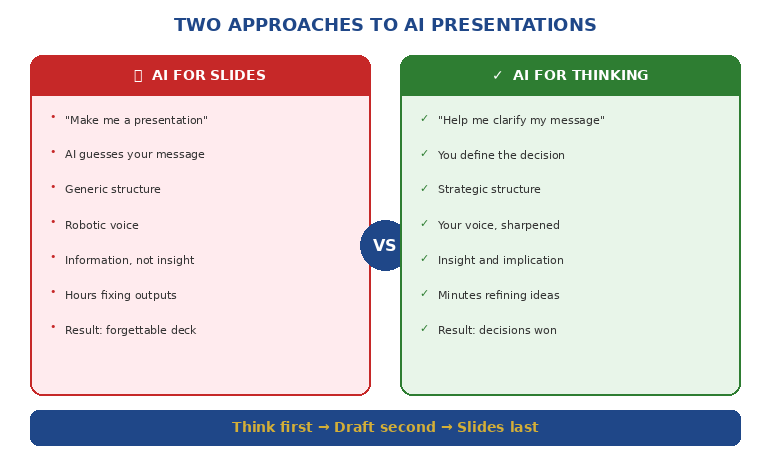
What “AI Thinking” Unlocks
Now consider a different approach. Before you generate a single slide, you use AI as a thinking partner:
Clarifying Your Message
“I need to present our Q3 results to the board. Our revenue is up 12% but margins are down. Help me identify the single message that positions this honestly while maintaining confidence in our strategy.”
AI won’t write your message for you. But it will help you find it — by asking questions, offering framings, and pressure-testing your logic.
Structuring Your Argument
“My audience is skeptical of this budget request. What objections will they have? In what sequence should I address them to build agreement before I ask for the money?”
This is strategic work. AI can help you map objections, sequence arguments, and identify proof points you might have missed.
Testing Your Logic
“Here’s my recommendation. Play devil’s advocate. What are the strongest counterarguments? Where is my reasoning weakest?”
Most presenters don’t stress-test their logic until they’re in the room, facing hostile questions. AI lets you do that work beforehand — privately, iteratively, without ego.
Translating Your Expertise
“I’m a technical expert presenting to non-technical executives. Here’s my explanation of the problem. Rewrite it so someone without engineering background understands why this matters.”
This is where AI shines — taking your expertise and making it accessible without dumbing it down.
Want the exact prompts and workflows? AI-Enhanced Presentation Mastery teaches you to use AI as a thinking partner — including the S.E.E. formula for making proof memorable.
The Flipped Workflow
Here’s the workflow that actually works:
Phase 1: Think With AI (60% of your time)
Define the decision: What do you need your audience to do, approve, or believe?
Clarify the message: What’s the single idea that makes your case?
Map the audience: What do they already believe? What concerns will they have? What do they need to hear?
Structure the argument: What sequence moves them from skepticism to agreement?
Identify the proof: What evidence makes your case undeniable?
All of this happens before you open PowerPoint. AI helps you think through each step — challenging, refining, sharpening.
Phase 2: Draft With AI (25% of your time)
Only now do you create content — but not slides yet. You’re creating:
Headlines: One clear sentence per section that could stand alone
Key points: The 2-3 supporting facts for each headline
Transitions: How each section connects to the next
AI can help you draft these — but you’re editing and approving, not accepting wholesale.
Phase 3: Build Slides (15% of your time)
Now — finally — you build slides. But notice: the hard work is done. You know your message. You know your structure. You know your proof.
The slides are just containers for thinking you’ve already completed. They almost build themselves.
And if you want AI to help with layout at this point? Fine. But you’re giving it clear inputs, not asking it to guess.
📚 The Complete AI Presentation System
AI-Enhanced Presentation Mastery includes:
- 8 self-paced modules on structure, messaging, and AI workflows
- AVP Framework: Action-Value-Proof for executive-ready presentations
- 132 Rule: The sequence your audience’s brain processes and remembers
- Master Prompt Pack: Ready-to-use prompts for every stage of creation
- 2 live coaching sessions for Q&A and feedback
Join AI-Enhanced Presentation Mastery → £249
Lifetime access. Study at your own pace. Join live sessions when convenient.
Frameworks That Make AI Useful
The difference between “AI Slides” and “AI Thinking” often comes down to having frameworks that guide the conversation. Here are three that transform how you work with AI:
The AVP Framework (Action-Value-Proof)
Every presentation should answer three questions in this order:
Action: What do you want the audience to do?
Value: Why should they care? What’s in it for them?
Proof: Why should they believe you?
When you structure your AI conversation around AVP, the outputs become dramatically more focused. Instead of “create a presentation about X,” you’re saying “help me articulate the specific action I’m asking for, the value proposition for this audience, and the proof points that support my case.”
The 132 Rule
Audiences process information in a specific sequence: one main message, supported by three pillars, each backed by two proof points.
This isn’t arbitrary — it’s how memory works. One thing is memorable. Three things are manageable. Two supports each point without overwhelming.
When you tell AI “structure this using the 132 Rule,” you get outputs that match how your audience’s brain actually works.
The S.E.E. Formula (Story-Evidence-Emotion)
For any proof point to land, it needs:
Story: A concrete example or scenario
Evidence: Data or facts that support the story
Emotion: Connection to what the audience cares about
Most AI-generated content has evidence without story or emotion. When you explicitly ask for S.E.E., you get proof that’s memorable and persuasive, not just accurate.
Learn these frameworks in depth. AI-Enhanced Presentation Mastery includes ready-to-use prompts that apply AVP, 132, and S.E.E. to any presentation challenge.
The Real Difference
A colleague recently showed me two presentations on the same topic — a budget request for a new initiative.
Presentation A was AI-generated. Polished slides. Professional layouts. Comprehensive information. It took 30 minutes to create. The executive committee said “interesting” and asked to revisit it next quarter.
Presentation B was AI-enhanced. Simpler slides. Less polish. But the message was razor-sharp, the structure anticipated every objection, and the proof points were undeniable. It took 90 minutes to create. The executive committee approved it on the spot.
Presentation B wasn’t better because it had better slides. It was better because the presenter had used AI to think, not just to make.
That’s the distinction that changes everything.
🎯 Transform How You Create Presentations
AI-Enhanced Presentation Mastery teaches you to use AI as a strategic thinking partner — not just a slide generator. You’ll learn:
- The flipped workflow that cuts creation time in half
- Frameworks (AVP, 132 Rule, S.E.E.) that make AI outputs executive-ready
- Prompts for every stage — from clarifying your message to stress-testing your logic
- How to transform data into stories people actually understand
Join AI-Enhanced Presentation Mastery → £249
8 self-paced modules releasing through April 2026. Join anytime — get immediate access to all released content. Lifetime access included.
📬 PS: Weekly strategies for AI-enhanced presentations and executive communication. Subscribe to The Winning Edge — practical techniques from 24 years in corporate boardrooms.
Frequently Asked Questions
Does this mean I should never use AI to generate slides?
Not at all. AI can be helpful for initial layouts, especially for routine presentations. But for anything high-stakes — board presentations, investment pitches, strategic recommendations — the thinking work should come first. Use AI for slides last, not first.
Which AI tools work best for the “thinking” approach?
Any conversational AI works — ChatGPT, Claude, Gemini. The tool matters less than how you use it. The key is treating it as a thinking partner (asking questions, getting feedback, refining ideas) rather than a production tool (generate this output for me).
How long does the “flipped workflow” actually take?
For a typical executive presentation, the thinking phase might take 30-45 minutes. Drafting another 15-20. Slides 15-20. Total: about 60-90 minutes for a presentation that would otherwise take 3-4 hours — and the quality is dramatically higher because the thinking is sharper.
What if I’m not good at giving AI instructions?
That’s exactly what frameworks solve. When you know to ask for AVP structure or S.E.E. proof points, you don’t need to be a “prompt engineer.” The framework does the heavy lifting. AI-Enhanced Presentation Mastery includes ready-to-use prompts for every scenario.
Related: The thinking-first approach is especially powerful for recurring executive presentations. See Transformation Program Updates That Make Executives Want to Fund You for how to structure updates that build champions.
And if presentation anxiety is holding you back from presenting your AI-enhanced work confidently, read When Your Voice Cracks Mid-Sentence for recovery techniques that work.
That senior director who told me “AI presentations don’t work for executive content” was right about the symptom but wrong about the cause.
AI presentations don’t fail because AI is bad at presentations. They fail because most people use AI to skip the thinking — when thinking is exactly what AI does best.
Flip the workflow. Think first. Slides last.
Use AI as a strategic partner, not a production tool.
That’s the distinction that changes everything.
About the Author
Mary Beth Hazeldine is the Owner & Managing Director of Winning Presentations. With 24 years in corporate banking at JPMorgan Chase, PwC, Royal Bank of Scotland, and Commerzbank, she has delivered high-stakes presentations in boardrooms across three continents.
A certified hypnotherapist and NLP practitioner, Mary Beth now pioneers AI-enhanced presentation mastery — combining strategic thinking with AI efficiency. She developed the AVP framework and 3Ps methodology, refined through years of executive presentation work in high-stakes banking and consulting environments.