

I spent three years watching TED Talks, studying the speakers, taking notes on their techniques. My presentations didn’t improve at all.
Quick answer: Watching TED Talks to improve presentations is like watching cooking shows to become a chef—it feels productive, but passive consumption doesn’t build skills. The problem isn’t the content; it’s the learning mode. Presentation skills require active practice with frameworks, not passive observation of polished performances. The executives who actually improve use structured frameworks they can apply immediately, not inspiration they can’t replicate.
In practice, improving your presentations requires deliberate application of specific frameworks to real presentations you’re building—not watching someone else’s finished product and hoping the magic transfers.
Written by Mary Beth Hazeldine — executive presentation coach, 24 years corporate banking, trained 5,000+ executives. Last updated: January 2026.
🚨 Presenting THIS WEEK? Skip the TED Talks. Do this instead:
- Pick ONE framework (problem → solution → action works for 80% of business presentations)
- Restructure your current deck using that framework (don’t start from scratch)
- Practice the transitions between sections out loud (this is where most people stumble)
- Record yourself once on your phone—watch for filler words and pacing only
This 45-minute active session will improve your presentation more than 10 hours of TED Talk watching.
📋 Copy/paste this opening for your next presentation:
“Here’s the decision we need today…” [state the specific ask]
“Here’s the impact if we don’t act…” [make it concrete and urgent]
“Here’s what I’m recommending…” [your solution in one sentence]
This 30-second opening uses the Problem-Solution-Action framework. It works for 80% of business presentations.
📅 Want to systematically improve your presentations over the next 90 days?
The difference between professionals who plateau and those who keep improving is structured practice with feedback. This article explains why passive learning fails—and what to do instead.
After my three years of TED Talk “research,” I finally understood the problem: I was confusing entertainment with education, and inspiration with skill-building.
The executives I now train often come to me after the same realisation. They’ve watched the talks, read the books, attended the webinars. Their presentations haven’t changed.
If you’ve ever wondered why consuming great presentation content hasn’t made you a better presenter, this article explains exactly why—and what actually works instead.
In this article:
Why Watching TED Talks Doesn’t Transfer to Your Presentations
TED Talks are meticulously crafted performances. The speakers have typically rehearsed for months. They’ve worked with professional coaches. The talks are edited to remove any rough edges. The stage, lighting, and audience are optimised for the speaker’s success.
None of that transfers to your Tuesday afternoon project update.
I see this constantly: executives who can quote Chris Anderson’s TED commandments, who’ve watched Brené Brown’s vulnerability talk six times, who know exactly why Simon Sinek says to “start with why”—but who still struggle to structure a clear 10-minute board update.
The gap isn’t knowledge. It’s application.
A senior product manager named Rachel told me: “I watched Amy Cuddy’s body language talk and tried the power pose before my next presentation. It didn’t help at all. My problem wasn’t confidence—it was that my slides were a mess and I didn’t know how to structure my argument.”
TED Talks give you inspiration. They don’t give you frameworks you can actually use.
The Passive Learning Trap (And Why It Feels Productive)
Here’s the uncomfortable truth about why we default to watching TED Talks when we want to improve presentations: it’s easy, and it feels productive.
Watching a brilliant speaker is enjoyable. You’re learning something. You’re “investing in yourself.” You can do it from your couch after dinner.
Actually restructuring your deck using a new framework? That’s hard. Recording yourself and watching the playback? Uncomfortable. Getting feedback from a colleague? Vulnerable.
So we choose the easy path and wonder why nothing changes.
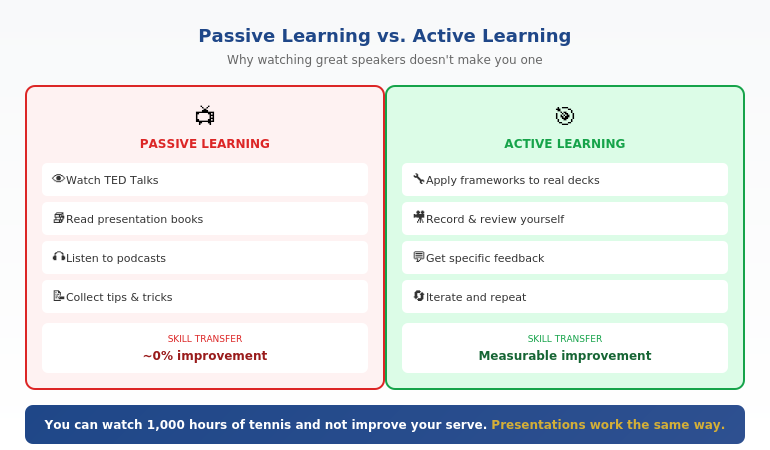
The research on skill acquisition is clear: passive consumption accounts for almost zero skill transfer. You can watch 1,000 hours of tennis and not improve your serve. Presentations work the same way.
A finance director named James spent six months consuming presentation content—books, podcasts, YouTube channels, TED Talks. When I asked him to show me a recent presentation, it had all the same problems as before: buried lead, too many slides, unclear ask.
“I know what good looks like,” he said. “I just can’t seem to do it.”
That’s the passive learning trap in one sentence.
📥 Want to start applying frameworks immediately?
Get the 7 Presentation Frameworks Cheat Sheet — the exact structures that handle 90% of business presentations. Free, instant download.
Download Free Framework Cheat Sheet →
Then, when you’re ready for guided practice with feedback, the course below takes you deeper.
⭐ From Watching to Doing: The Structured Path
AI-Enhanced Presentation Mastery is built on the principle that killed my TED Talk habit: frameworks you apply immediately, not inspiration you forget tomorrow.
What makes it different:
- 4 executive presentation frameworks (apply to your real presentations)
- Live cohort sessions (active practice, not passive watching)
- AI-enhanced workflow (70% faster creation, more time for what matters)
Next cohort starts soon. Limited to 20 participants for hands-on feedback.
📦 What You Get (Specifically):
- 4 executive presentation frameworks — board updates, budget requests, project proposals, stakeholder alignment
- AI-enhanced creation workflow — cut creation time by 70% so you can focus on delivery and refinement
- Live cohort sessions — practice with feedback, not passive observation
- Framework application exercises — apply each framework to a real presentation you’re building
- Spaced learning structure — designed for retention, not just completion
📌 What this course gives you that TED Talks can’t:
- Frameworks, not performances — structures you can apply to YOUR presentations, not polished shows to admire
- Active application — you build real presentations during the course, with feedback
- Accountability — cohort structure means you actually do the work, not just consume content
TED Talks show you what great looks like. This course teaches you how to build it yourself.
What Actually Improves Presentations (The Research)
If watching doesn’t work, what does? The research on skill acquisition points to three elements that actually improve presentations:
1. Deliberate Practice (Not Just Repetition)
Deliberate practice means working on specific weaknesses with immediate feedback. It’s not comfortable. It’s not entertaining. And it’s the only thing that consistently improves performance.
For presentations, this means: identify one specific weakness (unclear structure, filler words, weak openings), focus on that element, get feedback, adjust, repeat.
Watching TED Talks is the opposite of deliberate practice. It’s passive, there’s no feedback, and you’re not working on your specific weaknesses.
2. Frameworks (Not Tips)
Tips are forgettable. “Make eye contact.” “Tell a story.” “Use fewer bullet points.” You’ve heard them all. They don’t stick because they’re not systematic.
Frameworks are memorable and applicable. “Every executive presentation follows: context (30 seconds), problem (1 minute), solution (2 minutes), ask (30 seconds).” That’s a framework you can actually use on Tuesday.
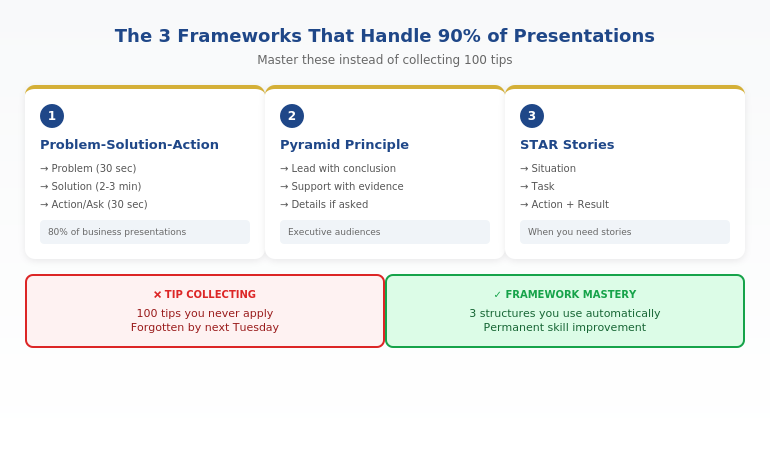
The executives who improve fastest are the ones who master 3-4 frameworks and apply them repeatedly, not the ones who collect 100 tips they never use.
3. Spaced Repetition (Not Binge Learning)
Remember all those TED Talks you watched? How much do you actually remember? Research shows that massed learning (consuming lots of content at once) creates the illusion of learning but poor retention.
Spaced repetition—revisiting concepts over time with increasing intervals—actually builds lasting skills. This is why one-day workshops rarely create lasting change, but structured programmes with spaced practice do.
For more on why traditional approaches fail, see why most presentation training fails.
Ready for frameworks that actually stick? AI-Enhanced Presentation Mastery uses spaced learning and active application—the opposite of TED Talk binge-watching. See the Curriculum →
The Framework Approach: How Top Performers Actually Learn
The executives who consistently deliver strong presentations share a common trait: they’ve internalised a small number of frameworks so deeply that they apply them automatically.
They’re not thinking about “tips” during a presentation. They’re not trying to remember what that TED speaker did. They’re executing a structure they’ve practiced dozens of times.
Here’s what the framework approach looks like in practice:
The Problem-Solution-Action Framework
This single framework handles 80% of business presentations:
- Problem (30 seconds): What’s the issue we’re addressing? Make it concrete and urgent.
- Solution (2-3 minutes): What do you propose? Be specific about the approach.
- Action (30 seconds): What do you need from this audience? Make the ask clear.
A product director named Sarah told me this framework transformed her stakeholder updates: “Before, I’d just walk through my slides in order. Now I structure everything around: here’s the problem, here’s what I’m doing about it, here’s what I need from you. My updates went from 20 minutes to 8, and I get decisions faster.”
The Pyramid Principle
Start with your conclusion, then support it with evidence. The opposite of how most people present (building up to the conclusion).
Executives don’t have time for suspense. They want the answer first, then the supporting logic. This framework alone will differentiate you in most corporate environments.
The STAR Framework for Stories
When you do tell stories (and you should), use: Situation, Task, Action, Result. This keeps your stories tight and business-relevant—unlike the rambling anecdotes that make audiences check their phones.
Three frameworks. Applied consistently. That’s worth more than 500 hours of TED Talks.
Related: See what to look for in presentation skills training that actually works.
⭐ If You’ve Tried “Learning Presentations” Before and It Didn’t Stick
That’s not a reflection on you—it’s a reflection on passive learning methods. AI-Enhanced Presentation Mastery is designed for executives who’ve consumed plenty of content but haven’t seen results.
Why it’s different:
- You apply frameworks to real presentations you’re building (not hypotheticals)
- Live sessions mean accountability and feedback (not self-paced content you never finish)
- AI workflow handles the grunt work so you focus on what matters
For executives who are done with passive content and ready for structured improvement.
The 90-Day Path From “Watching” to “Doing”
If you’re ready to stop watching and start improving, here’s what a structured 90-day path looks like:
Days 1-30: Foundation
Goal: Master one framework completely.
Pick the Problem-Solution-Action framework. Apply it to your next three presentations. Don’t add complexity—just get this one structure automatic.
Record yourself delivering the opening of each presentation. Watch for: clear problem statement, logical flow to solution, specific ask at the end.
Days 31-60: Expansion
Goal: Add the Pyramid Principle.
Now you have two tools: PSA for the overall structure, Pyramid for how you present information within each section. Lead with conclusions. Support with evidence.
Get feedback from one trusted colleague on one presentation during this phase. Specific feedback on structure, not general “that was good.”
Days 61-90: Integration
Goal: Add storytelling with STAR.
Identify one story you can use in your presentations. Structure it with STAR. Practice it until it’s natural. You now have three frameworks that handle nearly any business presentation.
By day 90, you’ve done more active skill-building than three years of TED Talk watching.
If you’re experiencing a plateau in your presentation skills, see the presentation skills gap most professionals don’t see.
Want a structured path with expert guidance? AI-Enhanced Presentation Mastery compresses years of self-directed learning into a focused cohort experience. Learn More →
Frequently Asked Questions
Are TED Talks completely useless for presentation skills?
Not completely—but they serve a different purpose than skill-building. TED Talks can inspire you, expose you to new ideas, and show you what excellence looks like. What they can’t do is teach you how to structure your own presentations, give you feedback on your delivery, or help you apply frameworks to your specific context. Think of them as entertainment that occasionally inspires, not training that builds skills.
Why does watching great speakers not make me better?
Skill acquisition research shows that passive observation creates almost zero transfer to active performance. You can watch 1,000 hours of tennis and not improve your serve. The same applies to presentations. Improvement requires deliberate practice: working on specific weaknesses, getting feedback, and adjusting. Watching—no matter how attentively—doesn’t include any of those elements.
What’s the fastest way to improve my presentations?
The fastest path to improve presentations is: (1) learn one framework deeply, (2) apply it to your next real presentation, (3) record yourself, (4) get specific feedback, (5) adjust and repeat. Most professionals try to learn too many techniques at once and apply none of them consistently. Mastering one framework and using it repeatedly will improve your presentations faster than consuming hundreds of hours of content.
How many frameworks do I actually need?
For most business professionals, 3-4 frameworks handle 90% of presentations: a general structure framework (Problem-Solution-Action), an information hierarchy framework (Pyramid Principle), a storytelling framework (STAR), and optionally a persuasion framework. Going beyond that adds complexity without proportional benefit. Depth beats breadth.
Should I still watch TED Talks?
If you enjoy them, yes—but recategorize them in your mind. They’re entertainment and inspiration, not training. Watch them when you want to relax, not when you want to improve. And when you do watch, focus on structure rather than delivery. Notice how the speaker organized their argument. That’s more transferable than trying to copy their charisma.
How long does it take to see real improvement?
With deliberate practice using frameworks, most executives see noticeable improvement within 3-4 presentations (roughly 2-4 weeks if you present regularly). Significant improvement—where colleagues start commenting on the difference—typically takes 8-12 weeks of consistent framework application. This is dramatically faster than passive learning, which often produces no improvement at all regardless of time invested.
What if I don’t present very often?
Less frequent presenting actually makes framework-based learning more important, not less. When you only present occasionally, you need reliable structures you can pull out without much warmup. Frameworks give you that. Create practice opportunities: volunteer for presentations, offer to present at team meetings, record yourself practicing. The less naturally you get reps, the more deliberate you need to be about creating them.
Is This Course Right For You?
✓ This is for you if:
- You’ve consumed presentation content before without seeing results
- You want frameworks you can apply immediately to real presentations
- You’re a senior professional who presents to executives/stakeholders
- You’re willing to do active practice, not just watch content
✗ This is NOT for you if:
- You want self-paced content you can watch passively
- You’re looking for inspiration, not skill-building
- You prefer consuming content to applying it
- You’re not currently presenting at work
⭐ Three Years of TED Talks Taught Me This: You Need Frameworks, Not Inspiration
After 200+ TED Talks and zero improvement, I finally understood: passive watching doesn’t build skills. AI-Enhanced Presentation Mastery is everything I wish existed when I was stuck in the consumption trap.
What you’ll actually do:
- Apply 4 executive frameworks to real presentations
- Practice with live feedback (not passive video)
- Use AI to handle creation so you focus on delivery
Next cohort starting soon. Limited to 20 participants.
📧 The Winning Edge Newsletter
Weekly frameworks for executive presentations—the opposite of passive content consumption. Actionable structures you can apply immediately. For senior professionals who want results, not just inspiration.
Your Next Step
If you’ve been trying to improve presentations by watching TED Talks, consuming podcasts, or reading books, you now understand why it hasn’t worked. The problem isn’t your effort or intelligence—it’s the learning mode.
Passive consumption feels productive but builds no skills. Active application of frameworks—even just one framework, applied consistently—will do more for your presentations than years of watching.
Start with Problem-Solution-Action. Apply it to your next presentation. Record yourself. Get feedback. That’s the path forward.
Or, if you’re ready for structured improvement with expert guidance, see the AI-Enhanced Presentation Mastery curriculum.
If you’re also dealing with high-stakes presentations where failure has real consequences, see how to present after a failure without destroying your credibility—today’s partner article on recovery presentations.
About the Author
Mary Beth Hazeldine is the founder of Winning Presentations and creator of AI-Enhanced Presentation Mastery. The “200+ TED Talks” admission that opened this article is real—and it took her three years to realise watching wasn’t the same as learning.
With 24 years of corporate experience at JPMorgan Chase, PwC, Royal Bank of Scotland, and Commerzbank, plus having trained 5,000+ executives, she now teaches the framework-based approach that actually builds presentation skills.


