
Tag: AI slides

11 Feb 2026
Professional thinking strategically with AI interface, not just generating slides

AI Slides vs. AI Thinking: The Distinction That Changes Everything

“Make me a 10-slide presentation on Q3 results.”

That’s the prompt. And that’s the problem.

I watched a senior director spend 45 minutes “fixing” what AI had generated — adjusting layouts, rewriting headlines, deleting clip art nobody asked for. By the time he finished, he’d saved maybe 20 minutes compared to building it himself. And the result still felt… generic.

“AI presentations don’t work for executive content,” he told me afterwards. “They’re fine for internal updates, but anything important? I still have to do it myself.”

He was wrong. But not in the way he thought.

In 2026, the professionals pulling ahead aren’t the ones who’ve mastered AI slide generation. They’re the ones who’ve discovered that slides are the last thing AI should touch. The real leverage is upstream — in thinking, structure, and messaging. That’s the distinction nobody’s teaching.

Quick answer: “AI Slides” means using AI to generate visual outputs — layouts, formatting, design. “AI Thinking” means using AI as a strategic partner to clarify your message, structure your argument, and pressure-test your logic before you ever open PowerPoint. The distinction matters because AI is mediocre at slides but exceptional at thinking. Professionals who flip their workflow — thinking first, slides last — create presentations in half the time with dramatically better results.

Three years ago, I was skeptical of AI for presentations. I’d seen too many executives embarrassed by obviously AI-generated decks — the telltale signs, the generic phrasing, the “this could be about any company” feel.

Then I started experimenting with a different approach. Instead of asking AI to make slides, I asked it to help me think. To challenge my structure. To find holes in my argument. To translate my jargon into language my audience would actually understand. I was using AI as a thinking partner for presentations — not a production tool.

The presentations got better. Not because the slides looked fancier — they didn’t. But because the thinking was sharper. The message was clearer. The structure was tighter.

That’s when I realised: we’ve been using the most powerful thinking tool in history to do graphic design. It’s like using a Formula 1 engine to power a lawnmower. The real AI presentation strategy? Think first, slides last.

Why Most People Start at the Wrong End

The typical AI presentation workflow looks like this:

Step 1: Open AI tool
Step 2: “Create a presentation about [topic]”
Step 3: Review generated slides
Step 4: Fix everything that’s wrong
Step 5: Add what’s missing
Step 6: Rewrite what sounds robotic
Step 7: Wonder why this took so long

The problem isn’t the AI. The problem is the sequence.

When you ask AI to generate slides first, you’re asking it to make decisions it has no business making: What’s the core message? What does this audience care about? What’s the one thing you need them to remember? What action do you want them to take?

AI doesn’t know these things. So it guesses. And its guesses are generic because they have to be — it’s optimising for “probably relevant to most presentations about this topic” rather than “exactly right for your specific situation.”

The Upstream Problem

Great presentations aren’t great because of their slides. They’re great because of the thinking behind them.

Before you ever touch a slide, you need clarity on:

  • The decision you’re driving: What do you want your audience to do, approve, or believe?
  • The single message: If they remember one thing, what is it?
  • The structure: What sequence will move them from where they are to where you need them?
  • The proof: What evidence will make your argument undeniable?

These are thinking problems, not design problems. And this is exactly where AI excels — if you use it correctly.

🎓 AI-Enhanced Presentation Mastery

Learn to use AI as a strategic thinking partner, not just a slide generator. This self-paced programme teaches the frameworks, workflows, and prompts that transform how you create executive presentations — cutting creation time in half while dramatically improving impact.

Includes the AVP framework (Action-Value-Proof), the 132 Rule for structure, and a complete AI presentation workflow you can use immediately.

Join AI-Enhanced Presentation Mastery → £249

8 self-paced modules + 2 live coaching sessions + lifetime access. Study at your own pace.

What “AI Slides” Actually Produces

Let’s be honest about what happens when you ask AI to generate presentation slides:

The Generic Structure

AI defaults to safe, forgettable structures: Agenda → Background → Key Points → Summary → Next Steps. This structure works for everything, which means it’s optimised for nothing.

Your quarterly business review looks like every other QBR. Your investment pitch looks like every other pitch. Your strategic recommendation looks like a Wikipedia article with bullet points.

The Clip Art Problem

AI tools love adding visuals. Icons. Stock imagery. Decorative elements that fill space but add nothing. You spend half your editing time removing things nobody asked for.

The Voice Mismatch

AI-generated text has a tell. It’s slightly too formal, too hedged, too… diplomatic. “It is recommended that consideration be given to…” instead of “We should do X because Y.”

Executive audiences notice. They may not consciously identify it, but they feel it. The presentation lacks conviction. It sounds like it was written by a committee — because in a way, it was.

The Missing Insight

Most damning of all: AI-generated slides contain information, not insight. They tell you what happened, not what it means. They present data, not implications. They describe the situation, not the decision.

That’s the gap that kills executive presentations. And no amount of better prompting will fix it — because the problem isn’t the slides. It’s the thinking that should have happened first.
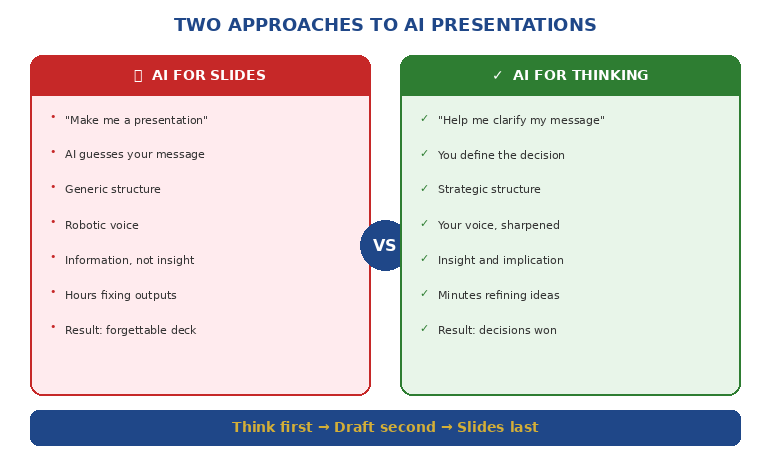

Comparison diagram showing AI for slides versus AI for thinking approaches

What “AI Thinking” Unlocks

Now consider a different approach. Before you generate a single slide, you use AI as a thinking partner:

Clarifying Your Message

“I need to present our Q3 results to the board. Our revenue is up 12% but margins are down. Help me identify the single message that positions this honestly while maintaining confidence in our strategy.”

AI won’t write your message for you. But it will help you find it — by asking questions, offering framings, and pressure-testing your logic.

Structuring Your Argument

“My audience is skeptical of this budget request. What objections will they have? In what sequence should I address them to build agreement before I ask for the money?”

This is strategic work. AI can help you map objections, sequence arguments, and identify proof points you might have missed.

Testing Your Logic

“Here’s my recommendation. Play devil’s advocate. What are the strongest counterarguments? Where is my reasoning weakest?”

Most presenters don’t stress-test their logic until they’re in the room, facing hostile questions. AI lets you do that work beforehand — privately, iteratively, without ego.

Translating Your Expertise

“I’m a technical expert presenting to non-technical executives. Here’s my explanation of the problem. Rewrite it so someone without engineering background understands why this matters.”

This is where AI shines — taking your expertise and making it accessible without dumbing it down.

Want the exact prompts and workflows? AI-Enhanced Presentation Mastery teaches you to use AI as a thinking partner — including the S.E.E. formula for making proof memorable.

Get the Course → £249

The Flipped Workflow

Here’s the workflow that actually works:

Phase 1: Think With AI (60% of your time)

Define the decision: What do you need your audience to do, approve, or believe?

Clarify the message: What’s the single idea that makes your case?

Map the audience: What do they already believe? What concerns will they have? What do they need to hear?

Structure the argument: What sequence moves them from skepticism to agreement?

Identify the proof: What evidence makes your case undeniable?

All of this happens before you open PowerPoint. AI helps you think through each step — challenging, refining, sharpening.

Phase 2: Draft With AI (25% of your time)

Only now do you create content — but not slides yet. You’re creating:

Headlines: One clear sentence per section that could stand alone

Key points: The 2-3 supporting facts for each headline

Transitions: How each section connects to the next

AI can help you draft these — but you’re editing and approving, not accepting wholesale.

Phase 3: Build Slides (15% of your time)

Now — finally — you build slides. But notice: the hard work is done. You know your message. You know your structure. You know your proof.

The slides are just containers for thinking you’ve already completed. They almost build themselves.

And if you want AI to help with layout at this point? Fine. But you’re giving it clear inputs, not asking it to guess.

📚 The Complete AI Presentation System

AI-Enhanced Presentation Mastery includes:

  • 8 self-paced modules on structure, messaging, and AI workflows
  • AVP Framework: Action-Value-Proof for executive-ready presentations
  • 132 Rule: The sequence your audience’s brain processes and remembers
  • Master Prompt Pack: Ready-to-use prompts for every stage of creation
  • 2 live coaching sessions for Q&A and feedback

Join AI-Enhanced Presentation Mastery → £249

Lifetime access. Study at your own pace. Join live sessions when convenient.

Frameworks That Make AI Useful

The difference between “AI Slides” and “AI Thinking” often comes down to having frameworks that guide the conversation. Here are three that transform how you work with AI:

The AVP Framework (Action-Value-Proof)

Every presentation should answer three questions in this order:

Action: What do you want the audience to do?
Value: Why should they care? What’s in it for them?
Proof: Why should they believe you?

When you structure your AI conversation around AVP, the outputs become dramatically more focused. Instead of “create a presentation about X,” you’re saying “help me articulate the specific action I’m asking for, the value proposition for this audience, and the proof points that support my case.”

The 132 Rule

Audiences process information in a specific sequence: one main message, supported by three pillars, each backed by two proof points.

This isn’t arbitrary — it’s how memory works. One thing is memorable. Three things are manageable. Two supports each point without overwhelming.

When you tell AI “structure this using the 132 Rule,” you get outputs that match how your audience’s brain actually works.

The S.E.E. Formula (Story-Evidence-Emotion)

For any proof point to land, it needs:

Story: A concrete example or scenario
Evidence: Data or facts that support the story
Emotion: Connection to what the audience cares about

Most AI-generated content has evidence without story or emotion. When you explicitly ask for S.E.E., you get proof that’s memorable and persuasive, not just accurate.

Learn these frameworks in depth. AI-Enhanced Presentation Mastery includes ready-to-use prompts that apply AVP, 132, and S.E.E. to any presentation challenge.

Get the Course → £249

The Real Difference

A colleague recently showed me two presentations on the same topic — a budget request for a new initiative.

Presentation A was AI-generated. Polished slides. Professional layouts. Comprehensive information. It took 30 minutes to create. The executive committee said “interesting” and asked to revisit it next quarter.

Presentation B was AI-enhanced. Simpler slides. Less polish. But the message was razor-sharp, the structure anticipated every objection, and the proof points were undeniable. It took 90 minutes to create. The executive committee approved it on the spot.

Presentation B wasn’t better because it had better slides. It was better because the presenter had used AI to think, not just to make.

That’s the distinction that changes everything.

🎯 Transform How You Create Presentations

AI-Enhanced Presentation Mastery teaches you to use AI as a strategic thinking partner — not just a slide generator. You’ll learn:

  • The flipped workflow that cuts creation time in half
  • Frameworks (AVP, 132 Rule, S.E.E.) that make AI outputs executive-ready
  • Prompts for every stage — from clarifying your message to stress-testing your logic
  • How to transform data into stories people actually understand

Join AI-Enhanced Presentation Mastery → £249

8 self-paced modules releasing through April 2026. Join anytime — get immediate access to all released content. Lifetime access included.

📬 PS: Weekly strategies for AI-enhanced presentations and executive communication. Subscribe to The Winning Edge — practical techniques from 24 years in corporate boardrooms.

Frequently Asked Questions

Does this mean I should never use AI to generate slides?

Not at all. AI can be helpful for initial layouts, especially for routine presentations. But for anything high-stakes — board presentations, investment pitches, strategic recommendations — the thinking work should come first. Use AI for slides last, not first.

Which AI tools work best for the “thinking” approach?

Any conversational AI works — ChatGPT, Claude, Gemini. The tool matters less than how you use it. The key is treating it as a thinking partner (asking questions, getting feedback, refining ideas) rather than a production tool (generate this output for me).

How long does the “flipped workflow” actually take?

For a typical executive presentation, the thinking phase might take 30-45 minutes. Drafting another 15-20. Slides 15-20. Total: about 60-90 minutes for a presentation that would otherwise take 3-4 hours — and the quality is dramatically higher because the thinking is sharper.

What if I’m not good at giving AI instructions?

That’s exactly what frameworks solve. When you know to ask for AVP structure or S.E.E. proof points, you don’t need to be a “prompt engineer.” The framework does the heavy lifting. AI-Enhanced Presentation Mastery includes ready-to-use prompts for every scenario.

Related: The thinking-first approach is especially powerful for recurring executive presentations. See Transformation Program Updates That Make Executives Want to Fund You for how to structure updates that build champions.

And if presentation anxiety is holding you back from presenting your AI-enhanced work confidently, read When Your Voice Cracks Mid-Sentence for recovery techniques that work.

That senior director who told me “AI presentations don’t work for executive content” was right about the symptom but wrong about the cause.

AI presentations don’t fail because AI is bad at presentations. They fail because most people use AI to skip the thinking — when thinking is exactly what AI does best.

Flip the workflow. Think first. Slides last.

Use AI as a strategic partner, not a production tool.

That’s the distinction that changes everything.

About the Author

Mary Beth Hazeldine is the Owner & Managing Director of Winning Presentations. With 24 years in corporate banking at JPMorgan Chase, PwC, Royal Bank of Scotland, and Commerzbank, she has delivered high-stakes presentations in boardrooms across three continents.

A certified hypnotherapist and NLP practitioner, Mary Beth now pioneers AI-enhanced presentation mastery — combining strategic thinking with AI efficiency. She developed the AVP framework and 3Ps methodology, refined through years of executive presentation work in high-stakes banking and consulting environments.

Book a discovery call | View services

07 Feb 2026
Professional man at desk with laptop focused on high-impact AI presentation tasks

AI Presentation 80/20 Rule: What Actually Moves the Needle

I spent three months mastering every AI presentation tool. Then I realized I was optimizing the wrong things.

Like most people who discover AI for presentations, I went deep. Prompt engineering courses. Every Copilot feature. Claude, ChatGPT, Gamma, Beautiful.ai — I tested them all. I built elaborate workflows with multiple tools chained together.

My presentations got faster to create. But they didn’t get better. And the executives I was presenting to couldn’t tell the difference between my AI-optimized decks and the ones I’d built the old way.

That’s when I started tracking where AI actually moved the needle — and where I was just playing with shiny tools.

The Pareto Principle applies to AI presentations just like everything else: roughly 20% of AI applications deliver 80% of the value. The rest is optimization theatre.

This guide shows you where to focus.

Quick answer: The highest-impact uses of AI in presentations are: (1) structuring your argument before you touch slides, (2) pressure-testing your logic against likely objections, and (3) transforming dense content into clear, scannable formats. The lowest-impact uses — where most people spend their time — are generating slides from scratch, finding “the perfect prompt,” and automating visual design. Focus on thinking assistance, not production assistance.

⚡ Need to use AI effectively right now?

If you only have 30 minutes to improve your presentation with AI, do these three things:

  1. Ask AI to find holes in your argument. Paste your key points and ask: “What would a skeptical CFO challenge here?”
  2. Ask AI to simplify your densest slide. Paste the content and ask: “Rewrite this so a busy executive can absorb it in 10 seconds.”
  3. Ask AI for your opening line. Describe your audience and goal, then ask: “Give me 5 opening sentences that would make this audience lean in.”

These three uses take 30 minutes total and improve your presentation more than hours of prompt engineering.

📋 Copy/Paste These 3 High-Impact Prompts:

PROMPT 1: Find holes

I need to convince [AUDIENCE] to [ACTION]. Here are my key points: [PASTE POINTS]. What would a skeptical executive challenge? What’s the weakest part of this argument?

PROMPT 2: Simplify

Here’s my densest slide: [PASTE CONTENT]. Rewrite this so a busy executive can absorb it in 10 seconds. Maximum 3 bullet points, 8 words each.

PROMPT 3: Opening options

I’m presenting to [AUDIENCE] about [TOPIC]. My goal is [OUTCOME]. Give me 5 opening sentences that would make this audience lean in. Range from conservative to bold.

The High-Impact 20% (Where AI Actually Helps)

After tracking my own AI usage — and observing how executives I train actually benefit from these tools — I’ve identified five high-impact applications. These are where AI genuinely improves outcomes, not just speeds up production.

1. Structuring your argument BEFORE slides

This is the single highest-value use of AI in presentations. Before you open PowerPoint, before you think about design, use AI to pressure-test your structure.

The prompt that works: “I need to convince [audience] to [action]. Here’s my current thinking: [your key points]. What’s the most persuasive order for these points? What’s missing? What would make a skeptic say no?”

Why it matters: Most weak presentations fail at the structure level, not the slide level. Getting your argument right first means everything downstream improves. AI is genuinely good at identifying logical gaps and suggesting better sequences.

2. Pressure-testing against objections

AI can simulate a hostile audience faster than you can anticipate objections yourself. This is where the technology excels — generating variations and edge cases.

The prompt that works: “You are a skeptical [CFO/board member/client]. Here’s the presentation I’m about to give you: [paste your structure or key points]. What questions would you ask? What would make you say no? What’s the weakest part of this argument?”

Why it matters: The questions that derail presentations are usually predictable. AI helps you find them before the room does.

3. Transforming dense content into clear formats

If you have a wall of text, a complex data set, or a technical explanation that needs to become executive-friendly, AI does this transformation well.

The prompt that works: “Here’s [technical content/data/dense text]. Transform this into [a 3-point executive summary / a comparison table / a timeline / a decision tree]. A busy executive should be able to absorb this in [10 seconds / one glance].”

Why it matters: This is genuine cognitive work that AI handles well — restructuring information for a different audience. It saves time AND improves clarity.

4. Generating opening and closing options

The first 30 seconds and last 30 seconds of a presentation carry disproportionate weight. AI can generate multiple options quickly, letting you pick and refine rather than starting from scratch.

The prompt that works: “I’m presenting to [audience] about [topic]. My goal is [specific outcome]. Give me 5 different opening lines that would make this audience want to keep listening. Range from conservative to bold.”

Why it matters: Most people default to their first idea for openings. Having options improves the final choice significantly.

5. Creating speaker notes and talking points

Once your slides are structured, AI can help you prepare what to actually say — creating natural talking points that expand on slide content without reading it verbatim.

The prompt that works: “Here’s my slide: [paste content]. Write speaker notes that: expand on the key point without repeating the slide text, include one concrete example, and transition naturally to [next topic].”

Why it matters: Good speaker notes are tedious to write. AI handles this well, and strong notes dramatically improve delivery.

For more on effective AI workflows, see my guide on AI presentation workflow.

Master the AI Techniques That Actually Matter

AI-Enhanced Presentation Mastery focuses on the high-impact 20% — the specific prompts, workflows, and techniques that improve presentation outcomes, not just production speed. Self-paced modules with live Q&A calls.

Join AI-Enhanced Presentation Mastery →

Join anytime — get instant access to all released modules.

The Low-Impact 80% (Where Most People Waste Time)

These are the AI applications that feel productive but don’t meaningfully improve your presentations. Most people spend most of their AI time here.

1. Generating slides from scratch

This is where everyone starts — and where AI consistently disappoints. “Create a presentation about Q3 results” produces generic slides that require so much editing you’d have been faster starting manually.

Why it’s low-impact: AI doesn’t know your audience, your politics, your specific situation. Generated slides are starting points at best, and often worse than templates you already have.

2. Obsessing over “the perfect prompt”

Prompt engineering has become its own hobby. People spend hours refining prompts to get slightly better outputs, when the real issue is what they’re asking AI to do in the first place.

Why it’s low-impact: A mediocre prompt for a high-value task beats a perfect prompt for a low-value task. Focus on WHAT you’re asking, not HOW you’re asking it.

3. Automating visual design

AI can suggest layouts, generate images, and format slides. But design that impresses other people rarely impresses executives. They care about clarity, not aesthetics.

Why it’s low-impact: Visual polish is the last 5% of presentation effectiveness. Getting it perfect while your argument is weak is optimization theatre.

4. Building elaborate multi-tool workflows

Using ChatGPT for structure, then Claude for refinement, then Copilot for formatting, then Midjourney for images… these workflows are intellectually satisfying but time-consuming.

Why it’s low-impact: The productivity gains from tool-chaining rarely exceed the time spent building and maintaining the workflow. Simple beats complex.

5. Generating content you should be thinking through

AI can write your executive summary, your recommendation, your conclusion. But if you’re outsourcing the thinking, you’re outsourcing the value.

Why it’s low-impact: The presentations that get approvals contain thinking that couldn’t have come from a generic AI. Your judgment, your context, your insight — that’s what matters.

For more on avoiding generic AI output, see my guide on why AI-generated slides look generic.

The AI Presentation Matrix

Here’s how to think about where AI fits in your presentation workflow:

The AI Presentation 80/20 Matrix showing high-impact versus low-impact AI use cases

High Impact + Low Time Investment (DO FIRST)

  • Structure pressure-testing
  • Objection anticipation
  • Opening/closing generation
  • Content simplification

High Impact + High Time Investment (DO SELECTIVELY)

  • Speaker notes for complex presentations
  • Data visualization suggestions
  • Audience-specific customization

Low Impact + Low Time Investment (SKIP OR AUTOMATE)

  • Basic formatting
  • Spell/grammar checking
  • Simple template application

Low Impact + High Time Investment (AVOID)

  • Full slide generation
  • Complex prompt optimization
  • Multi-tool workflows
  • AI-generated visuals for executive audiences

For a complete AI presentation approach, see my guide on how to make a presentation with AI.

The Focused Workflow

Here’s the AI workflow I now use — and teach — that focuses only on high-impact applications:

Step 1: Clarify before you create (15 minutes)

Before touching any tool, answer these questions (use AI to help if needed):

  • What decision am I asking for?
  • What does this audience already believe?
  • What would make them say no?
  • What’s the one thing they must remember?

Step 2: Structure with AI assistance (20 minutes)

Use AI to pressure-test your argument structure. Share your key points. Ask for logical gaps. Ask for better sequencing. Ask what a skeptic would challenge.

Output: A clear outline with your argument in the right order.

Step 3: Build slides manually (your normal process)

Yes, manually. Your existing process for creating slides is probably fine. The structure work you did in Step 2 is what matters. Don’t let AI slow you down with generated slides you’ll need to heavily edit anyway.

Step 4: AI refinement on specific elements (15 minutes)

Use AI surgically:

  • Simplify your densest slide
  • Generate 5 opening options
  • Create speaker notes for your 3 most complex slides
  • Anticipate questions for your Q&A

Step 5: Human review (always)

Every AI output gets human review. Check for: accuracy, tone match, context appropriateness, anything that sounds generic or could have come from anyone.

Total AI time: ~50 minutes, focused entirely on high-impact applications.

Learn the Focused AI Approach

AI-Enhanced Presentation Mastery teaches you exactly where AI helps and where it doesn’t — with specific prompts, real examples, and the workflow that senior professionals actually use. No fluff, no tool obsession, just results.

Join AI-Enhanced Presentation Mastery →

Self-paced learning with live Q&A calls. Join anytime.

Frequently Asked Questions

Isn’t using AI for slides the whole point?

It’s the obvious application, but not the valuable one. AI-generated slides require so much human editing that the time savings are minimal. The real value is using AI for thinking assistance — pressure-testing arguments, anticipating objections, simplifying complex content. These improve your presentation regardless of how you build the slides.

What about Copilot in PowerPoint — isn’t that high-impact?

Copilot is useful for specific tasks: reformatting existing content, suggesting layouts, generating speaker notes. It’s not useful for creating presentations from scratch. Think of it as an assistant for production tasks, not a replacement for thinking. Use it selectively, not comprehensively.

How do I know if I’m wasting time on low-impact AI use?

Ask yourself: “Is this helping me think more clearly, or just produce faster?” If you’re spending time refining prompts, chaining tools, or generating content you’ll heavily edit anyway, you’re in the low-impact zone. If AI is helping you see gaps in your logic or simplify your message, you’re in the high-impact zone.

Should I use multiple AI tools or just one?

One tool, used well, beats three tools used superficially. Pick the AI you’re most comfortable with (ChatGPT, Claude, Copilot) and learn to use it effectively for the high-impact applications. Tool-switching creates friction that usually exceeds any capability gains.

Your Next Step

The 80/20 rule works for AI presentations just like everything else. Most of the value comes from a small number of applications — and most of the time waste comes from chasing the wrong optimizations.

Focus on structure, objection-testing, and content transformation. Skip the elaborate workflows and slide generation. Use AI as a thinking partner, not a production tool.

That’s where the needle actually moves.

Ready to master AI presentations the right way?

Join AI-Enhanced Presentation Mastery →

📧 Get the Winning Edge Newsletter

Weekly insights on AI-enhanced presentations, executive communication, and high-stakes delivery — practical techniques you can use immediately.

Subscribe free →

Related reading: One of the highest-stakes presentations you might face is a restructuring announcement. Read Restructuring Announcement Presentation: What HR Won’t Tell You for the structure that preserves trust when delivering difficult news — an example where human judgment matters more than AI assistance.

About the Author

Mary Beth Hazeldine is the Owner & Managing Director of Winning Presentations. With 24 years of corporate banking experience at JPMorgan Chase, PwC, Royal Bank of Scotland, and Commerzbank, she has seen firsthand which presentation approaches actually influence executive decisions — and which are optimization theatre.

She now teaches senior professionals how to use AI tools strategically, focusing on the applications that improve outcomes rather than just production speed.

02 Jan 2026
How to make a presentation with AI - the complete 90-minute workflow

How to Make a Presentation With AI: The Complete 90-Minute Method [2026]

Want to make a presentation with AI in under 90 minutes? Last Tuesday, a client called me in a panic — board presentation in 4 hours, zero slides ready.By the time she walked into that boardroom, she had 12 polished slides, a clear narrative, and the confidence that comes from knowing exactly what to say.

The presentation landed. The board approved her proposal.

Total time to make a presentation with AI from scratch? 87 minutes.

I’ve spent 24 years creating presentations at JPMorgan Chase, PwC, Royal Bank of Scotland, and Commerzbank. For most of that time, a decent presentation took a full day. Sometimes two.

Not anymore.

If you want to learn how to make a presentation with AI that actually works — without spending your entire weekend on it — you need a system. Not random prompts. Not AI gimmicks. A repeatable process that combines human thinking with AI speed.

Here’s the exact method I use with clients.

For the fundamentals of presentation creation without AI tools, see my complete guide: How to Make a Presentation: The Complete Guide.

🎁 Want the prompts? Download my 10 Essential Copilot Prompts (free) — the exact prompts I use in the workflow below.

Why AI Changes How You Make a Presentation

The average professional spends 4-8 hours creating a single presentation. Some spend entire weekends.

Here’s why learning to make a presentation with AI is a game-changer:

  • First drafts in minutes — AI generates starting content instantly
  • Structure suggestions — AI can propose logical flows
  • Content expansion — AI fills in bullet points and speaker notes
  • Editing assistance — AI helps simplify and clarify

But here’s what most people get wrong: AI can’t replace thinking.

If you don’t know your purpose and audience, AI will just help you make a presentation faster — but it won’t be a good presentation. Garbage in, garbage out.

The 90-minute method works because it combines human strategy with AI execution.

How to Make a Presentation With AI: The 90-Minute Method

This workflow uses AI tools (Copilot, ChatGPT, or Claude) to accelerate each phase. Set a timer. Each phase has a strict time limit.

Phase 1: The Decision Frame (10 Minutes) — Human Only

Before you touch any AI tool, answer four questions in writing:

  1. What decision do I need from this presentation?
    Not “inform about Q3 results” but “approve the Q4 budget increase”
  2. Who makes that decision?
    Name them. Understand what they care about.
  3. What would make them say yes?
    What evidence, logic, or reassurance do they need?
  4. What would make them say no?
    What objections will they have? Plan to address them.

Write your answers in 2-3 sentences each. This is your presentation’s foundation.

If you skip this step, the next 80 minutes will be wasted. AI will help you make a presentation faster — but it’ll be the wrong presentation.

Phase 2: The Narrative Spine (15 Minutes) — AI-Assisted

Now use AI to help create your presentation’s structure.

Use this prompt:

I need to create a presentation to [YOUR DECISION FROM PHASE 1].My audience is [WHO DECIDES]. They care about [WHAT THEY VALUE].Their likely objections are [YOUR PHASE 1 ANSWERS].

Give me a 5-7 slide structure using the Problem → Solution → Action framework. For each slide, give me the headline (what the slide says) and the purpose (why this slide exists).

Review the AI output. Adjust the order if needed. You now have your narrative spine.

The test: Can you explain your presentation in 30 seconds using only these headlines? If not, ask AI to simplify the structure.

Phase 3: Content Generation (25 Minutes) — AI-Powered

Now — and only now — do you open PowerPoint or Google Slides. This is where AI dramatically accelerates how you make a presentation.

If you have Copilot in PowerPoint:

Create a slide about [YOUR HEADLINE]. Include [SPECIFIC DATA OR POINTS]. Keep text minimal — maximum 4 bullet points of 6 words each.

If you’re using ChatGPT or Claude:

I’m creating a slide with this headline: [HEADLINE]The purpose of this slide is: [PURPOSE]Give me 3-4 bullet points (maximum 6 words each) that support this headline. Make them specific and actionable.

For each slide in your structure:

  1. Use AI to generate initial content
  2. Review and edit (remove anything generic)
  3. Move to the next slide

At the end of Phase 3, you should have a complete first draft.

⚡ Get 25 Tested AI Prompts

The Copilot Quick-Start Prompt Pack (£9.99) includes prompts for every phase — structure, content, refinement, and speaker notes. Stop guessing what to ask AI.

Phase 4: Visual Refinement (20 Minutes) — Human-Led

AI can help you make a presentation quickly, but human judgment is still needed for refinement.

Go through each slide and apply these rules:

The One-Point Rule: Each slide makes ONE point. If you have two points, you need two slides.

The 6-Word Rule: No bullet point longer than 6 words. If it’s longer, ask AI to shorten it:

Shorten this bullet point to 6 words maximum while keeping the meaning: “[YOUR LONG BULLET POINT]”

The Squint Test: Squint at your slide. Can you still tell what it’s about? If not, simplify.

Phase 5: The Polish Pass (15 Minutes) — AI-Assisted

Final refinements that separate good from great:

Opening check (3 minutes): Does your first slide create curiosity? Ask AI:

My presentation is about [TOPIC]. My opening slide says “[CURRENT TITLE]”. Give me 3 alternative opening headlines that create curiosity and hint at the value the audience will get.

Flow check (5 minutes): Click through in slideshow mode. Mark any transitions that feel abrupt.

Closing check (3 minutes): Does your final slide tell the audience exactly what to do?

Spelling/grammar check (4 minutes): Run spell-check. Read titles aloud.

Phase 6: Speaker Notes (5 Minutes) — AI-Powered

Use AI to generate speaker notes for each slide:

Write brief speaker notes for this slide. Include: one conversational opening sentence, key talking points (not reading the slide), and a transition to the next topic which is [NEXT SLIDE HEADLINE].

You’re done. Total time: 90 minutes.

The Best AI Tools to Make a Presentation

Here’s what works best for different situations:

Tool Best For Limitations
Microsoft Copilot PowerPoint users, enterprise Requires Microsoft 365 subscription
ChatGPT Content generation, any platform Can’t edit slides directly
Claude Long content, detailed structures Can’t edit slides directly
Canva AI Visual-first presentations Less control over structure
Gamma Quick drafts from prompts Limited customisation

My recommendation: Use ChatGPT or Claude for Phases 1-2, then Copilot (if available) for Phases 3-6.

Common Mistakes When Using AI to Make a Presentation

Mistake 1: Skipping the Decision Frame. AI can’t read your boss’s mind. You need to define purpose and audience first.

Mistake 2: Using generic prompts. “Make a presentation about sales” gives generic results. Include your specific context, audience, and goals.

Mistake 3: Accepting AI output without editing. AI gives you a starting point, not a finished product. Always review and refine.

Mistake 4: Over-relying on AI for structure. AI suggests common structures. For high-stakes presentations, human judgment about what your specific audience needs is irreplaceable.

Mistake 5: Forgetting to fact-check. AI can make things up. Verify any statistics or claims before presenting.

The 90-Minute AI Presentation Checklist

Print this and use it every time you make a presentation with AI:

Phase Time AI Role Done?
Decision Frame 10 min Human only
Narrative Spine 15 min AI-assisted
Content Generation 25 min AI-powered
Visual Refinement 20 min Human-led
Polish Pass 15 min AI-assisted
Speaker Notes 5 min AI-powered

FAQs: Making Presentations With AI

Can AI make a complete presentation for me?

AI can generate slides, but it can’t replace thinking. You still need to define your purpose, know your audience, and review the output. Think of AI as a fast assistant, not a replacement for strategy.

Which AI tool is best for PowerPoint?

Microsoft Copilot is best if you have it — it works directly in PowerPoint. Otherwise, use ChatGPT or Claude to generate content, then paste into PowerPoint manually.

How do I make AI output less generic?

Include specific context in your prompts: your industry, audience, their concerns, your company’s situation. The more specific your input, the more useful the output.

Is 90 minutes realistic for a good presentation?

Yes — for most business presentations. The method works because it eliminates time wasted on blank-page syndrome, template hunting, and rewriting. You focus only on what matters.

Your AI Presentation Toolkit

Here’s everything you need to make a presentation with AI efficiently:

🎁 FREE: 10 Essential Copilot Prompts
The exact prompts from this article — ready to copy and paste.


⚡ QUICK WIN (£9.99): Copilot Quick-Start Prompt Pack
25 tested prompts for every phase of AI-powered presentation creation.


📚 COMPLETE AI TOOLKIT (£29): PowerPoint Copilot Master Guide
201-page guide with prompts, workflows, and advanced techniques for AI presentations.


🎯 COMPLETE SYSTEM (£39): The Executive Slide System
17 templates + 51 AI prompts + video training. For high-stakes presentations to executives.

🎓 Master AI-Enhanced Presentations

Ready to go beyond prompts? The Executive Buy-In Presentation System teaches you how to combine AI tools with proven frameworks to create presentations that win executive approval.

  • 7 modules of video training
  • AI prompt sequences that build on each other
  • The Decision Definition Canvas
  • Executive-ready templates
  • Live Q&A sessions

Learn More About the Course →


Related Articles:

📧 Get The Winning Edge

Weekly AI presentation tips, new prompts, and insights from 24 years in corporate boardrooms. No fluff. No spam.

Subscribe Free →


Mary Beth Hazeldine spent 24 years in corporate banking at JPMorgan Chase, PwC, Royal Bank of Scotland, and Commerzbank. As a qualified clinical hypnotherapist and founder of Winning Presentations, she now trains executives on high-stakes presentations — combining proven frameworks with AI tools that actually work.

15 Dec 2025
Why AI presentations fail - the hidden problem with AI-generated slides and how to fix them

Why AI Presentations Fail (And How to Fix Them)

📅 Updated: December 2025

Why AI presentations fail - the hidden problem with AI-generated slides and how to fix them

Why AI Presentations Fail (And How to Fix Them)

Quick Answer

AI presentations fail because they optimise for speed, not persuasion. Tools like Copilot, ChatGPT, and Gamma generate slides in seconds — but the output is generic, forgettable, and often counterproductive. The fix isn’t avoiding AI; it’s using frameworks first (AVP, 132 Rule, S.E.E. Formula) and AI second. This article explains why most AI-generated presentations underperform and the 4-step system to make yours actually work.

🎁 FREE DOWNLOAD

Executive Presentation Checklist

The 12-point framework that makes AI presentations actually persuade. Complete this BEFORE you prompt any AI tool.

Download Free Checklist →

No spam. Unsubscribe anytime.


AI presentation tools promise to save you hours. And they do — if you measure success by how fast you create slides.

But speed isn’t the goal. Persuasion is. Decisions are. Results are.

And by those measures, most AI presentations fail spectacularly.

I’ve trained executives on presentations for 35 years. In the last two years, I’ve watched AI tools transform how people create slides — and I’ve seen the results. The presentations are faster to create. They’re also worse at persuading.

Here’s what’s actually happening, and how to fix it.

The 5 Reasons AI Presentations Fail

1. AI Optimises for Completeness, Not Clarity

Ask ChatGPT or Copilot to create a presentation about your product, and you’ll get comprehensive slides covering every feature, benefit, and use case.

The problem? Comprehensive isn’t persuasive.

Human attention is limited. The best presentations focus ruthlessly on 2-3 key messages. AI doesn’t know which messages matter most to YOUR audience in THIS context. So it includes everything — which means nothing stands out.

The result: Your audience remembers nothing. The decision gets delayed. You’ve saved 4 hours of creation time and lost 4 weeks of momentum.

2. AI Can’t Read the Room

A CFO cares about ROI and risk. A technical buyer cares about integration and security. A CEO cares about strategic fit and competitive advantage.

AI doesn’t know who’s in the room. It generates generic content for a generic audience — which resonates with no one specifically.

I recently reviewed a sales deck created with Copilot for a client pitching a private equity firm. Beautifully formatted. Professionally structured. And completely wrong for the audience — they wanted 3 slides on financial returns, not 15 slides on product features. The deal went to a competitor who understood what the audience actually wanted.

The result: The AI presentation looked professional but felt tone-deaf.

3. AI Produces “Correct” But Forgettable Content

AI-generated text is grammatically perfect and factually accurate. It’s also utterly forgettable.

Why? Because AI optimises for the average of all presentations it’s trained on. It produces the most statistically likely content — which is, by definition, the most generic.

Great presentations aren’t average. They have a point of view. They take a stance. They make you think. AI doesn’t do that — unless you specifically prompt it to, and most people don’t.

The result: Your slides look like everyone else’s slides. In a competitive pitch, you blend in when you need to stand out.

5 reasons AI presentations fail - completeness over clarity, generic content, no audience awareness, missing structure, false confidence

4. AI Skips the Strategic Thinking

The hardest part of a presentation isn’t making slides. It’s deciding what to say.

What’s your core message? What action do you want? What objections will arise? What story ties it together?

AI tools skip this entirely. They jump straight to slide creation — which is like writing a novel by generating sentences without knowing the plot.

When I work with clients, we spend 70% of our time on strategy and 30% on slides. AI inverts this ratio. You spend 5 minutes prompting and get 20 slides — none of which answer the fundamental question: “Why should this audience care?”

5. AI Creates False Confidence

This might be the most dangerous failure mode.

When you struggle to create a presentation manually, you’re forced to think. You wrestle with structure. You cut slides that don’t work. You refine your message through iteration.

AI eliminates that productive struggle. You get a polished-looking deck in minutes and assume it’s ready. But “looks professional” isn’t the same as “will persuade.”

I’ve seen executives walk into board meetings with AI-generated decks that looked beautiful and completely failed to land. They trusted the tool instead of testing the thinking.

📄
Fix Your AI Presentations

Start with the free checklist — complete this BEFORE prompting any AI tool. It’s the strategic thinking AI can’t do for you.

Download Free Checklist →

The Hidden Costs of Failed AI Presentations

When AI presentations fail, the costs are real — even if they’re invisible.

Lost revenue: A SaaS company I worked with had a 23% close rate with AI-generated decks. We restructured their pitch around the AVP framework (Action-Value-Proof) and their close rate hit 34%. On an £8M pipeline, that’s an £880K swing — from changing how they presented the same product.

Wasted time: The promise of AI is saving time. But if your AI presentation requires 3 follow-up meetings to clarify what you meant, you’ve saved nothing. I’ve seen teams spend 4 hours “perfecting” AI output that would have taken 90 minutes to create properly from scratch.

Career stagnation: The executives who rely on AI for high-stakes presentations often plateau. They’re not developing the strategic thinking that separates good from great. Meanwhile, colleagues who understand frameworks and audience psychology advance faster.

I worked with a director at a major consulting firm who’d been passed over twice for partner. His presentations were technically solid but forgettable. After applying the AVP framework to his next client pitch, the feedback was: “That’s the clearest we’ve ever seen our strategy articulated.” He made partner 8 months later.

Decision paralysis: Generic AI presentations don’t drive decisions. They create more questions. “Can we schedule a follow-up to clarify…?” is the sound of an AI presentation failing.

Related: Best Copilot PowerPoint Prompts That Actually Work

How to Make AI Presentations Actually Work

AI isn’t the problem. Using AI without frameworks is the problem.

Here’s the 4-step approach that transforms AI from a liability into a genuine advantage:

Step 1: Start With Frameworks, Not Prompts

Before you touch any AI tool, answer these questions:

  • What’s the ONE action you want? (Not three actions. One.)
  • What’s the core value proposition for THIS audience?
  • What proof will they find credible?

This is the AVP framework: Action-Value-Proof. It takes 10 minutes to complete and makes your AI prompts 10x more effective.

Step 2: Use the 132 Rule for Structure

The 132 Rule: 1 message, 3 supporting points, 2 minutes maximum per section.

AI generates endless content. The 132 Rule forces focus. Before you prompt, decide your one message and three supporting points. Then prompt AI to develop ONLY those — not everything it thinks might be relevant.

Step 3: Prompt for Specificity, Not Completeness

Bad prompt: “Create a presentation about our product for potential customers.”

Better prompt: “Create 5 slides for a CFO audience. Core message: Our platform reduces month-end close from 12 days to 4. Focus on: (1) time savings, (2) error reduction, (3) ROI within 6 months. Tone: Direct, data-driven, no fluff.”

The difference? The second prompt embeds your strategic thinking into the AI request. You’re using AI as an execution tool, not a thinking tool.

Step 4: Apply the S.E.E. Formula to Proof

AI-generated proof is generic: “Companies see significant improvements…”

The S.E.E. Formula makes proof memorable: Story-Evidence-Emotion.

  • Story: “Acme Corp’s finance team was drowning in manual reconciliation…”
  • Evidence: “Within 90 days, they reduced close time from 12 days to 4.”
  • Emotion: “Their CFO told me it was the first time she left work before 7pm during month-end.”

AI can help you draft this — but only after YOU identify which story, what evidence, and what emotional hook matters for this audience.

Related: Executive Presentation Template: 12 Slides That Command the Room

The 4-step framework for AI presentations that work - AVP, 132 Rule, Specific Prompts, S.E.E. Formula

Who Gets AI Presentations Right — And Wrong

In my experience, AI presentations work for:

  • People who already know how to present — They use AI to execute faster, not to think for them
  • Internal updates with low stakes — When “good enough” is actually good enough
  • First drafts that will be heavily edited — AI as starting point, not final product

AI presentations fail for:

  • High-stakes pitches — Board meetings, investor presentations, competitive deals
  • Audiences you don’t understand well — AI can’t compensate for missing audience insight
  • People who skip the strategic thinking — Garbage in, garbage out

The professionals pulling ahead use AI as a strategic execution tool, not a content generator. They apply frameworks first, then use AI to execute 10x faster.

The Course That Fixes This

I’ve spent 35 years training executives on presentations. In the last two years, I’ve watched AI tools transform the landscape — creating new opportunities and new problems.

The old approach to presentation training doesn’t work anymore. Day-long workshops teach techniques you forget by Friday. And they don’t address the AI question: How do you use these powerful tools without producing generic garbage?

I built AI-Enhanced Presentation Mastery because the people who master frameworks + AI will have an unfair advantage. They’ll create better presentations in less time while everyone else struggles with AI output that looks professional but fails to persuade.

Think about the hidden costs: The £880K revenue swing from fixing one company’s presentation approach. The partner promotion that followed learning to structure presentations properly. The decision-makers who say yes in the room instead of “let’s schedule a follow-up.”

Against those stakes, the investment is almost irrelevant. But I’ve priced the course to be accessible: less than the cost of a single hour with most consultants.

🎓 JANUARY 2026 COHORT

AI-Enhanced Presentation Mastery

Persuade Faster. Influence More. Master the frameworks that make AI presentations actually work.

8 self-paced modules + 2 live group coaching sessions with me. You’ll get direct feedback on your presentations — not just theory.

  • AVP Framework — Structure presentations that guide audiences to yes
  • 132 Rule — Force focus so AI doesn’t drown you in content
  • S.E.E. Formula — Make proof memorable instead of generic
  • AI Workflow System — Create first drafts in 30 minutes with prompts that actually work
  • Before/After Transformations — See exactly how to fix AI-generated slides
  • Lifetime access — All modules, recordings, and future updates

⏰ PRESALE ENDS DECEMBER 31

£249 £499

60 seats total • January 1: Early Bird £299 • Full Price £499

“Mary Beth’s frameworks changed how I approach every presentation. I used to dread board meetings — now I look forward to them.”
— Sarah Chen, Senior Director, Biotech

Reserve Your Seat — £249 →

Backed by the Maven Guarantee. Full refund available until halfway point.

What Changes With Frameworks

Metric AI Without Frameworks AI + Frameworks
Creation time 5 minutes 30 minutes
Content quality Generic, forgettable Focused, persuasive
Audience fit One-size-fits-all Tailored to audience
Decision outcome “We’ll get back to you” Clear action taken
Follow-up required 2-3 clarification meetings Minimal or none
Total time investment 5 min + 3 hours follow-up 30 min total

The 25 extra minutes upfront saves hours of follow-up and dramatically improves outcomes.

Not Ready for the Course?

Start with the free checklist. It won’t fix everything, but it’ll improve your next AI presentation immediately.

Download Free Checklist →

Frequently Asked Questions

What are the disadvantages of AI presentations?

The main disadvantages are: generic content that doesn’t resonate with specific audiences, missing strategic structure, false confidence from polished-looking slides that don’t actually persuade, and skipping the thinking work that makes presentations effective. AI optimises for completeness and speed, not for the focus and audience awareness that drive decisions.

Why do AI-generated slides fail?

AI-generated slides fail because they produce statistically average content — the most likely output based on training data. Great presentations aren’t average. They have a point of view, focus ruthlessly on 2-3 key messages, and tailor everything to the specific audience. AI can’t do that thinking for you.

Is Copilot good for presentations?

Copilot is excellent for presentations — if you use it correctly. The tool itself is powerful. The problem is how people use it. When you apply frameworks like AVP (Action-Value-Proof) before prompting, Copilot becomes a massive time-saver. When you skip frameworks and just prompt, you get fast garbage. The tool is only as good as the thinking you bring to it.

How do I make AI presentations better?

Four steps: (1) Use the AVP framework to clarify your action, value proposition, and proof before touching AI. (2) Apply the 132 Rule — 1 message, 3 supporting points, 2 minutes per section. (3) Prompt for specificity, not completeness — tell AI exactly what to focus on. (4) Use the S.E.E. Formula (Story-Evidence-Emotion) to make proof memorable. This approach takes 25 extra minutes upfront but saves hours of follow-up and dramatically improves results.

What’s the time commitment for the course?

2-3 hours per week over 8 weeks. The modules are self-paced. If you’re currently spending 4+ hours per AI presentation (including revision and follow-up time), the course will pay for itself in time savings within the first few weeks.

📧
The Winning Edge Newsletter

Weekly insights on presentations that close deals, win budgets, and advance careers.

Subscribe Free →

Related Resources

About the Author

Mary Beth Hazeldine has trained executives on high-stakes presentations for 35 years. With 24 years in corporate banking at JPMorgan Chase, PwC, Royal Bank of Scotland, and Commerzbank, she’s seen the real cost of poor communication — and the transformative ROI of getting it right. Her clients have raised over £250 million using her presentation frameworks. She teaches at Winning Presentations.