

How to Build Presentations Faster: The System That Cut My Build Time by 75%
Six hours. That’s what a client presentation used to cost me.
Two hours researching and outlining. Two hours building slides. Two hours tweaking formatting, adjusting layouts, and second-guessing every design choice. By the end, I was exhausted — and the presentation still felt like it could be better.
Then I discovered something that changed everything: the problem wasn’t my speed. It was my process.
Today, I create presentations in 90 minutes that are better than what I used to produce in six hours. Not because I found a magic AI tool. Because I found a system for faster presentation creation that puts thinking first and production second.
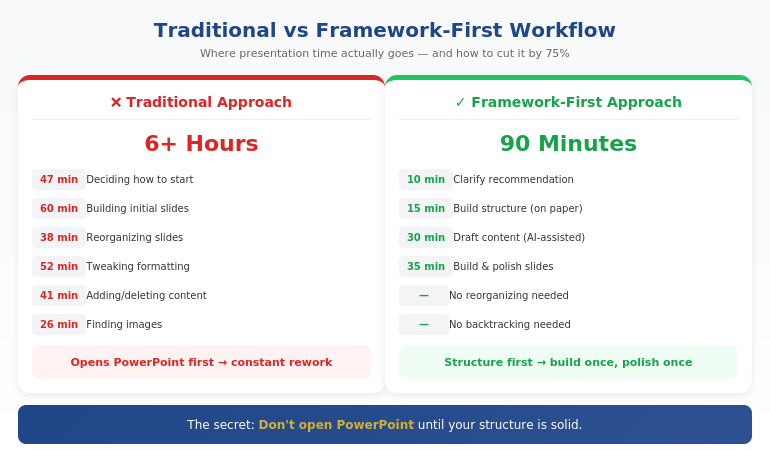
Quick Answer: Faster presentation creation comes from working framework-first, not slide-first. Most time waste happens when you open PowerPoint before you’ve decided your core message, structure, and key proof points. The fastest workflow is: clarify your recommendation (10 min) → build your structure (15 min) → draft content with AI assistance (30 min) → refine and design (35 min). Total: 90 minutes for a presentation that used to take 6 hours.
If you’re building for a steering committee, CFO, or board — speed isn’t the only goal. Decision clarity is. That’s why this workflow starts with Recommendation → Proof → Decision, not slides.
⚡ Need to Build a Presentation Today? The 90-Minute Framework:
- Minutes 1-10: Write your recommendation in one sentence. What do you want them to decide/do/believe?
- Minutes 11-25: Build your structure: Recommendation → Stakes → Their concern → Proof → Decision
- Minutes 26-55: Draft slide content (use AI to expand bullet points into full slides)
- Minutes 56-90: Refine language, add visuals, polish design
The key: Don’t open PowerPoint until step 3. Structure first, slides second.
In This Article:
Where Presentation Time Actually Goes
A few years ago, I tracked exactly how I spent time on a board presentation. The results were embarrassing:
- 47 minutes deciding how to start
- 38 minutes reorganizing slides I’d already built
- 52 minutes adjusting fonts, colors, and alignments
- 41 minutes adding content, then deleting it, then adding it back
- 26 minutes looking for the “right” image
Less than an hour of that time was actual thinking — deciding what to say and how to structure it. The rest was production busywork and decision fatigue.
That’s when I realized: I wasn’t slow at building presentations. I was building them in the wrong order.
Opening PowerPoint first meant making design decisions before content decisions. Starting with slides meant restructuring constantly as my thinking evolved. Working without a framework meant reinventing my approach every single time.
The fix wasn’t working faster. It was working in a different sequence.
The Framework-First Approach
Here’s the principle that changed everything: structure before slides, thinking before production.
Most professionals open PowerPoint and start building. They think in slides, not in messages. They make dozens of micro-decisions about layout and formatting before they’ve made the one macro-decision that matters: what’s the point?
The framework-first approach flips this:
- Decide your recommendation before you touch any tool
- Build your logical structure on paper or in a simple doc
- Draft content in whatever format is fastest (often with AI help)
- Then — and only then — build slides
This sounds obvious, but almost nobody does it. The temptation to “just start building” is strong. And it’s exactly what makes presentations take 6 hours instead of 90 minutes.
For the executive-focused structure I use, see our guide to executive presentation structure.
How can I make presentations faster?
Make presentations faster by working framework-first: decide your core message and structure before opening PowerPoint. Most time waste comes from building slides before you’ve clarified your thinking — which leads to constant reorganizing and second-guessing. Use a repeatable structure (recommendation → stakes → proof → decision), then use AI to help draft content once your framework is solid.
⭐ Master the Framework-First System
AI-Enhanced Presentation Mastery teaches you the complete system: how to structure your thinking before you build, where AI accelerates production, and how to create executive-quality presentations in a fraction of the time.
What you’ll learn:
- The framework-first workflow that cuts creation time by 50-75%
- Where AI helps (drafting, iteration) and where it doesn’t (strategy, structure)
- Prompt patterns that produce usable content, not generic filler
- The quality checks that ensure AI-assisted work meets executive standards
Cut Your Build Time (See Maven) →
Live cohort-based course. 70% frameworks, 30% AI implementation. Check Maven for current dates and pricing.
The 90-Minute System Step by Step
Here’s exactly how I build presentations now:
Phase 1: Clarify (10 minutes)
Before anything else, I answer three questions in writing:
- What do I want them to decide, do, or believe after this presentation?
- What’s the ONE thing they need to understand for that to happen?
- What’s their biggest concern or objection likely to be?
This takes 10 minutes. It saves hours. Because every slide decision that follows becomes obvious when you know your destination.
Phase 2: Structure (15 minutes)
I use a consistent structure for executive presentations:
- Slide 1: Recommendation (the answer, upfront)
- Slide 2: Stakes (why this matters now)
- Slide 3: Their concern (name the objection)
- Slides 4-5: Proof (evidence that addresses the concern)
- Slide 6: Decision (the specific ask)
I sketch this out in a simple document or even on paper. No PowerPoint yet. Just the logic flow.
Phase 3: Draft Content (30 minutes)
Now I draft the actual content — slide titles, key points, supporting data. This is where AI becomes genuinely useful.
I don’t ask AI to “create a presentation about X.” That produces generic garbage. Instead, I give it my structure and ask it to help me expand specific sections:
- “Here’s my recommendation and three proof points. Help me articulate the stakes in language a CFO would respond to.”
- “I need to address this objection: [objection]. Give me three ways to frame the response.”
- “Turn these bullet points into a clear slide narrative: [bullets]”
AI drafts. I direct and edit. The quality stays high because I’m driving the strategy.
For more on AI-assisted presentation creation, see our detailed guide on how to make a presentation with AI.
Phase 4: Build and Polish (35 minutes)
Only now do I open PowerPoint. And because my content is already drafted, this phase is pure execution:
- Paste content into slides
- Apply consistent formatting
- Add simple visuals where they help
- Review flow and make final adjustments
No more agonizing over structure. No more rewriting slides three times. The thinking is done. I’m just packaging it.
How do you speed up PowerPoint creation?
Speed up PowerPoint by doing your thinking before you open it. Draft your structure and content in a simple document first, then use PowerPoint only for final assembly. Also: use a consistent template, master keyboard shortcuts, and resist the urge to perfect every slide before moving forward. Build rough, then polish once at the end.
Want the complete framework-first system?
Where AI Helps (And Where It Doesn’t)
Let me be direct about AI’s role in this system: it’s an accelerator, not a replacement.
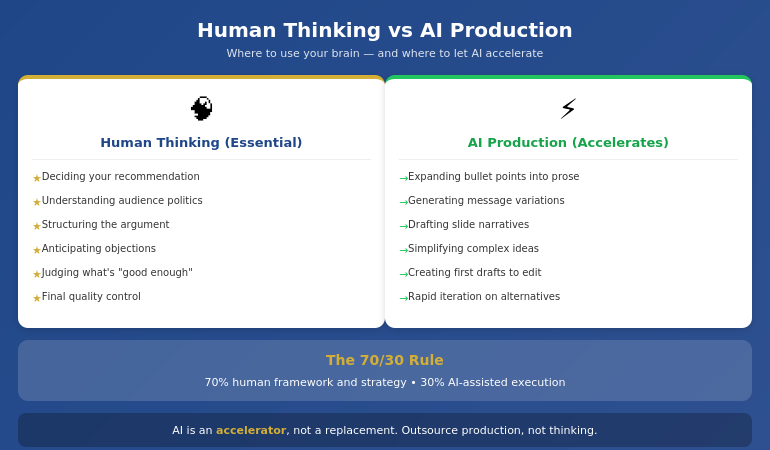
AI is excellent at:
- Drafting content from your bullet points
- Generating variations of your messaging
- Suggesting ways to phrase complex ideas simply
- Creating first drafts you can edit and improve
- Iterating quickly when you need to try different approaches
AI is poor at:
- Knowing what your audience cares about
- Understanding the politics of your organization
- Deciding what to recommend
- Structuring an argument strategically
- Judging what’s “good enough” for your specific context
The professionals who get burned by AI are the ones who outsource the thinking. They ask AI to “create a presentation” and get something that looks polished but says nothing. The slides are pretty. The logic is hollow.
The professionals who save hours are the ones who use AI for production while retaining control of strategy. They know what they want to say. AI helps them say it faster.
⭐ Learn the Human + AI Balance
AI-Enhanced Presentation Mastery teaches you exactly where to use AI and where to trust your judgment — so you get speed without sacrificing quality or strategic thinking.
The course covers:
- The 70/30 rule: 70% human framework, 30% AI execution
- Prompt patterns that produce executive-quality content
Live sessions with real feedback. Check Maven for current cohort dates.
Mistakes That Kill Your Speed
After coaching hundreds of professionals on presentation efficiency, I see the same speed-killers repeatedly:
Mistake #1: Opening PowerPoint first
The moment you open PowerPoint, you start thinking in slides instead of messages. You make formatting decisions before content decisions. You build, then restructure, then rebuild. This single habit can double your creation time.
Mistake #2: Perfecting slides as you go
Adjusting fonts while you’re still figuring out your argument is a form of productive procrastination. You feel busy, but you’re avoiding the hard thinking. Build rough first. Polish once at the end.
Mistake #3: Starting from scratch every time
If you don’t have a repeatable structure, you reinvent your approach with every presentation. That’s exhausting and slow. Develop a go-to framework. Adapt it for each situation. Don’t rebuild from zero.
Mistake #4: Using AI without a framework
Asking AI to “create a presentation about Q3 results” produces garbage. AI needs constraints to be useful. Give it your structure, your key points, your audience context. Then let it draft within those boundaries.
Mistake #5: Treating every presentation as equally important
A 15-minute team update doesn’t need the same polish as a board presentation. Calibrate your effort to the stakes. Some presentations deserve 90 minutes. Some deserve 30. Know the difference.
For more workflow optimization, see our complete guide to AI presentation workflow.
What is the fastest way to create a professional presentation?
The fastest way to create a professional presentation is: (1) clarify your recommendation in one sentence, (2) build your structure on paper first, (3) draft content with AI assistance using specific prompts, (4) only then open PowerPoint to assemble and polish. This framework-first approach can cut creation time by 50-75% compared to building slides from scratch.
Ready to cut your presentation time in half?
The Compound Effect of a System
Here’s what most people miss: the real value of a system isn’t just time saved on one presentation. It’s the compound effect across your career.
If you create two presentations per week and save 4 hours each, that’s 8 hours per week. Over a year, that’s more than 400 hours — ten full work weeks returned to you.
But the benefit goes beyond hours. When presentations stop being a time drain, you:
- Approach them with less dread
- Have energy left to rehearse properly
- Can take on more opportunities without burning out
- Actually improve over time instead of just surviving
A system for building presentations faster isn’t about cutting corners. It’s about creating space for what actually matters: clear thinking, confident delivery, and results.
⭐ Build the System That Lasts
AI-Enhanced Presentation Mastery gives you the complete framework-first system — from initial thinking to final polish — so you can create executive-quality presentations in a fraction of the time, consistently.
What’s included:
- The 90-minute presentation workflow
- Framework templates for different presentation types
- Prompt library for AI-assisted content creation
- Quality checks that ensure AI work meets executive standards
- Live sessions with direct feedback on your work
Live cohort-based course on Maven. Check the page for current dates, pricing, and syllabus.
Frequently Asked Questions
Will AI-generated content look generic?
Only if you use AI wrong. Generic content comes from generic prompts like “create a presentation about X.” When you give AI your specific framework, key points, and audience context, it produces drafts you can actually use. The framework-first approach ensures AI is expanding your thinking, not replacing it with filler.
How much time can I realistically save?
Most professionals report saving 50-75% once they’ve internalized the system. A presentation that took 6 hours typically drops to 90 minutes to 2 hours. The biggest savings come in the first phase (no more agonizing over how to start) and the third phase (AI-assisted drafting instead of writing from scratch).
Does this work for highly technical or specialized presentations?
Yes — in some ways, better. Technical presentations often suffer from too much detail and unclear structure. The framework-first approach forces you to identify your core message and structure your argument logically before diving into technical content. AI is less useful for specialized terminology, but still helps with structuring explanations and drafting transitions.
What if I’m not technical with AI tools?
You don’t need to be technical. The AI-assisted portions use simple prompts in conversational language — you’re telling AI what you need the same way you’d brief a junior colleague. The course teaches exact prompts that work, so you don’t need to figure out “prompt engineering” on your own.
Get Weekly Presentation Efficiency Insights
Frameworks, workflows, and AI strategies for creating better presentations in less time — from 24 years of corporate experience.
📋 Not ready for the course? Take the checklist.
A quick-reference guide showing which tasks benefit from AI assistance and which require human judgment. Use it to speed up your next presentation without sacrificing quality.
Your Next Step
The next time you need to create a presentation, try this:
- Don’t open PowerPoint
- Write your recommendation in one sentence
- Sketch your structure on paper
- Then start building
You’ll be surprised how much faster the whole process becomes when you know where you’re going before you start.
P.S. Speed matters, but so does getting the decision. If you’re presenting for approval, I wrote about pre-meeting alignment — the strategy that gets “yes” before you open your slides.
P.P.S. And if nerves are affecting your delivery, check out how to project your voice — it’s more about releasing tension than speaking louder.
About Mary Beth Hazeldine
Owner & Managing Director of Winning Presentations. After 24 years in corporate banking building hundreds of presentations under deadline pressure, I became obsessed with efficiency. The framework-first approach I teach now is the system I wish I’d had in year one.