

Stop Writing Slide Titles Like This (Before and After Examples)
Your slide titles are probably costing you approvals, buy-in, and promotions.
After reviewing thousands of presentations across 24 years in corporate banking and 16 years of training executives, I can tell you the single biggest mistake I see: label slide titles instead of headline slide titles.
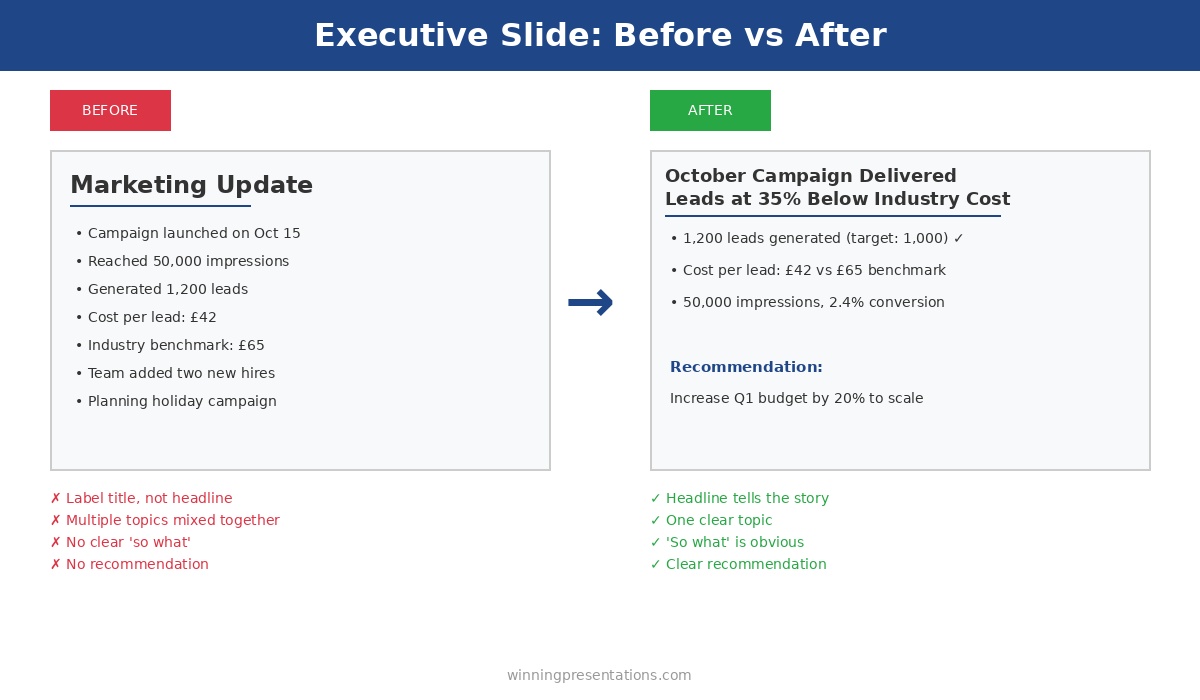
“Q3 Financial Results” is a label. It tells me what category of information I’m about to see.
“Q3 Revenue Up 12% Despite Market Headwinds” is a headline. It tells me what I need to know — even if I never read the rest of the slide.
This distinction in slide titles sounds small. It’s not. It’s the difference between presentations that get skimmed and ignored versus presentations that drive decisions.
Here are 10 before-and-after examples to transform your slide titles today.
Why Slide Titles Matter More Than You Think
Executives don’t read presentations. They scan them.
They flip through slide titles looking for red flags, key decisions, and anything that requires their attention. If your slide titles are labels, you’re invisible. They’re scanning past your slide titles without absorbing anything.
But when your slide titles are headlines — complete messages that communicate the “so what” — executives can get your story just from the slide titles. They know what you’re saying before they read a single bullet point.
This changes everything about how your presentation lands.
The Slide Titles Test That Reveals Weak Presentations
Here’s how to know if your slide titles are working:
Read only the slide titles of your presentation, in order. Do they tell a coherent story? Does someone scanning just the slide titles understand your key message and recommendation?
If yes, you have headline slide titles. If no — if the slide titles are just labels that require reading the slide content — you have work to do.
Let’s fix your slide titles.
10 Slide Titles Transformations: Before and After
Slide Titles Example 1: Financial Results
| ❌ Before: “Q3 Financial Results” | ✅ After: “Q3 Revenue Up 12%, Margins Stable at 42%” |
Why this slide title is better: The executive knows exactly how the quarter went without reading anything else. The before slide title requires them to dig into the content to understand if Q3 was good or bad.
Slide Titles Example 2: Project Status
| ❌ Before: “Project Status Update” | ✅ After: “Project Green: 3 Weeks Ahead, 10% Under Budget” |
Why this slide title is better: The slide title communicates health, timeline, and budget in one line. An executive scanning these slide titles knows immediately this project doesn’t need attention.
Slide Titles Example 3: Market Analysis
| ❌ Before: “Competitive Landscape” | ✅ After: “We Lead in 3 of 5 Categories; Gap in Enterprise” |
Why this slide title is better: The slide title tells the strategic story — mostly winning, but with one clear weakness. The executive knows exactly where to focus the discussion from the slide title alone.
Slide Titles Example 4: Budget Request
| ❌ Before: “Budget Proposal” | ✅ After: “Requesting £500K for Platform Upgrade — 6-Month Payback” |
Why this slide title is better: The slide title states the ask and the return. The executive is already doing the mental math before seeing the details.
Want slide titles already written for you?
Every template in The Executive Slide System has headline-style slide titles built in — just fill in your numbers. No more staring at blank slide titles wondering what to write.
Slide Titles Example 5: Team Update
| ❌ Before: “Team Performance” | ✅ After: “Team at Full Capacity — All KPIs Green for Q3” |
Why this slide title is better: The slide title answers the question leadership actually has: is this team performing? Instead of making them hunt for the answer, your slide title delivers it immediately.
Slide Titles Example 6: Risk Assessment
| ❌ Before: “Risk Register” | ✅ After: “2 High Risks Require Board Attention — Mitigations in Place” |
Why this slide title is better: The slide title tells leadership exactly what they need to know: how many risks, severity level, and current status. They know immediately if this slide needs discussion from the slide title.
Slide Titles Example 7: Customer Metrics
| ❌ Before: “Customer Satisfaction” | ✅ After: “NPS Up 15 Points to 72 — Highest in Company History” |
Why this slide title is better: The slide title celebrates a win with specifics. The executive knows from the slide title this is good news worth acknowledging — maybe even sharing with the board.

Slide Titles Example 8: Strategic Recommendation
| ❌ Before: “Strategic Options” | ✅ After: “Recommend Option B: Fastest Time-to-Market at Moderate Risk” |
Why this slide title is better: The slide title leads with the recommendation. The executive knows your position before reviewing the options — which focuses the discussion on your reasoning rather than re-evaluating everything from scratch.
Struggling to write strong slide titles?
The Executive Slide System includes 30 AI prompts — one specifically generates 5 headline slide title options for any slide. The same prompts I’ve used to help clients secure over £250 million in funding.
Slide Titles Example 9: Challenges
| ❌ Before: “Current Challenges” | ✅ After: “Churn at 8% — Above Target; Mitigation Plan in Progress” |
Why this slide title is better: The slide title is honest about the problem but also shows you’re addressing it. It demonstrates accountability in the slide title rather than hiding bad news behind a vague label.
Slide Titles Example 10: Next Steps
| ❌ Before: “Next Steps” | ✅ After: “Decision Needed by Friday to Meet Q1 Launch Date” |
Why this slide title is better: The slide title creates urgency and specifies exactly what you need. “Next Steps” could mean anything; this slide title tells leadership precisely what action you’re requesting.
The Slide Titles Formula That Always Works
Every strong slide title follows this pattern:
The Headline Slide Titles Formula
[Subject] + [Key Message] + [Number or Context]
Slide titles examples:
- • “Revenue + Up 12% + Despite Market Headwinds”
- • “Project + On Track + 3 Weeks Ahead of Schedule”
- • “Churn + Above Target + Mitigation in Progress”
Numbers are particularly powerful in slide titles. “Performance Improved” is vague. “Performance Up 23%” is specific and credible. Wherever possible, include a number in your slide titles.
Common Slide Titles Mistakes to Avoid
Mistake 1: Single-word slide titles. “Overview,” “Summary,” “Appendix” — these slide titles tell the reader nothing. Every slide should have a message, and the slide title should communicate it.
Mistake 2: Questions as slide titles. “What Did We Learn in Q3?” forces the reader to dig for the answer. “Q3 Taught Us Enterprise Is Our Growth Engine” delivers the answer in the slide title.
Mistake 3: Slide titles that need the slide to make sense. If your slide title only makes sense after reading the content, it’s backwards. The slide title should make sense first, then the content provides supporting detail.
Mistake 4: Slide titles that are too long. Slide titles should be scannable — ideally under 12 words. If you can’t communicate your message in 12 words, your slide might be trying to say too much.
FAQs About Slide Titles
Should every slide have a headline slide title?
Yes, with rare exceptions. Even “Agenda” can become “Today: 3 Decisions Required.” The only slides that might keep label slide titles are section dividers in long presentations — and even those slide titles can often be improved.
What about title slides with just the presentation name?
Title slides are the one exception for slide titles. “Q3 Business Review” is fine as a presentation title. But slide 2 onwards should all have headline slide titles, not labels.
Won’t headline slide titles give away my conclusions too early?
That’s the point. Executives want to know your conclusions immediately. Leading with conclusions in your slide titles shows confidence and respects their time. Building suspense is for movies, not presentations.
How do I write headline slide titles for complex topics?
Focus on the “so what” for your slide titles. Even complex analysis has a key takeaway. “Analysis Results” tells me nothing. “Analysis Shows Market Entry Viable in Q2” tells me the conclusion. Start with the takeaway and work backwards to write your slide title.
Transform Your Slide Titles Today
Open your most recent presentation. Look at the slide titles only — don’t read the content.
Ask yourself: if an executive only read these slide titles, would they understand my message?
For any slide title where the answer is no, apply the formula: Subject + Key Message + Number or Context.
This takes 10 minutes. It will transform how your presentation lands.
I’ve seen careers change because of slide titles. A VP at one of my client companies told me she started getting invited to board meetings after she fixed her slide titles. The content hadn’t changed — just the slide titles. But suddenly, executives could actually see her strategic thinking instead of having to dig for it.
Your slide titles are the first thing leadership reads. Make them count.

Get Templates With Headline Slide Titles Built In
Stop staring at blank slides. The Executive Slide System includes 10 PowerPoint templates with headline-style slide titles already written — just fill in your numbers and present.
Plus 30 AI prompts including one that generates 5 headline slide title options for any slide.
10 templates • 30 AI prompts • Instant download • 30-day guarantee
Related: How to Create Executive Presentations That Get Approved in 2025 — the complete guide covering all 10 executive presentation types with headline slide titles and structures.
