

The 3-Part Presentation System Executives Trust: Structure → Story → Slides
I once spent 14 hours on a single board presentation. Fourteen hours. And it still wasn’t right.
After 24 years in corporate banking — at JPMorgan Chase, PwC, Royal Bank of Scotland, Commerzbank — I’d built hundreds of presentations. But I had no system. Every deck was a fresh struggle: staring at a blank screen, rearranging slides endlessly, second-guessing every choice.
Then I developed what I now call the 3-part presentation system executives actually trust. It cut my prep time by 75%. More importantly, it consistently delivered results — budget approvals, project sign-offs, client wins.
Here’s the system I wish someone had given me two decades ago.
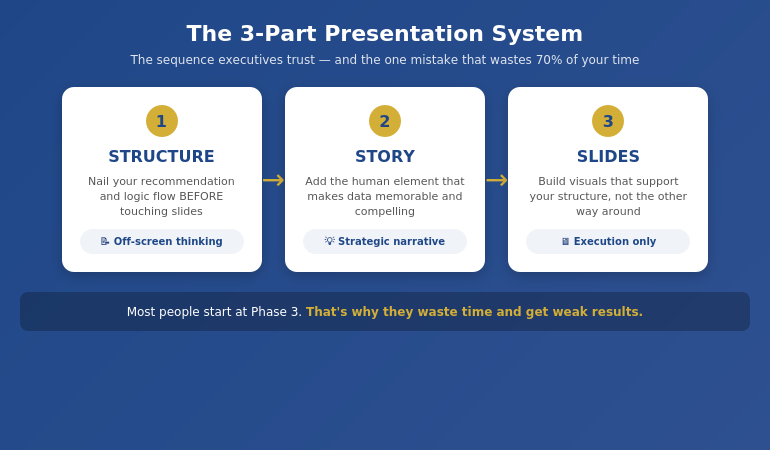
Quick Answer: The presentation system executives trust follows three phases in strict order: (1) Structure — nail your recommendation and logic flow before touching slides, (2) Story — add the human element that makes data memorable, (3) Slides — build visuals that support your structure, not the other way around. This sequence prevents the #1 time-waster: building slides before you know what you’re actually saying.
📋 Creating a Presentation This Week? Start Here:
Before you open PowerPoint, answer these 3 questions:
- What’s your ONE recommendation? (If you can’t say it in one sentence, you’re not ready)
- What are the 3 proof points? (Data, example, or logic that supports it)
- What decision do you need? (Approval, funding, alignment, action)
Only after you can answer all three should you start building slides.
In This Article:
Why Most Presentation “Systems” Fail
Early in my banking career, I watched a colleague present to the executive committee. He had 47 beautifully designed slides. Animations. Charts. The works.
The CFO stopped him on slide 3. “What are you actually recommending?”
My colleague couldn’t answer clearly. He’d spent days on slides without first nailing his structure. The meeting ended early. The project stalled for months.
I’ve seen this pattern hundreds of times since. Professionals jump straight to PowerPoint, build slides that look impressive, then wonder why executives lose interest or decisions don’t happen.
The problem isn’t the slides. It’s the sequence.
Most presentation advice focuses on delivery tips or design tricks. But without a solid underlying system, you’re just decorating a house with no foundation.
Phase 1: Structure (The Foundation)
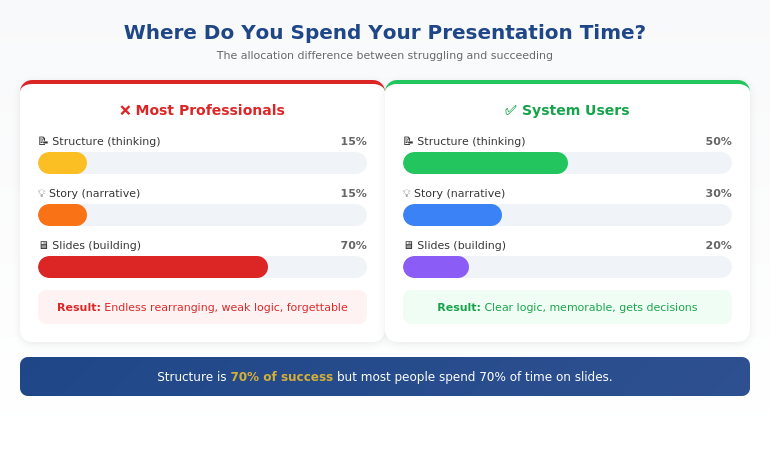
Structure is 70% of whether your presentation succeeds or fails. Yet most people spend 70% of their time on slides.
The structure phase happens entirely OFF the screen. Whiteboard, paper, or just thinking — but not in PowerPoint.
The Executive Structure Formula:
- Lead with your recommendation. Not background. Not context. The answer first.
- Identify 3 supporting points. Data, logic, or examples that prove your recommendation is sound.
- Define the decision needed. What exactly do you want them to approve, fund, or do?
- Anticipate 2-3 objections. What will they push back on? Have your responses ready.
This follows the Pyramid Principle that McKinsey made famous: conclusion first, then supporting evidence. It’s the opposite of how most people naturally think (building up to the conclusion), but it’s how executives prefer to receive information.
For a deeper dive into the exact format, see our guide to executive presentation structure.
What system do executives use for presentations?
Senior executives typically use a top-down structure: recommendation first, supporting evidence second, decision request third. This is often called the Pyramid Principle or BLUF (Bottom Line Up Front). The best executive presenters also have a consistent personal methodology — a repeatable process they follow for every presentation, regardless of topic or audience.
⭐ Master the Complete System in 4 Weeks
AI-Enhanced Presentation Mastery is a live cohort course that teaches the full Structure → Story → Slides methodology — plus how to use AI tools to accelerate (not replace) each phase.
What you’ll learn:
- The complete 3-part framework in depth
- How to apply it to board decks, client pitches, and internal updates
- AI prompts that enhance each phase (without making slides generic)
- Live feedback on your real presentations
Live cohort format with direct instructor access. Built from 24 years of corporate banking experience.
Phase 2: Story (The Connection)
Once your structure is solid, you add the human element. Data convinces the rational mind. Story convinces the whole person.
This doesn’t mean turning your board presentation into a TED Talk. It means strategic use of narrative to make your points memorable and your recommendations compelling.
Three Story Techniques for Executive Presentations:
1. The Stakes Story (60 seconds)
Before presenting your recommendation, briefly establish what’s at risk. “If we don’t address this now, here’s what happens…” This creates urgency without being dramatic.
2. The Proof Story (90 seconds)
Instead of just citing data, briefly tell the story behind one data point. “When we piloted this with the Manchester team, here’s what happened…” Specific examples stick better than aggregate statistics.
3. The Future Story (60 seconds)
Paint a brief picture of what success looks like. “Six months from now, if we do this, here’s where we’ll be…” This helps executives visualise the outcome they’re approving.
Notice the time limits. Executive presentations aren’t the place for long narratives. These are strategic micro-stories embedded within a structured argument.
How do you structure an executive presentation?
The most effective structure for executive presentations is: (1) Recommendation/conclusion first, (2) Three supporting points with evidence, (3) Clear decision or action request, (4) Appendix for detail. This “top-down” approach respects executives’ time and mirrors how they make decisions. Avoid building up to your conclusion — executives want to know your answer immediately, then decide if they need the supporting detail.
Ready to master the complete system?
Phase 3: Slides (The Delivery)
Only now — after structure and story are locked — do you open PowerPoint.
This is where most people START, which is why they waste so much time. When you build slides before your structure is solid, you end up rearranging endlessly, adding slides you don’t need, and second-guessing every design choice.
When structure comes first, slides become almost mechanical. You know exactly what each slide needs to say. You’re just visualising decisions you’ve already made.
The Slide Phase Checklist:
- One message per slide. If a slide makes two points, split it.
- Headlines that state conclusions. Not “Q3 Results” but “Q3 Revenue Exceeded Target by 12%”
- Visuals that prove the headline. The chart or image should make the headline obvious.
- Appendix for detail. Anything they might ask about but don’t need upfront.
For the detailed workflow I use, including how AI can accelerate this phase, see our guide to AI presentation workflow.
What makes a presentation system effective?
An effective presentation system is: (1) Repeatable — works for any presentation type, (2) Sequenced — forces you to do the right things in the right order, (3) Efficient — eliminates wasted time and rework, (4) Results-focused — optimised for getting decisions, not just delivering information. The best systems separate thinking (structure) from building (slides), ensuring you don’t waste time on visuals before your logic is sound.
⭐ Stop Reinventing Every Presentation
The AI-Enhanced Presentation Mastery course gives you a complete, repeatable system — so you never face a blank screen wondering where to start again.
Course includes:
- 4 weeks of live instruction + Q&A
- Templates for board, client, and internal presentations
- AI prompt library for each phase of the system
- Peer cohort for feedback and accountability
Framework-first, AI-enhanced. Next cohort starting soon.
Where AI Fits (And Where It Doesn’t)
AI tools like ChatGPT, Claude, and Copilot can dramatically accelerate presentation creation. But only if you use them at the right points in the system.
Where AI helps:
- Phase 1 (Structure): Brainstorming counter-arguments, stress-testing your logic, identifying gaps
- Phase 2 (Story): Drafting story options, finding analogies, refining language
- Phase 3 (Slides): Generating first-draft slide content, reformatting data, creating visual options
Where AI fails:
- Knowing your specific audience and what they care about
- Understanding the political dynamics in your organisation
- Making the judgment call on what to include vs. leave out
- Replacing the strategic thinking that makes presentations persuasive
The professionals who get the most from AI use it as an accelerator within a proven framework — not as a replacement for having a system in the first place.
Want to learn how to combine framework + AI effectively?
Is This System Right For You?
The 3-part system works for anyone who creates presentations for business audiences. But the full course is designed for a specific professional:
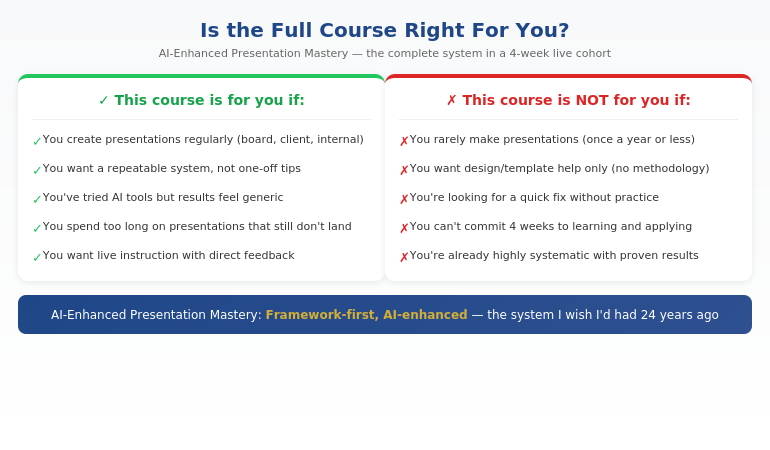
If you recognised yourself in the left column, the system will transform how you approach presentations — whether you learn it from this article or go deeper in the course.
⭐ The Complete System + Live Instruction
AI-Enhanced Presentation Mastery is a 4-week live cohort course that teaches the full Structure → Story → Slides methodology — plus the AI techniques that accelerate each phase without making your presentations generic.
What’s included:
- 4 weeks of live sessions with Q&A
- The complete 3-part framework with templates
- AI prompt library for each phase
- Feedback on your real presentations
- Cohort of peers for ongoing accountability
Built from 24 years of corporate banking experience. Framework-first, AI-enhanced.
Frequently Asked Questions
How is this different from using AI tools alone?
AI tools are powerful but they don’t give you a system. They can generate content, but they can’t tell you what content you actually need. Without a framework, AI often produces generic slides that look impressive but don’t persuade. The 3-part system gives you the strategic foundation — AI then accelerates execution within that framework. It’s the difference between having a GPS (system) versus just having a fast car (AI).
Does this work for different presentation types (board, client, internal)?
Yes — that’s the point of having a system. The Structure → Story → Slides sequence works whether you’re presenting to a board, pitching a client, updating your team, or requesting budget. The specific content changes, but the methodology stays the same. In the course, we apply the system to multiple presentation types so you can see how it adapts.
How much time does the system actually save?
In my experience, the system cuts presentation prep time by 50-75% once you’ve internalised it. The savings come from eliminating the two biggest time-wasters: (1) building slides before your structure is clear, and (2) endless rearranging and second-guessing. When you know exactly what each slide needs to say before you open PowerPoint, the building phase becomes almost mechanical.
What if I’m already experienced at presentations?
Most experienced presenters are “unconsciously competent” — they do things that work but can’t articulate why. The system makes your process conscious and repeatable, which means you can improve it deliberately and teach it to others. It also fills gaps you might not know you have. Many experienced professionals find the Story phase (Phase 2) particularly eye-opening.
Get Weekly Presentation System Insights
Frameworks, templates, and techniques for executive presentations — from 24 years in corporate banking.
Your Next Step
The 3-part presentation system — Structure → Story → Slides — isn’t complicated. But it does require discipline to follow the sequence, especially when you’re tempted to jump straight into PowerPoint.
Start with your next presentation. Before you open any software, answer the three questions from the rescue block above. Get your structure right first. Everything else becomes easier.
P.S. If you’re making a presentation this week, check out the presentation habit that’s quietly killing careers — it’s about the structural mistake most professionals make without realising it.
P.P.S. If nerves are part of your presentation challenge, I wrote about how to speak confidently in meetings — including the 30-second reset that helps even when anxiety hits.
About Mary Beth Hazeldine
Owner & Managing Director of Winning Presentations. 24 years in corporate banking at JPMorgan Chase, PwC, RBS, and Commerzbank. I’ve built hundreds of executive presentations and now teach the system I wish I’d had from the start.
