
Tag: stakeholder presentations

13 Feb 2026
Executive facing boardroom questions after presentation with confident composed posture

The Presentation Was Perfect. The Q&A Lost the Deal.

Quick answer: Senior executives rarely make decisions during your slides. They use the presentation to gather context, then use Q&A to test your thinking, probe your assumptions, and decide whether they trust your judgement. Most presenters spend 90% of preparation on slides and 10% on Q&A. The ratio should be closer to 50/50. Below: the strategic Q&A preparation system that turns the most dangerous part of your presentation into the most persuasive.

47 Slides. Standing Ovation. Zero Approval.

A client of mine — a senior director at a financial services firm — spent three weeks building what he called the best presentation of his career. A £3.2M technology investment. Beautiful slides. Compelling narrative. Clear ROI. The kind of deck that makes you think, “This is going to be easy.”

He delivered it flawlessly. Twenty-two minutes, no stumbles, perfect pacing. The CFO nodded throughout. The CTO leaned forward twice. When he finished, there was a pause — the good kind, the kind that feels like the room is absorbing what you’ve said.

Then the CFO asked one question: “What happens to the existing vendor contract if we approve this in Q2 instead of Q1?”

He didn’t know. Not because the answer was complicated — it was a straightforward penalty clause he hadn’t reviewed. He said, “I’ll need to come back to you on that.” The CTO followed with, “And what’s the migration risk if we run both systems in parallel?” He wasn’t sure about that either.

Two questions. Two “I’ll come back to you” answers. The CFO said, “Let’s reconvene when you have the full picture.” The project was delayed four months. By the time he got back in the room, the budget had been reallocated.

His slides were perfect. His Q&A preparation was almost zero. And that’s where the deal died.

In 24 years of banking across JPMorgan Chase, PwC, RBS, and Commerzbank, I’ve watched this pattern repeat in boardroom after boardroom. The presentation goes well. The Q&A collapses. And the presenter walks away confused because they thought the hard part was the slides.

🎯 Stop Losing Deals in Q&A

The Executive Q&A Handling System gives you the complete preparation framework for the part of your presentation that actually decides outcomes. Question mapping templates, the 3-part executive response structure, “I don’t know” recovery scripts, and hostile question deflection techniques — built from real boardroom situations across banking and consulting.

Used by senior professionals who’ve learned that Q&A preparation matters more than slide preparation.

Get the Executive Q&A Handling System → £39

Instant download — use it for your next Q&A this week.

Why Executives Actually Decide During Q&A (Not During Your Slides)

Here’s something most presenters don’t understand about senior audiences: they don’t use your presentation to make a decision. They use it to build a mental model of your proposal. The decision-making happens during Q&A.

There’s a reason for this. Senior executives sit through presentations all day. They’ve learned that slides represent the presenter’s best case — the version where everything works, the risks are manageable, and the ROI is compelling. Of course it looks good. You built it to look good.

What they can’t see in your slides is how you think under pressure. Whether you’ve considered the second-order consequences. Whether you understand the risks you didn’t put on the slide. Whether your confidence comes from deep understanding or surface preparation.

Q&A reveals all of this in minutes.

When a CFO asks “what happens if the timeline slips by six months?” she’s not looking for a perfect answer. She’s looking at how you respond. Do you have the number? Do you have a framework for thinking about it? Do you panic, deflect, or engage? That response tells her more about the viability of your proposal than your entire slide deck.

This is why the same presentation can succeed or fail depending entirely on what happens after “Any questions?” The slides get you to the table. The Q&A decides whether you leave with approval.

The 90/10 Preparation Mistake (And What the Ratio Should Be)

Most presenters spend roughly 90% of their preparation time on slides — designing, refining, rehearsing the narrative — and leave maybe 10% for thinking about questions. Often that 10% happens the night before, when you lie in bed imagining worst-case scenarios without actually preparing responses.

The problem isn’t that slides don’t matter. They do. A poor executive presentation structure will lose your audience before you reach Q&A. But once your slides are solid — clear structure, clear recommendation, clear ask — additional slide refinement produces diminishing returns. The marginal value of your twentieth revision of slide 14 is close to zero.

The marginal value of preparing for the CFO’s top three questions? Enormous.
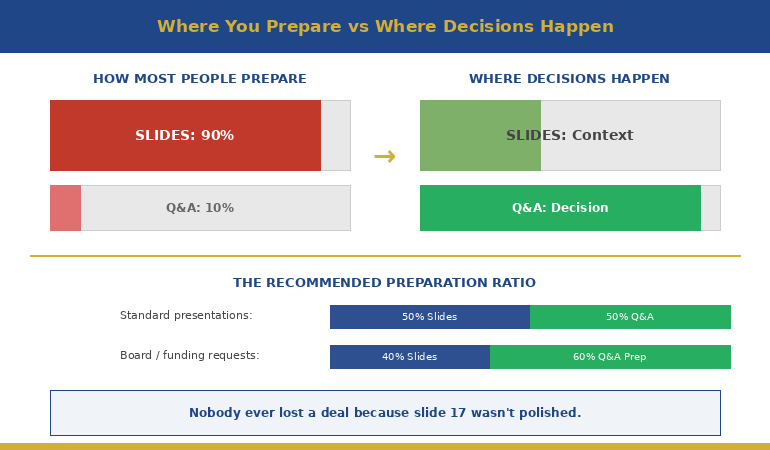

Diagram showing presentation preparation ratio versus where executive decisions actually happen during Q&A

Here’s the preparation ratio I recommend to my clients: once your slides are structurally sound, split your remaining preparation time 50/50 between rehearsing the presentation and preparing for Q&A. For a high-stakes presentation — a board approval, a funding request, a major proposal — I’d go further: 40% slides, 60% Q&A preparation.

That feels counterintuitive. It felt counterintuitive to the senior director who lost the £3.2M deal too. But after working with hundreds of executives through high-stakes presentations, I can tell you: nobody ever lost a deal because slide 17 wasn’t polished enough. Plenty have lost deals because they couldn’t answer question two.

📋 Want the complete Q&A preparation system?

The Executive Q&A Handling System includes question mapping templates, response frameworks, and the exact preparation process that turns Q&A from your biggest risk into your strongest asset.

Get the Executive Q&A Handling System → £39

The Question Map: Predicting What They’ll Ask

The biggest myth about Q&A is that questions are unpredictable. They’re not. In my experience, you can predict the majority of the questions you’ll receive — if you prepare systematically rather than hoping for the best.

I teach my clients a technique called Question Mapping. Before any high-stakes presentation, you build a map of likely questions organised by stakeholder and by category. Here’s how it works:

Step 1: List every person in the room and their primary concern.

The CFO cares about cost, risk, and return. The CTO cares about technical feasibility and integration. The COO cares about operational disruption. The CEO cares about strategic alignment and timing. Each person will ask questions through their lens. Knowing the lens tells you the question before it’s asked.

Step 2: For each person, write the three questions they’re most likely to ask.

Not the questions you’d like them to ask — the questions they’ll actually ask based on their role, their concerns, and any history you have with them. If the CFO challenged your timeline last time, she’ll challenge your timeline again. Prepare for that specific challenge.

Step 3: For each question, prepare your answer AND your evidence.

The answer is what you’ll say. The evidence is what you’ll show — a backup slide, a data point, a reference to a comparable situation. This is where appendix slides become essential. They’re not afterthoughts; they’re your Q&A arsenal.

Step 4: Identify the two or three questions you can’t answer yet — and prepare honest responses for those too.

Knowing what you don’t know is just as important as knowing what you do. We’ll cover how to handle these in a moment.

When my client lost the £3.2M deal, I asked him afterwards: “Did you do a question map?” He looked at me blankly. He’d spent three weeks on slides and zero minutes mapping the questions his audience was guaranteed to ask. The CFO’s question about the vendor contract penalty wasn’t obscure — it was the most obvious financial question in the room. Ten minutes of question mapping would have caught it.

Answer Architecture: The 3-Part Executive Response

Knowing what they’ll ask is half the battle. The other half is structuring your answer so it lands with a senior audience. Most people answer executive questions the way they’d answer in conversation — they think out loud, circle around the point, add context, and eventually arrive at the answer. For a peer, this is fine. For a CFO with six more meetings after yours, it’s fatal.

I teach a three-part response structure that works for virtually any executive question:

Part 1: Direct Answer (first sentence)

Start with the answer. Not the context, not the caveat, not the background. The answer. “The migration risk is moderate — we estimate two weeks of parallel running with a 15% contingency built in.” The executive now has what they need. Everything after this is supporting detail.

Part 2: One Supporting Point (second sentence)

Give one piece of evidence or reasoning that strengthens your answer. “We’ve based that on the migration timeline from the Singapore rollout last year, which had similar complexity.” One point. Not three. Not a data dump. One credible reference that shows your answer isn’t a guess.

Part 3: The Bridge (optional third sentence)

If it’s useful, connect back to a point from your presentation or redirect to a related strength. “That’s actually why we’ve built the phased approach I showed on slide 8 — it gives us an exit ramp at each stage.” This turns a defensive moment (answering a question) into an offensive one (reinforcing your proposal).

Three sentences. Sometimes two. Never seven. The discipline of brevity in Q&A communicates the same thing it communicates in your slides: you know what matters and you’re not afraid to be direct about it.

📊 Question Maps + Response Frameworks + Recovery Scripts

The Executive Q&A Handling System gives you the complete toolkit: question mapping templates for every stakeholder type, the 3-part response structure with worked examples, “I don’t know” recovery scripts, hostile question techniques, and preparation checklists you can run before any high-stakes presentation.

Get the Executive Q&A Handling System → £39

Instant download. Built from 24 years of real boardroom Q&A across JPMorgan Chase, PwC, RBS, and Commerzbank.

The Most Powerful Answer: “I Don’t Know, But…”

Here’s something that surprises most of my clients: the executives I’ve worked with over 24 years don’t expect you to know everything. What they can’t tolerate is pretending you do when you don’t.

When you bluff in Q&A, senior people can tell. They’ve sat through thousands of presentations. They know the difference between someone who’s genuinely confident in their answer and someone who’s constructing one in real time. Bluffing doesn’t just fail to convince them — it actively undermines every other answer you’ve given, including the ones you were right about.

“I don’t know” — when it’s honest — is a trust-building statement. But it needs a second half.

The formula: “I don’t have that figure yet. Here’s what I do know: [related fact]. I’ll have the specific answer to you by [date].”

Three elements: honest admission, related context that shows you understand the territory, and a specific commitment to follow up. The admission shows integrity. The related context shows competence. The commitment shows accountability. Together, they communicate something more valuable than the actual answer: that you’re someone who can be trusted with a £3.2M decision.

My client who lost the deal said “I’ll need to come back to you on that” — which is close but missing the middle element. He didn’t demonstrate that he understood the territory around the question. Compare that with: “I don’t have the exact penalty clause figure, but I know the contract has a 90-day notice period and we’d be within that window for a Q2 start. I’ll confirm the specific financial impact by Friday.”

Same honesty. Completely different impression. The first version says “I didn’t prepare for this.” The second says “I understand the landscape even though I’m missing one data point.”

For a deeper dive into handling the really difficult questions — the hostile ones, the ambush questions, the ones designed to put you on the spot — this guide covers specific techniques for those situations.

🔍 Want the “I don’t know” recovery scripts and hostile question playbook?

The Executive Q&A Handling System includes word-for-word scripts for every Q&A scenario — including the ones you can’t predict. Plus the question mapping template that catches most questions before they’re asked.

Get the Executive Q&A Handling System → £39

How do you prepare for Q&A after an executive presentation?

Use a Question Map: list every person in the room and their primary concern, write the three most likely questions each will ask, prepare direct answers with supporting evidence, and identify the questions you can’t answer yet. Aim to spend at least 50% of your remaining preparation time on Q&A once your slides are structurally sound.

Why do good presentations still fail to get approval?

Because executives don’t decide during slides — they decide during Q&A. Your slides present your best case. Q&A reveals how deeply you’ve thought about risks, alternatives, and second-order consequences. Two unanswered questions can undo twenty-two minutes of perfect delivery.

What’s the best way to answer questions from senior executives?

Use the 3-part structure: direct answer first (one sentence), one supporting point (evidence or reasoning), then an optional bridge back to your presentation. Keep responses under three sentences. Brevity in Q&A signals confidence and clarity — rambling signals uncertainty.

🏆 The Complete Executive Q&A Handling System

Everything you need to turn Q&A from your biggest vulnerability into your strongest moment. Built from 24 years of high-stakes boardroom presentations where the real decisions happened after the slides.

  • Question Mapping templates (by stakeholder role and concern type)
  • The 3-Part Executive Response framework with worked examples
  • “I Don’t Know” recovery scripts that build trust instead of destroying it
  • Hostile question deflection and reframing techniques
  • Appendix slide strategy — what to prepare and when to deploy
  • Pre-presentation Q&A preparation checklist

Built from real situations across banking, consulting, and corporate leadership. Not theory — pattern recognition from hundreds of executive Q&A sessions.

Get the Executive Q&A Handling System → £39

Instant download. Customise for your next high-stakes presentation.

Frequently Asked Questions

How long should I spend preparing for Q&A versus preparing slides?

Once your slide structure is solid, split remaining preparation time at least 50/50 between presentation rehearsal and Q&A preparation. For board-level or funding presentations, consider 40/60 in favour of Q&A. No executive ever rejected a proposal because slide 17 wasn’t polished — but many have rejected proposals because the presenter couldn’t answer question two.

What if I’m asked a question I genuinely haven’t thought of?

Use the “I don’t know, but…” formula: honest admission, one related fact that shows you understand the territory, and a specific commitment to follow up with the answer by a named date. This builds more trust than a bluffed answer that unravels under follow-up questioning.

Should I invite questions during the presentation or only at the end?

For senior audiences, invite questions throughout. Executives don’t wait well — if they have a question on slide 4, they won’t be listening to slides 5 through 20. Saying “I welcome questions at any point” also signals confidence. If the question is answered on a later slide, say so: “Great question — I cover that in two slides. Shall I jump ahead or continue?”

How do I handle it when the Q&A goes completely off-topic?

Acknowledge the question’s value, then redirect: “That’s an important point, and it deserves proper attention. Can I take that offline with you after this meeting so we can give it the time it needs? I want to make sure we cover [the decision you need] in the time we have left.” This respects the questioner while protecting your agenda.

📬 The Winning Edge Newsletter

Weekly executive presentation strategies — Q&A preparation, slide structures, and boardroom techniques that actually work. No filler.

Subscribe Free →

📥 Free: Executive Presentation Checklist

Includes a Q&A preparation section — covers question mapping, response structure, and the appendix slides you need ready before any high-stakes presentation.

Download Free →

Related reading: The breathing technique that stopped my pre-presentation vomiting — managing the physical side of high-stakes presentations, including Q&A anxiety.

Your next step: Before your next presentation, take fifteen minutes and build a Question Map. List every person in the room, their primary concern, and the three questions they’re most likely to ask. Prepare a direct answer for each one. That fifteen minutes will do more for your outcome than another three hours of slide refinement. And if you want the complete Q&A preparation system — question maps, response frameworks, recovery scripts, and hostile question techniques — the Executive Q&A Handling System (£39) gives you everything you need to turn the most dangerous part of your presentation into the most persuasive.

About the Author

Mary Beth Hazeldine is the Owner & Managing Director of Winning Presentations. With 24 years of corporate banking experience at JPMorgan Chase, PwC, Royal Bank of Scotland, and Commerzbank, she has delivered high-stakes presentations in boardrooms across three continents.

A qualified clinical hypnotherapist and NLP practitioner, Mary Beth combines executive communication expertise with evidence-based techniques for managing presentation anxiety. She has trained senior professionals and executive audiences over many years and supported high-stakes funding and approval presentations throughout her career.

Book a discovery call | View services

25 Jan 2026
Professional executive receiving instant approval after presenting a decision slide to senior leadership

The Decision Slide That Gets “Yes” in 60 Seconds

The CFO looked at the slide for exactly 8 seconds. Then she said: “Approved. Next item.”

The presenter—a VP who’d spent three weeks preparing—was stunned. She’d expected pushback, questions, a debate. Instead, she got the fastest approval of her career.

The difference wasn’t her data. It was her decision slide.

Quick answer: A decision slide executive format puts the recommendation first, the ask second, and the support third—in that exact order. Most presenters reverse this, burying their ask under context and data. Executives don’t have time to hunt for your point. The decision slide structure gives them everything they need to say yes in 60 seconds or less.

When your decision slide works:

  • Executives approve faster (often without questions)
  • You’re seen as someone who “thinks like leadership”
  • Your recommendations stop getting stuck in review cycles

Written by Mary Beth Hazeldine — Owner & Managing Director of Winning Presentations, 24 years corporate banking at JPMorgan Chase, PwC, RBS, and Commerzbank. I’ve written decision slides that unlocked £50M+ in funding and taught hundreds of executives how to do the same. Last updated: January 2026.

🚨 Presenting a DECISION this week? Use this 60-second check:

  1. Line 1: Does your recommendation appear in the first sentence? (Not background—the actual ask)
  2. Line 2: Is the specific decision clear? (“Approve £500K” not “Consider investment options”)
  3. Line 3: Can they say yes without flipping to another slide?

If you can’t answer yes to all three, restructure before you present.

→ Need the exact decision slide templates? Get the Executive Slide System (£39) — includes 3 decision formats ready to use.

📅 Have a high-stakes presentation coming up?

The decision slide format in this article takes 15 minutes to implement. Most executives who use it report faster approvals within their very next presentation.

I learned this structure the hard way. Early in my banking career, I built what I thought was a bulletproof business case. Fifteen slides of analysis. Comprehensive risk assessment. Three alternative scenarios.

The executive stopped me on slide two.

“What do you want me to do?”

I fumbled. The recommendation was on slide twelve. By the time I got there, he’d lost interest. The proposal went into “further review”—which meant it died.

That afternoon, a colleague showed me her approach. One slide. Recommendation first. Clear ask. Supporting data underneath. She got approvals in meetings that took me months of follow-up.

The difference wasn’t seniority or politics. It was slide structure. And once I understood why it worked, I never built a decision presentation any other way.

Why Most Decision Slides Fail

The typical decision slide looks like this:

Title: “Investment Recommendation”
Content: Background on the project. Market analysis. Three options with pros and cons. Risk factors. Financial projections. And somewhere near the bottom: “Recommendation: Proceed with Option B.”

This structure fails because it forces executives to do your job.

They have to read through everything, piece together the logic, and figure out what you want them to decide. Most won’t. They’ll ask clarifying questions, request a follow-up meeting, or defer the decision entirely.

The 60-second decision slide format flips this completely:

First: What you recommend (the answer)
Second: What you need them to do (the ask)
Third: Why this is the right choice (the support)

This isn’t just about saving time. It’s about how senior leaders actually process information.

How Executives Actually Make Decisions

Research on executive decision-making shows that senior leaders use a “satisficing” approach—they look for the first option that meets their criteria, rather than exhaustively evaluating all possibilities.

When you lead with your recommendation, you give them something to react to immediately. They can say yes, ask a clarifying question, or explain why they disagree. All of these move the decision forward.

When you bury your recommendation, you force them into analysis mode. They’re not deciding—they’re processing. And processing doesn’t lead to approval.

For more on executive summary best practices, see how to write the only slide that matters.

Diagram comparing traditional decision slide structure versus the 60-second decision slide format that gets faster executive approval

The Anatomy of a 60-Second Decision Slide

Every effective decision slide has four components in this exact order:

Component 1: The Headline Recommendation

The slide title itself should state your recommendation—not describe the topic.

Wrong: “Q4 Marketing Investment Options”
Right: “Approve £200K for Q4 Digital Campaign (2.3x Projected ROI)”

The headline tells them what you want before they’ve read a single line of body text. If they read nothing else, they know your position.

Component 2: The Specific Ask

Immediately below the headline, state exactly what decision you need:

“Decision required: Approve £200,000 marketing budget for Q4 digital campaign, effective November 1.”

Notice the specificity: exact amount, exact purpose, exact timing. Vague asks get vague responses. Specific asks get decisions.

Component 3: The 3-Point Support

Below your ask, provide exactly three supporting points. Not five. Not seven. Three.

Why three? It’s the maximum number of reasons executives can hold in working memory while making a decision. More than three, and you’re diluting your argument.

Each point should be one line:

  • Q3 pilot achieved 2.3x ROI (£46K spend → £106K revenue)
  • Competitor digital spend increased 40% YoY—we’re losing share
  • Campaign ready to launch; delay costs £15K/week in lost momentum

Component 4: The Next Step

End with the immediate next action if they approve:

“If approved today: Campaign launches November 1. First results report: November 15.”

This removes friction. They don’t have to wonder what happens after they say yes—you’ve already told them.

⭐ Decision Slides That Get “Yes” (Not “Let Me Think About It”)

The Executive Slide System includes the exact decision slide templates I used for 24 years in banking—the same structures that got £50M+ in approvals.

What’s inside:

  • 3 decision slide formats (budget requests, project approvals, strategic recommendations)
  • The “60-Second Test” checklist for every decision presentation
  • Before/after examples from real executive presentations

Get the Executive Slide System → £39

Built from 24 years in corporate banking + executive training work.

3 Decision Slide Formats That Work

Not every decision is the same. Here are three formats for different situations:

Format 1: The Single Recommendation

Use when: You have one clear recommendation and need approval.

Structure:

  • Headline: [Recommendation + Key Benefit]
  • Ask: One sentence stating the specific decision needed
  • Support: Three bullet points with evidence
  • Next step: What happens if approved

Example headline: “Hire 3 Senior Engineers by March (Reduces Delivery Risk by 60%)”

Format 2: The Either/Or Choice

Use when: You need them to choose between two options (both acceptable to you).

Structure:

  • Headline: [Decision Required + Stakes]
  • Option A: [Description + Key tradeoff]
  • Option B: [Description + Key tradeoff]
  • Recommendation: Which option you prefer and why (one line)

Example headline: “Platform Migration Decision Required by Jan 31 (£2M Cost Differential)”

Note: Never present three or more options. If you have three options, you haven’t done enough analysis to narrow it down.

Format 3: The Approval + Escalation

Use when: You need approval AND need to flag a related risk or dependency.

Structure:

  • Headline: [Primary Recommendation]
  • Primary ask: The main decision needed
  • Support: Three points
  • Escalation: One related issue requiring their awareness or separate decision

Example: “Approve Q1 Launch Schedule (Note: Requires CFO Sign-off on £150K Contingency)”

This format prevents the “yes, but what about…” derailment by acknowledging the dependency upfront.

For the complete decision framework, see the 3-slide system that gets faster decisions.

Want all three decision slide templates ready to use? The Executive Slide System (£39) includes these formats plus 9 more executive presentation templates.

Common Mistakes That Kill Approvals

Even with the right structure, these mistakes can sink your decision slide:

Mistake 1: The Hedge

What it looks like: “We recommend considering Option B, pending further analysis…”

Why it fails: If you’re not confident enough to make a clear recommendation, why should they be confident enough to approve it?

The fix: “We recommend Option B.” Full stop. If there’s genuinely more analysis needed, don’t bring it to a decision meeting.

Mistake 2: The Data Dump

What it looks like: Seven supporting points, three charts, and a footnote about methodology.

Why it fails: More evidence doesn’t equal more persuasion. It signals you’re not sure which evidence matters most.

The fix: Three points maximum. If they want more detail, they’ll ask. (Put the rest in an appendix.)

Mistake 3: The Missing Ask

What it looks like: A slide that explains your recommendation but never explicitly states what you need them to do.

Why it fails: Executives can agree with your analysis and still not approve anything—because you never asked them to.

The fix: Include the literal words “Decision required:” followed by the specific action you need.

Mistake 4: The Unclear Timeline

What it looks like: “We recommend proceeding with this initiative soon.”

Why it fails: “Soon” isn’t actionable. Without a deadline, the decision gets deprioritized.

The fix: Specific date or trigger. “Approval needed by January 31 to meet Q2 launch window.”

Mistake 5: The Missing Stakes

What it looks like: A recommendation with no context about what happens if they don’t approve.

Why it fails: If there’s no cost to inaction, there’s no urgency to act.

The fix: Include the cost of delay or the missed opportunity. “Each week of delay costs £15K in lost market share.”

The 5 common mistakes that kill executive approvals and how to fix each one for faster decision slides

⭐ Stop Getting “Let Me Think About It”

The Executive Slide System includes the Decision Slide Checklist—the same quality gate I use before every high-stakes presentation. Run it once, and you’ll catch every approval-killing mistake.

You’ll get:

  • The “60-Second Test” for decision slides
  • 12 executive-tested slide templates (including 3 decision formats)
  • Before/after transformations from real presentations

Get the Executive Slide System → £39

The same structures I used for 24 years in banking—now available as templates.

Before and After: Real Decision Slide Transformations

Here’s what the 60-second decision slide format looks like in practice:

Transformation 1: Budget Request

Before (buried ask):

Title: “Q4 Marketing Analysis”
Content: Market trends, competitor analysis, three budget scenarios, risk assessment… recommendation on page 8.

Result: “Good analysis. Let’s discuss at next month’s planning meeting.”

After (decision slide format):

Title: “Approve £200K Q4 Digital Campaign (2.3x Projected ROI)”
Decision required: Approve £200K budget, effective November 1.
Support: Q3 pilot ROI (2.3x), competitor gap (40% more spend), launch-ready status.
Next step: Campaign launches November 1 if approved today.

Result: “Approved. Keep me updated on November 15.”

Transformation 2: Project Approval

Before (missing stakes):

Title: “Platform Migration Options”
Content: Three options with detailed comparison. No recommendation. No timeline. No cost of inaction.

Result: “Good work. Let’s get the tech team’s input and reconvene.”

After (decision slide format):

Title: “Approve Platform Migration by Jan 31 (£2M Cost Difference)”
Decision required: Select Option B (cloud migration) with Feb 1 start.
Support: 60% lower TCO, vendor contract expires March 1 (penalty if delayed), team capacity available now.
Next step: Contracts signed by Feb 1, migration complete by June 30.

Result: “Option B approved. Send me the contracts.”

Transformation 3: Strategic Recommendation

Before (the hedge):

Title: “Market Entry Considerations”
Content: “We recommend potentially considering APAC expansion, subject to further due diligence…”

Result: “Come back when you have a clearer recommendation.”

After (decision slide format):

Title: “Enter Singapore Market by Q3 (£4M Revenue Opportunity)”
Decision required: Approve Singapore market entry with £500K initial investment.
Support: £4M addressable market, 3 enterprise prospects already engaged, competitor entering Q4.
Next step: Local entity setup begins February 1 if approved today.

Result: “Singapore approved. Let’s discuss the prospect pipeline in our next 1:1.”

For proven executive presentation structures, see the 12-slide template that commands the room.

Ready to transform your decision slides? The Executive Slide System (£39) includes all three decision formats plus the 60-Second Test checklist.

Frequently Asked Questions

What if executives want to see the analysis before the recommendation?

They don’t—even if they say they do. What they actually want is confidence that you’ve done the analysis. Lead with your recommendation, and when they ask “how did you get there?”, walk them through the logic. This is more engaging than front-loading the analysis.

How do I handle complex decisions that can’t fit on one slide?

The decision slide should still lead. Put your recommendation and ask on slide one. Use slides 2-3 for supporting analysis if needed. But structure the deck so they could approve from slide one alone—the rest is backup.

What if I genuinely have three good options?

You don’t. If you can’t narrow to two, you haven’t done enough analysis to determine what matters most. Do that work before the meeting. Presenting three options signals uncertainty and invites “let’s discuss further” instead of decisions.

How specific should the ask be?

As specific as possible. “Approve investment” is vague. “Approve £500,000 for Q2 expansion, releasing funds by February 15” is specific. Specific asks get specific answers. Vague asks get deferred.

What if they say no?

A clear “no” is better than endless deferral. At least you know their objection and can address it. The executive decision slide format is designed to get decisions—yes or no—not to guarantee approval. But in my experience, clear asks get approved far more often than buried ones.

Should I share the decision slide in advance?

Yes, if the decision is significant. Send the slide 24-48 hours before the meeting with a note: “Here’s what I’ll be recommending. Happy to discuss before the meeting if you have questions.” This pre-wires the approval and surfaces objections before you’re in the room.

How is this different from an executive summary?

An executive summary provides an overview of your entire presentation. A decision slide focuses specifically on the choice you need them to make. You might have an executive summary AND a decision slide in the same deck—summary first, decision slide when you’re ready for the ask.

Is This Right For You?

✓ This is for you if:

  • You present budget requests, project approvals, or strategic recommendations
  • You’re tired of getting “let me think about it” instead of decisions
  • You want templates that get faster executive buy-in
  • You’re willing to restructure how you present decisions

✗ This is NOT for you if:

  • You mainly give informational updates (no decision needed)
  • Your presentations are primarily training or education
  • You’re not the one making recommendations
  • You prefer to let executives “discover” the conclusion themselves

⭐ That 8-Second Approval Changed How I Present Forever

After watching the CFO approve my colleague’s proposal in seconds while mine languished for months, I rebuilt everything. The decision slide formats in the Executive Slide System are exactly what I learned—and what I’ve taught hundreds of executives since.

What you’ll get:

  • 3 decision slide templates (single recommendation, either/or, approval + escalation)
  • The 60-Second Test checklist
  • 12 executive-tested slide structures total

Get the Executive Slide System → £39

Used in senior stakeholder decks across global banking and consulting-style environments.

📧 Optional: Get weekly executive presentation strategies in The Winning Edge newsletter (free).

Your Next Step

Your next decision presentation is an opportunity to get a faster “yes.”

Before you present, run the 60-second check: Is your recommendation in the headline? Is the specific ask crystal clear? Can they approve without flipping to another slide?

If you can answer yes to all three, you’ve built a decision slide executive format that respects their time and earns their approval.

For the complete system with all three decision slide templates and the 60-Second Test checklist, get the Executive Slide System (£39).

P.S. If nerves are undermining your delivery when you present to senior leadership, see how to sound calm and credible when presenting to executives.

About the Author

Mary Beth Hazeldine is the Owner & Managing Director of Winning Presentations. The 8-second approval that opens this article is real—and that colleague’s approach became the foundation for how she now teaches decision slide structure.

With 24 years at JPMorgan Chase, PwC, Royal Bank of Scotland, and Commerzbank—where decision slides determined funding, strategy, and careers—she’s written hundreds of decision presentations and taught the format to executives across global organisations.

Book a discovery call | View services

24 Jan 2026
Professional woman evaluating her presentation slides and realizing what they signal about her competence to executives

What Your Slides Say About You (And It’s Not What You Think)

A CFO once told me why she rejected a £2 million budget request before the presenter finished slide three: “His slides told me everything I needed to know about his thinking. It was scattered.”

Quick answer: Executive slide design perception is how decision-makers read your competence, preparation, and thinking quality through your slides—before you speak a single word. Executives form judgments within 5 seconds of seeing your first slide. Cluttered slides signal cluttered thinking. Buried conclusions signal uncertainty. Wall-of-text slides signal you haven’t done the synthesis work.

In practice, the visual signals your slides send often matter more than the words on them. Executives aren’t reading your slides—they’re reading YOU through your slides.

When your slides send the right signals:

  • Executives lean in instead of checking email
  • Your recommendations get faster approvals
  • You’re seen as someone who “gets it”

Written by Mary Beth Hazeldine — executive presentation coach, 24 years corporate banking at JPMorgan Chase, PwC, RBS, and Commerzbank. I’ve sat in the room when slides killed careers and when they made them. Last updated: January 2026.

🚨 Presenting THIS WEEK? Check your slides for these 3 signals:

  1. Slide 1: Does your conclusion appear in the first 10 words? (If not, you’re burying the lead)
  2. Any slide: Can someone grasp the point in 3 seconds? (If not, it’s too cluttered)
  3. Titles: Do they make claims or just label topics? (“Revenue grew 23%” beats “Revenue Overview”)

Fix these three and you’ll send different signals immediately.

→ If your slide 1 doesn’t contain your decision ask, executives assume you don’t have one. Get the templates that fix this in 60 seconds →

📅 Have 7 days to transform your deck?

The slide signal system in this article takes one focused session to implement. Most professionals see the difference in how executives respond within their very next presentation.

I learned this lesson the hard way. Early in my banking career, I spent 40 hours building what I thought was a comprehensive deck. Fifty-seven slides. Every data point. Complete background on every issue.

The Managing Director stopped me on slide four.

“I can see you worked hard on this,” she said. “But I still don’t know what you want me to do.”

Forty hours of work. Four slides in. And my slides had already told her I didn’t understand what mattered. Not because of the content—but because of the signals the design sent about my thinking.

That moment changed how I approach every deck. And after 24 years of watching executives react to presentations, I now know exactly what signals matter—and which ones kill your credibility before you’ve finished your opening sentence.

What Executives Actually See (In the First 5 Seconds)

When an executive sees your slide, they’re not reading it. They’re scanning it for signals about YOU.

Research on cognitive load shows people form impressions within milliseconds of seeing a visual. Your audience has judged your slide—and by extension, your thinking—before you’ve finished your opening sentence.

Here’s what they’re actually processing:

Signal 1: Hierarchy (Do you know what matters?)

The first thing executives notice is whether there’s a clear visual hierarchy. Is there one dominant element? Or is everything competing for attention?

A slide with five equally-weighted bullet points tells the executive: “I couldn’t decide what was important, so I’m making you do it.”

A slide with one clear headline supported by three subordinate points tells them: “I’ve done the thinking. Here’s what matters.”

Signal 2: Density (Do you respect my time?)

Wall-of-text slides send an unmistakable message: “I haven’t distilled this enough to present it clearly, so I’m going to read to you.”

One senior partner at a consulting firm told me: “When I see a dense slide, I immediately wonder if the presenter understands the material well enough to simplify it. Usually they don’t.”

Signal 3: Structure (Can you think clearly?)

Executives are pattern-matchers. They’ve seen thousands of presentations. They immediately notice whether your deck follows a logical structure or feels random.

A deck that jumps from problem to solution to background to data to recommendation signals scattered thinking. A deck that flows—situation, complication, resolution—signals someone who can construct a coherent argument.

For more on title mistakes, see why “Overview” is the worst slide title.

Diagram showing what executives see in the first 5 seconds of viewing a slide: hierarchy, density, and structure signals

The Hidden Messages Your Slides Are Sending

Beyond the conscious signals, your slides send subconscious messages that executives process without even realising it.

“I’m not confident in my recommendation”

When you bury your conclusion on slide 15 instead of leading with it, executives interpret this as hedging. You’re building up to something because you’re not sure they’ll accept it.

A VP of product once told me: “When someone buries the ask, I assume they know it’s weak. If they believed in their recommendation, they’d lead with it.”

“I don’t understand my audience”

Technical details that belong in an appendix. Jargon that assumes expertise they don’t have. Context they already know being explained at length.

All of these signal the same thing: you haven’t thought about who’s in the room and what they need.

“I’m trying to impress rather than inform”

Over-designed slides with animations, complex charts, and visual flourishes often backfire. Executives see through them immediately.

A managing director at an investment bank put it bluntly: “Fancy slides usually mean the content is weak. The best presenters I know use the simplest slides.”

“I haven’t done the hard work”

It takes more effort to create a simple, clear slide than a complex one. As the saying goes: “If you can’t explain it simply, you don’t understand it well enough.”

Executives know this. When they see complex slides, they question whether you’ve done the synthesis work—or whether you’re just dumping information and hoping they’ll sort it out.

⭐ Slides That Signal “This Person Gets It”

The Executive Slide System gives you the exact structures that send the right signals—hierarchy, clarity, and confidence—from slide one.

What’s inside:

  • 12 executive-tested slide templates (board updates, budget requests, project proposals)
  • The “Headline Test” that ensures every title makes a claim
  • Before/after examples showing signal transformation

Get the Executive Slide System → £39

Built from 24 years in corporate banking + executive training work with senior stakeholders.

5 Slide Signals That Kill Your Credibility

These are the specific executive slide design perception mistakes that damage how you’re seen:

1. The “Agenda” Opening Slide

Starting with “Agenda” or “Overview” tells executives nothing. It’s a missed opportunity to signal that you understand what matters.

What it signals: “I’m going to walk you through this linearly because I haven’t identified what you actually need to know.”

The fix: Open with your conclusion or recommendation. “We should approve the £2M investment because it will generate £8M in returns within 18 months.”

2. The Wall of Bullets

Five or more bullet points of equal weight, each a complete sentence, filling the slide.

What it signals: “I couldn’t synthesise this information, so I’m presenting my notes instead of my thinking.”

The fix: One headline that makes a claim. Three supporting points maximum. If you need more, you need more slides.

3. The Chart Without a Story

A complex chart with no annotation, no highlight, no indication of what the viewer should notice.

What it signals: “I’m showing you data but I haven’t interpreted it. You figure out what it means.”

The fix: Every chart needs a headline that states the insight. “Revenue grew 23% despite market contraction” not “Revenue Chart Q3.”

4. The “Let Me Give You Context” Deck

Slides 1-10 are background. The recommendation doesn’t appear until slide 15.

What it signals: “I’m afraid you’ll reject my recommendation, so I’m delaying it as long as possible.”

The fix: Recommendation on slide 1. Context only when asked for or as appendix.

5. The Design-Over-Substance Slide

Beautiful gradients, custom icons, animations—but the content is thin or unclear.

What it signals: “I spent time on how this looks because I didn’t have confidence in what it says.”

The fix: Simple, clean, content-focused. Let the message carry the weight.

For more on executive summary best practices, see how to write the only slide that matters.

Want slide templates that send the right signals? The Executive Slide System (£39) includes 12 proven structures used by executives at top firms.

5 Slide Signals That Build Authority

These are the signals that make executives think “this person knows what they’re doing”:

1. Conclusion-First Structure

Your recommendation or key message appears in the first 10 seconds. No buildup. No suspense.

What it signals: “I’m confident in my position. I’ve done the analysis. Here’s what we should do.”

2. Headline-Driven Slides

Every slide title makes a claim, not a label. “Market share increased 15%” not “Market Share Update.”

What it signals: “I’ve interpreted the data. I’m not making you do my job.”

3. Strategic White Space

Slides that breathe. One idea per slide. Room for the eye to rest.

What it signals: “I’ve distilled this to what matters. I respect your cognitive load.”

4. Annotated Visuals

Charts with callouts. Diagrams with explanatory text. Visual elements that guide rather than overwhelm.

What it signals: “I’ve thought about what you need to see and made it easy to find.”

5. The “So What?” Test

Every slide answers “so what?” explicitly. No slide exists just to show information—each one drives toward the conclusion.

What it signals: “Everything here has a purpose. I’m not wasting your time.”

Comparison of credibility-killing slide signals versus authority-building slide signals that executives notice

⭐ If Your Slides Aren’t Getting the Response You Want

It’s probably not your content—it’s the signals your slides are sending. The Executive Slide System rewires how your deck communicates before you even speak.

You’ll get:

  • The “Signal Audit” checklist (run before every important presentation)
  • 12 slide templates that pass the executive perception test
  • Real before/after transformations from actual client decks

Get the Executive Slide System → £39

The same structures I used for 24 years in banking—now available as templates.

Before and After: Real Slide Transformations

Here’s what changing your slide signals looks like in practice:

Transformation 1: The Opening Slide

Before: “Q3 Performance Review — Agenda: 1. Background, 2. Market Overview, 3. Results, 4. Challenges, 5. Next Steps”

What it signalled: “Buckle up for a linear data dump. I’ll get to the point eventually.”

After: “Recommendation: Approve £500K additional investment in Product X. Q3 results exceeded targets by 23%, validating our strategy.”

What it signals now: “I know what you need to decide. Here it is.”

Transformation 2: The Data Slide

Before: Title: “Revenue Data” — Complex chart with 8 data series, no annotations, legend in small text.

What it signalled: “Here’s all the data. Good luck finding the insight.”

After: Title: “Revenue grew 23% while competitors declined” — Same data, but one trend highlighted, callout pointing to key inflection, competitors greyed out.

What it signals now: “I’ve analysed this. Here’s what matters.”

Transformation 3: The Recommendation Slide

Before: Bullet list of 7 recommendations, all equal weight, no prioritisation.

What it signalled: “I generated a list but couldn’t prioritise it for you.”

After: One primary recommendation in large text. Three supporting actions in smaller text. Clear next step with owner and deadline.

What it signals now: “I know what matters most. I’ve made the decision easy for you.”

For proven executive presentation structures, see the 12-slide template that commands the room.

Ready to transform your slides? The Executive Slide System (£39) includes the exact before/after templates you can apply immediately.

Frequently Asked Questions

How quickly do executives form impressions from slides?

Research suggests visual impressions form within milliseconds—faster than conscious thought. By the time you’ve said your first sentence, they’ve already judged your slide. This is why executive slide design perception matters so much: the signals happen before your content has a chance to land.

Does slide design really matter more than content?

No—but poor slide design can prevent good content from being heard. If your slides signal scattered thinking, executives will be skeptical of your content regardless of its quality. The design IS the first impression of your content.

What’s the biggest slide mistake executives notice?

Burying the lead. When your conclusion or recommendation doesn’t appear until deep in the deck, executives interpret this as either lack of confidence or lack of synthesis. Lead with your point. Support it with evidence.

Should I use professional design templates?

Clean, simple templates are fine. Over-designed templates can actually hurt you—they signal that you’re compensating for weak content. The goal is invisible design: formatting that helps the content communicate, not formatting that draws attention to itself.

How do I know if my slides are sending the wrong signals?

Apply the “3-second test”: show someone your slide for 3 seconds, then hide it. Ask them what the main point was. If they can’t tell you, your hierarchy is wrong. If they mention something other than your main point, your emphasis is wrong. If they say “it was really busy,” your density is wrong.

Can I fix bad slide signals quickly before a presentation?

Yes. Focus on three things: (1) Move your conclusion to slide 1, (2) Make every title a claim instead of a label, (3) Remove any slide that doesn’t directly support your conclusion. This won’t make your deck perfect, but it will send dramatically better signals.

Why do executives care about slides if they’re listening to me?

Executives are overwhelmed with information. Slides act as a filter—a quick way to assess whether this presentation is worth their full attention. Clean, well-structured slides signal that you’ve done the hard work of synthesis. That earns their attention. Cluttered slides signal the opposite.

Is This Right For You?

✓ This is for you if:

  • You present to executives, boards, or senior stakeholders
  • You’ve noticed your slides aren’t getting the response you want
  • You want templates that signal competence immediately
  • You’re willing to restructure how you build decks

✗ This is NOT for you if:

  • You only present to internal teams (lower stakes)
  • You want design software training, not structure help
  • Your main issue is delivery, not deck construction
  • You’re not willing to change how you organise information

⭐ The MD Who Stopped Me on Slide Four Taught Me Everything

That 57-slide deck that died on slide four? I rebuilt it using the structures now in the Executive Slide System. Same content. Different signals. The same MD approved it two weeks later—and asked for the template.

What you’ll get:

  • 12 executive-tested slide templates
  • The Signal Audit checklist
  • Before/after transformation examples

Get the Executive Slide System → £39

Built from structures that work in global banking and consulting-style environments.

📧 Optional: Get weekly slide strategies in The Winning Edge newsletter (free).

Your Next Step

Your slides are sending signals whether you intend them to or not. The question is whether those signals build your credibility or undermine it.

Run the 3-second test on your next deck. Check whether your conclusion appears in the first 10 seconds. Make sure every title makes a claim instead of labelling a topic.

Those three changes alone will transform your executive slide design perception—how executives read you through your slides.

For the complete system with templates and checklists, get the Executive Slide System (£39).

P.S. If presentation anxiety is affecting your delivery regardless of how strong your slides are, see what to do if you have a panic attack before presenting.

About the Author

Mary Beth Hazeldine is the Owner & Managing Director of Winning Presentations. The MD story that opened this article is real—and that rejected deck became the foundation for how she now teaches slide structure.

With 24 years at JPMorgan Chase, PwC, Royal Bank of Scotland, and Commerzbank—where one presentation could change funding, strategy, or careers—she’s seen thousands of executive presentations. The patterns of what works became the Executive Slide System.

Book a discovery call | View services

16 Jan 2026
Steering committee presentation template showing 10-slide decision format

Steering Committee Presentation Template: The 10-Slide Decision Format That Gets Approvals

Quick Answer: An effective steering committee presentation template follows a decision-first 10-slide format:
Executive Summary → Decision Required → Current Status → Key Metrics → Issues & Risks → Options Analysis → Recommendation → Resource Ask → Timeline → Next Steps.
Lead with the decision, not the background—so the committee can approve in 15 minutes or less.

The programme director had prepared 47 slides for a 30-minute steering committee meeting.

I watched from the back of the room at Commerzbank as six executives grew visibly impatient. By slide 12—still on “project background”—the CFO interrupted: “What do you need from us?”

The presenter froze. The decision was buried on slide 38. The meeting ended without approval—not because the programme wasn’t solid, but because the deck structure was backwards: background first, decision last.

After 24 years in corporate banking (JPMorgan, PwC, RBS, Commerzbank) and 15+ years training senior leaders, I’ve learned one truth: steering committees don’t want comprehensive—they want decisive. Here’s the 10-slide format that consistently gets “yes.”

This is for you if:

  • You present to steering committees monthly/quarterly
  • Decisions keep getting deferred (“Let’s revisit next meeting”)
  • You need a deck that looks executive-ready without rebuilding from scratch

⭐ Copy/Paste the Steering Committee Deck Structure Executives Approve

Get the exact slide order + executive-ready layouts that turn updates into decisions—so you stop losing approvals to “we need more time.”

Includes:

  • 12 executive slide templates (decision, status, budget, risk)
  • The 10-slide steering committee decision flow (built for approvals)
  • Before/after examples from real executive meetings

Get the Executive Slide System → £39

Built for programme leads, PMO, transformation teams, and exec sponsors who need approvals fast.

Why Most Steering Committee Presentations Fail

Steering committees are governance bodies. Their job is to make decisions—approve budgets, resolve escalations, unblock resources, and course-correct programmes.

Yet most presenters treat them like status update meetings. They walk through every workstream, every milestone, every percentage complete. By the time they reach the decision, the committee has mentally moved on to their next meeting.

The #1 mistake is leading with context instead of leading with the ask.

Executives on steering committees often oversee multiple programmes. They don’t need the full picture—they need the decision picture: what’s working, what’s not, and what you need from them.

Quick self-check: The 60-Second Test Every Executive Slide Should Pass.

What should be in a steering committee presentation?
A steering committee deck should include the decision required, current status, decision-level metrics, the top risks needing executive input, and a clear recommendation.
If the committee cannot approve in 15 minutes, the deck is too detailed.
How many slides should a steering committee deck have?
8–12 slides is ideal. Ten slides works well because it covers the decision, supporting evidence, and next steps without forcing executives to wade through delivery detail.
How do you get approvals faster in a steering committee meeting?
Lead with the decision, show “yes vs no” impact, and make trade-offs visible (time, cost, risk). Executives decide faster when the recommendation is explicit and quantified.

The 10-Slide Steering Committee Framework

10-slide steering committee presentation framework showing decision-first structure

This steering committee presentation template works because it respects how steering committees actually operate: they scan, they decide, they move on.

Slide 1: Executive Summary (The Only Slide That Matters)

If the committee only sees one slide, this is it. Include:

  • Programme health (RAG status with one-line explanation)
  • The decision or approval you’re seeking
  • Your recommendation in one sentence
  • Key risk if no action is taken

Rule: everything else in your deck supports this slide. If your executive summary doesn’t communicate the essential message, the rest won’t save you.

Slide 2: Decision Required (Say it out loud)

State explicitly what you need the committee to decide. Not “for discussion”—for decision.

“Approve an additional £180K for Phase 2 infrastructure to maintain Q3 delivery.”

Be precise. Vague asks get deferred.

Slide 3: Current Status (10-second scan)

  • Overall RAG with brief explanation
  • Budget: spent vs remaining
  • Timeline: on track / at risk / delayed
  • One milestone achieved since last meeting

Resist workstream-level detail here. Put it in an appendix or backup slides.

If you want the ready-made slide layouts for these first three slides (executive summary + decision + status), they’re included in
The Executive Slide System.

Slide 4: Key Metrics (Decision metrics only)

Use 3–4 metrics that matter to this committee. Not vanity metrics—decision metrics.

Examples: adoption rate, defect density, benefits realisation, change readiness, stakeholder engagement.

Show trend (up/down) and target comparison, so executives instantly see “improving or deteriorating.”

Slide 5: Issues & Risks (Only what needs executive input)

Don’t list every risk in your register. Surface the ones that require steering committee attention.

Format each issue as: Issue → Impact → Mitigation → Ask

If a risk doesn’t require steering committee input, it doesn’t belong on this slide.

Related reading: How to Present Bad News Without Killing Your Career.

⭐ Decision Slides That Stop “Let’s Revisit Next Month”

When your deck makes trade-offs obvious, executives can approve immediately. Use executive-ready layouts designed for steering committee decisions.

Includes:

  • Decision + escalation slide templates (approval, unblock, resource ask)
  • RAG status formats that communicate instantly
  • The “one-page programme view” executives prefer

Get the Executive Slide System → £39

Slide 6: Options Analysis (Make trade-offs visible)

If you’re asking for a decision between alternatives, present the trade-offs clearly.

Option Pros Cons Cost / Time
Option A Lower cost 6-week delay £120K / Q3
Option B (Recommended) Maintains timeline Higher investment £180K / Q2

Always indicate your recommendation. Steering committees reward clarity.

Slide 7: Recommendation (Three bullets max)

State your recommendation clearly, then support it with the three best reasons.

  • Maintains committed delivery date
  • Avoids a measurable downside (penalty, risk exposure, rework cost)
  • Aligns with an existing leadership priority

Slide 8: Resource Ask (Make “yes” easy)

  • What you need (exact amount / headcount)
  • Where it comes from (reallocation vs new investment)
  • What happens if not approved (consequence)

Need the budget/resource ask slide that reads like a CFO-approved business case? It’s inside
The Executive Slide System.

Slide 9: Timeline (Show both scenarios)

Show the path forward visually—key milestones only, not a full project plan.

If your decision affects timeline, show both scenarios: with approval vs without approval.

Slide 10: Next Steps & Actions (Who does what by when)

Close with clarity:

  • Finance to release funds by [date]
  • PMO to onboard resources by [date]
  • Next steering committee update: [date]

Name names. Assign dates. Leave no ambiguity about what happens after the approval.

What “No Decision” Is Costing You (And Why This Template Fixes It)

Steering committee deferrals feel harmless—until you calculate the real impact:

  • One more meeting cycle = lost momentum + delayed benefits
  • More stakeholder churn = more rework + more misalignment
  • More uncertainty = higher delivery risk and cost creep

The fastest way to stop deferrals is simple: make the decision unavoidable. When Slide 1–2 clearly shows
the ask and the “yes vs no” consequence, executives can approve immediately.

Presenting to Your Steering Committee (So the Decision Happens)

The template is half the battle. Delivery is the other half.

  • Start with the decision. Your first sentence should include the ask: “Today I’m asking the committee to approve…”
  • Assume they’ve read nothing. Even if you sent a pre-read, present as if they’re seeing it fresh.
  • Watch the sponsor. Their body language tells you when to pause, clarify, or move to the recommendation.
  • Time-box ruthlessly. In a 30-minute slot, plan to present for 12 and use the rest for discussion.

If nerves cause you to speed up under pressure, this is a common executive-room pattern:
How to Stop Talking Too Fast When Nervous.

⭐ Stop Rebuilding Steering Committee Decks From Scratch

Get templates that work the first time. The Executive Slide System includes ready-to-use frameworks for steering committees, board updates, and executive decision meetings.

Includes:

  • 10-slide steering committee decision-first framework
  • Executive summary + recommendation templates
  • RAG status and risk escalation formats

Get the Executive Slide System → £39

Frequently Asked Questions

Can I download a steering committee PowerPoint template?

Yes—most teams use a standard steering committee PowerPoint template with a consistent slide order. The fastest way to improve approvals is to use a decision-first structure (Executive Summary → Decision → Status → Risks → Recommendation) so leadership can approve quickly.

How long should a steering committee presentation be?

Plan for 10–15 minutes of presenting within a 30-minute slot. The rest should be discussion. If time is short, cut to 5–7 slides: Executive Summary, Decision Required, Status, Risks, Recommendation, Next Steps.

Should I send the deck before the meeting?

Yes—send it 24–48 hours ahead as a pre-read. But present as if no one has seen it. A pre-read helps people arrive with questions, but many will skim at best.

What if the committee disagrees with my recommendation?

That’s their job. Present your recommendation with conviction, but be ready with Option A. The worst outcome isn’t disagreement—it’s deferral. Aim for a decision, even if it’s not your preferred one.

How do I handle steering committees with too many attendees?

Focus on decision-makers, not observers. Identify the 2–3 people with real authority before the meeting. Direct key points to them and keep the discussion anchored on the decision required.

📧 Get sharper executive messaging every week.
Subscribe to The Winning Edge →

📋 Free Download: Executive Presentation Checklist

Before your next steering committee, run through this checklist covering structure, executive summary essentials, and decision framing.

Download the Free Checklist →

Related: Presenting to senior leaders and worried you’ll speed up? Read:
How to Stop Talking Too Fast When Nervous

Related Resources


About the Author

Mary Beth Hazeldine spent 24 years at JPMorgan, PwC, RBS, and Commerzbank, and now leads Winning Presentations—helping executives communicate clearly when decisions matter.