

Quick answer: Senior executives rarely make decisions during your slides. They use the presentation to gather context, then use Q&A to test your thinking, probe your assumptions, and decide whether they trust your judgement. Most presenters spend 90% of preparation on slides and 10% on Q&A. The ratio should be closer to 50/50. Below: the strategic Q&A preparation system that turns the most dangerous part of your presentation into the most persuasive.
Jump to:
47 Slides. Standing Ovation. Zero Approval.
A client of mine — a senior director at a financial services firm — spent three weeks building what he called the best presentation of his career. A £3.2M technology investment. Beautiful slides. Compelling narrative. Clear ROI. The kind of deck that makes you think, “This is going to be easy.”
He delivered it flawlessly. Twenty-two minutes, no stumbles, perfect pacing. The CFO nodded throughout. The CTO leaned forward twice. When he finished, there was a pause — the good kind, the kind that feels like the room is absorbing what you’ve said.
Then the CFO asked one question: “What happens to the existing vendor contract if we approve this in Q2 instead of Q1?”
He didn’t know. Not because the answer was complicated — it was a straightforward penalty clause he hadn’t reviewed. He said, “I’ll need to come back to you on that.” The CTO followed with, “And what’s the migration risk if we run both systems in parallel?” He wasn’t sure about that either.
Two questions. Two “I’ll come back to you” answers. The CFO said, “Let’s reconvene when you have the full picture.” The project was delayed four months. By the time he got back in the room, the budget had been reallocated.
His slides were perfect. His Q&A preparation was almost zero. And that’s where the deal died.
In 24 years of banking across JPMorgan Chase, PwC, RBS, and Commerzbank, I’ve watched this pattern repeat in boardroom after boardroom. The presentation goes well. The Q&A collapses. And the presenter walks away confused because they thought the hard part was the slides.
🎯 Stop Losing Deals in Q&A
The Executive Q&A Handling System gives you the complete preparation framework for the part of your presentation that actually decides outcomes. Question mapping templates, the 3-part executive response structure, “I don’t know” recovery scripts, and hostile question deflection techniques — built from real boardroom situations across banking and consulting.
Used by senior professionals who’ve learned that Q&A preparation matters more than slide preparation.
Get the Executive Q&A Handling System → £39
Instant download — use it for your next Q&A this week.
Why Executives Actually Decide During Q&A (Not During Your Slides)
Here’s something most presenters don’t understand about senior audiences: they don’t use your presentation to make a decision. They use it to build a mental model of your proposal. The decision-making happens during Q&A.
There’s a reason for this. Senior executives sit through presentations all day. They’ve learned that slides represent the presenter’s best case — the version where everything works, the risks are manageable, and the ROI is compelling. Of course it looks good. You built it to look good.
What they can’t see in your slides is how you think under pressure. Whether you’ve considered the second-order consequences. Whether you understand the risks you didn’t put on the slide. Whether your confidence comes from deep understanding or surface preparation.
Q&A reveals all of this in minutes.
When a CFO asks “what happens if the timeline slips by six months?” she’s not looking for a perfect answer. She’s looking at how you respond. Do you have the number? Do you have a framework for thinking about it? Do you panic, deflect, or engage? That response tells her more about the viability of your proposal than your entire slide deck.
This is why the same presentation can succeed or fail depending entirely on what happens after “Any questions?” The slides get you to the table. The Q&A decides whether you leave with approval.
The 90/10 Preparation Mistake (And What the Ratio Should Be)
Most presenters spend roughly 90% of their preparation time on slides — designing, refining, rehearsing the narrative — and leave maybe 10% for thinking about questions. Often that 10% happens the night before, when you lie in bed imagining worst-case scenarios without actually preparing responses.
The problem isn’t that slides don’t matter. They do. A poor executive presentation structure will lose your audience before you reach Q&A. But once your slides are solid — clear structure, clear recommendation, clear ask — additional slide refinement produces diminishing returns. The marginal value of your twentieth revision of slide 14 is close to zero.
The marginal value of preparing for the CFO’s top three questions? Enormous.
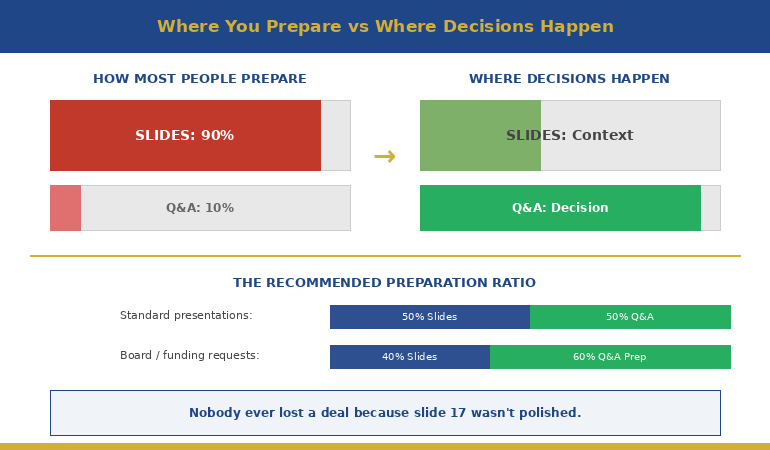
Here’s the preparation ratio I recommend to my clients: once your slides are structurally sound, split your remaining preparation time 50/50 between rehearsing the presentation and preparing for Q&A. For a high-stakes presentation — a board approval, a funding request, a major proposal — I’d go further: 40% slides, 60% Q&A preparation.
That feels counterintuitive. It felt counterintuitive to the senior director who lost the £3.2M deal too. But after working with hundreds of executives through high-stakes presentations, I can tell you: nobody ever lost a deal because slide 17 wasn’t polished enough. Plenty have lost deals because they couldn’t answer question two.
📋 Want the complete Q&A preparation system?
The Executive Q&A Handling System includes question mapping templates, response frameworks, and the exact preparation process that turns Q&A from your biggest risk into your strongest asset.
The Question Map: Predicting What They’ll Ask
The biggest myth about Q&A is that questions are unpredictable. They’re not. In my experience, you can predict the majority of the questions you’ll receive — if you prepare systematically rather than hoping for the best.
I teach my clients a technique called Question Mapping. Before any high-stakes presentation, you build a map of likely questions organised by stakeholder and by category. Here’s how it works:
Step 1: List every person in the room and their primary concern.
The CFO cares about cost, risk, and return. The CTO cares about technical feasibility and integration. The COO cares about operational disruption. The CEO cares about strategic alignment and timing. Each person will ask questions through their lens. Knowing the lens tells you the question before it’s asked.
Step 2: For each person, write the three questions they’re most likely to ask.
Not the questions you’d like them to ask — the questions they’ll actually ask based on their role, their concerns, and any history you have with them. If the CFO challenged your timeline last time, she’ll challenge your timeline again. Prepare for that specific challenge.
Step 3: For each question, prepare your answer AND your evidence.
The answer is what you’ll say. The evidence is what you’ll show — a backup slide, a data point, a reference to a comparable situation. This is where appendix slides become essential. They’re not afterthoughts; they’re your Q&A arsenal.
Step 4: Identify the two or three questions you can’t answer yet — and prepare honest responses for those too.
Knowing what you don’t know is just as important as knowing what you do. We’ll cover how to handle these in a moment.
When my client lost the £3.2M deal, I asked him afterwards: “Did you do a question map?” He looked at me blankly. He’d spent three weeks on slides and zero minutes mapping the questions his audience was guaranteed to ask. The CFO’s question about the vendor contract penalty wasn’t obscure — it was the most obvious financial question in the room. Ten minutes of question mapping would have caught it.
Answer Architecture: The 3-Part Executive Response
Knowing what they’ll ask is half the battle. The other half is structuring your answer so it lands with a senior audience. Most people answer executive questions the way they’d answer in conversation — they think out loud, circle around the point, add context, and eventually arrive at the answer. For a peer, this is fine. For a CFO with six more meetings after yours, it’s fatal.
I teach a three-part response structure that works for virtually any executive question:
Part 1: Direct Answer (first sentence)
Start with the answer. Not the context, not the caveat, not the background. The answer. “The migration risk is moderate — we estimate two weeks of parallel running with a 15% contingency built in.” The executive now has what they need. Everything after this is supporting detail.
Part 2: One Supporting Point (second sentence)
Give one piece of evidence or reasoning that strengthens your answer. “We’ve based that on the migration timeline from the Singapore rollout last year, which had similar complexity.” One point. Not three. Not a data dump. One credible reference that shows your answer isn’t a guess.
Part 3: The Bridge (optional third sentence)
If it’s useful, connect back to a point from your presentation or redirect to a related strength. “That’s actually why we’ve built the phased approach I showed on slide 8 — it gives us an exit ramp at each stage.” This turns a defensive moment (answering a question) into an offensive one (reinforcing your proposal).
Three sentences. Sometimes two. Never seven. The discipline of brevity in Q&A communicates the same thing it communicates in your slides: you know what matters and you’re not afraid to be direct about it.
📊 Question Maps + Response Frameworks + Recovery Scripts
The Executive Q&A Handling System gives you the complete toolkit: question mapping templates for every stakeholder type, the 3-part response structure with worked examples, “I don’t know” recovery scripts, hostile question techniques, and preparation checklists you can run before any high-stakes presentation.
Get the Executive Q&A Handling System → £39
Instant download. Built from 24 years of real boardroom Q&A across JPMorgan Chase, PwC, RBS, and Commerzbank.
The Most Powerful Answer: “I Don’t Know, But…”
Here’s something that surprises most of my clients: the executives I’ve worked with over 24 years don’t expect you to know everything. What they can’t tolerate is pretending you do when you don’t.
When you bluff in Q&A, senior people can tell. They’ve sat through thousands of presentations. They know the difference between someone who’s genuinely confident in their answer and someone who’s constructing one in real time. Bluffing doesn’t just fail to convince them — it actively undermines every other answer you’ve given, including the ones you were right about.
“I don’t know” — when it’s honest — is a trust-building statement. But it needs a second half.
The formula: “I don’t have that figure yet. Here’s what I do know: [related fact]. I’ll have the specific answer to you by [date].”
Three elements: honest admission, related context that shows you understand the territory, and a specific commitment to follow up. The admission shows integrity. The related context shows competence. The commitment shows accountability. Together, they communicate something more valuable than the actual answer: that you’re someone who can be trusted with a £3.2M decision.
My client who lost the deal said “I’ll need to come back to you on that” — which is close but missing the middle element. He didn’t demonstrate that he understood the territory around the question. Compare that with: “I don’t have the exact penalty clause figure, but I know the contract has a 90-day notice period and we’d be within that window for a Q2 start. I’ll confirm the specific financial impact by Friday.”
Same honesty. Completely different impression. The first version says “I didn’t prepare for this.” The second says “I understand the landscape even though I’m missing one data point.”
For a deeper dive into handling the really difficult questions — the hostile ones, the ambush questions, the ones designed to put you on the spot — this guide covers specific techniques for those situations.
🔍 Want the “I don’t know” recovery scripts and hostile question playbook?
The Executive Q&A Handling System includes word-for-word scripts for every Q&A scenario — including the ones you can’t predict. Plus the question mapping template that catches most questions before they’re asked.
How do you prepare for Q&A after an executive presentation?
Use a Question Map: list every person in the room and their primary concern, write the three most likely questions each will ask, prepare direct answers with supporting evidence, and identify the questions you can’t answer yet. Aim to spend at least 50% of your remaining preparation time on Q&A once your slides are structurally sound.
Why do good presentations still fail to get approval?
Because executives don’t decide during slides — they decide during Q&A. Your slides present your best case. Q&A reveals how deeply you’ve thought about risks, alternatives, and second-order consequences. Two unanswered questions can undo twenty-two minutes of perfect delivery.
What’s the best way to answer questions from senior executives?
Use the 3-part structure: direct answer first (one sentence), one supporting point (evidence or reasoning), then an optional bridge back to your presentation. Keep responses under three sentences. Brevity in Q&A signals confidence and clarity — rambling signals uncertainty.
🏆 The Complete Executive Q&A Handling System
Everything you need to turn Q&A from your biggest vulnerability into your strongest moment. Built from 24 years of high-stakes boardroom presentations where the real decisions happened after the slides.
- Question Mapping templates (by stakeholder role and concern type)
- The 3-Part Executive Response framework with worked examples
- “I Don’t Know” recovery scripts that build trust instead of destroying it
- Hostile question deflection and reframing techniques
- Appendix slide strategy — what to prepare and when to deploy
- Pre-presentation Q&A preparation checklist
Built from real situations across banking, consulting, and corporate leadership. Not theory — pattern recognition from hundreds of executive Q&A sessions.
Get the Executive Q&A Handling System → £39
Instant download. Customise for your next high-stakes presentation.
Frequently Asked Questions
How long should I spend preparing for Q&A versus preparing slides?
Once your slide structure is solid, split remaining preparation time at least 50/50 between presentation rehearsal and Q&A preparation. For board-level or funding presentations, consider 40/60 in favour of Q&A. No executive ever rejected a proposal because slide 17 wasn’t polished — but many have rejected proposals because the presenter couldn’t answer question two.
What if I’m asked a question I genuinely haven’t thought of?
Use the “I don’t know, but…” formula: honest admission, one related fact that shows you understand the territory, and a specific commitment to follow up with the answer by a named date. This builds more trust than a bluffed answer that unravels under follow-up questioning.
Should I invite questions during the presentation or only at the end?
For senior audiences, invite questions throughout. Executives don’t wait well — if they have a question on slide 4, they won’t be listening to slides 5 through 20. Saying “I welcome questions at any point” also signals confidence. If the question is answered on a later slide, say so: “Great question — I cover that in two slides. Shall I jump ahead or continue?”
How do I handle it when the Q&A goes completely off-topic?
Acknowledge the question’s value, then redirect: “That’s an important point, and it deserves proper attention. Can I take that offline with you after this meeting so we can give it the time it needs? I want to make sure we cover [the decision you need] in the time we have left.” This respects the questioner while protecting your agenda.
📬 The Winning Edge Newsletter
Weekly executive presentation strategies — Q&A preparation, slide structures, and boardroom techniques that actually work. No filler.
📥 Free: Executive Presentation Checklist
Includes a Q&A preparation section — covers question mapping, response structure, and the appendix slides you need ready before any high-stakes presentation.
Related reading: The breathing technique that stopped my pre-presentation vomiting — managing the physical side of high-stakes presentations, including Q&A anxiety.
Your next step: Before your next presentation, take fifteen minutes and build a Question Map. List every person in the room, their primary concern, and the three questions they’re most likely to ask. Prepare a direct answer for each one. That fifteen minutes will do more for your outcome than another three hours of slide refinement. And if you want the complete Q&A preparation system — question maps, response frameworks, recovery scripts, and hostile question techniques — the Executive Q&A Handling System (£39) gives you everything you need to turn the most dangerous part of your presentation into the most persuasive.
About the Author
Mary Beth Hazeldine is the Owner & Managing Director of Winning Presentations. With 24 years of corporate banking experience at JPMorgan Chase, PwC, Royal Bank of Scotland, and Commerzbank, she has delivered high-stakes presentations in boardrooms across three continents.
A qualified clinical hypnotherapist and NLP practitioner, Mary Beth combines executive communication expertise with evidence-based techniques for managing presentation anxiety. She has trained senior professionals and executive audiences over many years and supported high-stakes funding and approval presentations throughout her career.


