
The exact process I use to structure presentations that have helped clients raise £250M+
You have a presentation next week. Maybe it’s a board update, a sales pitch, or an investor meeting. You know your content — the problem is figuring out what order to put it in.
Most people start with a blank slide and begin typing. That’s backwards.
After 24 years in corporate banking at JPMorgan, PwC, Royal Bank of Scotland, and Commerzbank — and training thousands of executives since — I’ve developed a step-by-step process for structuring any presentation. It works whether you have 5 slides or 50, whether you’re presenting to your team or the board.
Here’s exactly how to structure a presentation that gets results.
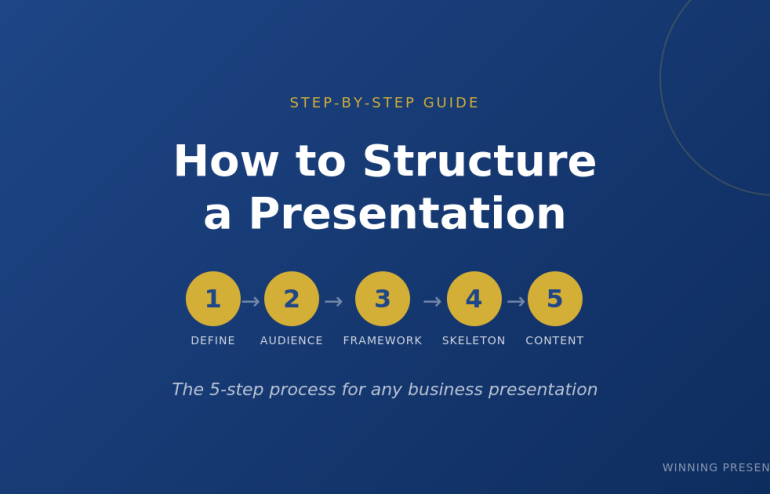
The 5-Step Process to Structure Any Presentation
Before you open PowerPoint, you need clarity on five things. Skip any of these and your presentation structure will fall apart.
Want ready-made structures instead of building from scratch?
The Executive Slide System includes 17 PowerPoint templates with proven structures for every business presentation — board meetings, budget requests, sales pitches, QBRs, and more. Plus 51 AI prompts to generate your content.
Step 1: Define Your One Thing
Every presentation needs a single core message. Not three messages. Not “several key points.” One thing you want the audience to remember.
Ask yourself: If my audience forgets everything else, what’s the one thing they must remember?
Examples:
- Budget presentation: “We need £500K to hit our Q3 targets”
- Sales pitch: “Our solution cuts your processing time by 60%”
- Board update: “We’re on track, but need a decision on the expansion”
- Investor pitch: “We’re raising £2M to capture a £500M market”
Write this down before you do anything else. Every slide you create should support this one thing.

Step 2: Know Your Audience’s Starting Point
The biggest presentation structure mistake is assuming your audience knows what you know.
Before you structure anything, answer these questions:
- What do they already know about this topic?
- What do they care about most? (Hint: usually money, time, or risk)
- What concerns or objections will they have?
- What decision are they able to make?
A presentation to your team requires different structure than the same content presented to the board. Your team wants details. The board wants the decision and the headline numbers.
Related: How to Present to a CFO: The Finance-First Framework
Step 3: Choose Your Framework
Now you’re ready to pick a presentation structure. The right framework depends on your situation:
| Situation | Best Framework | Why It Works |
|---|---|---|
| Sales pitch or proposal | Problem-Solution-Benefit | Creates urgency, then delivers relief |
| Executive briefing | Pyramid Principle | Answer first, details only if needed |
| Data presentation | What-So What-Now What | Turns numbers into decisions |
| Keynote or all-hands | Hero’s Journey | Inspires through narrative |
| Strategy recommendation | SCQA | Creates tension that demands resolution |
| Investor pitch | 10-20-30 Rule | Forces clarity and brevity |
| Client meeting (flexible) | Modular Deck | Adapts to conversation flow |
Deep dive: Presentation Structure: 7 Frameworks That Actually Work
Don’t know which to choose? Default to Problem-Solution-Benefit for external audiences and Pyramid Principle for internal executives.
💡 Want to combine these frameworks with AI? My AI-Enhanced Presentation Mastery course teaches you how to use Copilot as a strategic partner — cut creation time from 6 hours to 90 minutes while doubling impact.
Step 4: Build Your Slide Skeleton
Now — and only now — open PowerPoint.
Don’t write content yet. Just create placeholder slides with titles only. This is your skeleton.
Example: Problem-Solution-Benefit structure for a sales pitch
- Title slide
- The Problem (what pain they’re experiencing)
- The Cost (what this problem costs them)
- The Cause (why the problem exists)
- The Solution (your answer — benefits, not features)
- How It Works (3 steps maximum)
- Proof (case study with specific numbers)
- Next Step (one clear action)
Eight slides. That’s it. If you need more, you probably haven’t synthesised enough.
Pro tip: Read your slide titles in sequence. They should tell a complete story without any content. If someone read only your titles, would they understand your message?
Step 5: Fill In the Content (Last)
Only after your skeleton is solid do you write the actual content.
For each slide, ask:
- What’s the ONE point this slide makes?
- What’s the minimum evidence needed to prove it?
- What can I cut?
Most slides need 3-5 bullet points maximum. If you have more, you’re putting two slides’ worth of content on one slide.
Related: Stop Writing Slide Titles Like This (Before and After Examples)
Skip the Skeleton — Get Pre-Built Structures
The 5-step process works. But it takes time.
The Executive Slide System gives you 17 ready-made presentation structures — just fill in your content. Includes:
- 17 PowerPoint templates (Board, QBR, Budget, Sales, Investor, and more)
- 51 AI prompts to generate content for each slide
- 7 proven frameworks (Pyramid Principle, Problem-Solution-Benefit, SCQA, etc.)
- Before/after examples showing exactly what good looks like
How to Structure Different Types of Presentations
The 5-step process applies universally. But each presentation type has nuances. Here’s how to structure the most common ones:
How to Structure a Sales Presentation
Use Problem-Solution-Benefit. The structure is:
- Problem — State their pain (be specific to their situation)
- Cost — Quantify what it’s costing them
- Cause — Explain why the problem exists
- Solution — Your answer (benefits first, features later)
- How It Works — 3 steps maximum
- Proof — Case study with specific numbers
- Next Step — One clear action
Spend 70% of your prep time on slides 1-3. If they don’t feel the problem, they won’t care about your solution.
Template: Sales Presentation Template: The Structure Top Performers Use
How to Structure an Executive Presentation
Use the Pyramid Principle. Lead with your answer:
- The Answer — Your recommendation in one sentence
- Supporting Point 1 — Strongest argument + evidence
- Supporting Point 2 — Second argument + evidence
- Supporting Point 3 — Third argument + evidence
- Implications — What this means for the business
- Next Steps — What you need from them
Never more than 3 supporting points. If you have more, group related points together.
Template: Executive Presentation Template: 12 Slides That Command the Room
How to Structure a Board Presentation
Boards have specific expectations. Your structure must include:
- The Ask — What decision you need (slide 1, not slide 12)
- Context — Brief background (what they need to know)
- Recommendation — Your proposed course of action
- Business Case — ROI, costs, timeline
- Risks — What could go wrong and your mitigation
- Decision — Restate the ask with clear options
Board presentations fail when the ask is buried. Put it on slide 1.
Template: Board Presentation Template: The Complete Guide
How to Structure a Data Presentation
Use What-So What-Now What for every data point:
- What — The facts (specific numbers with context)
- So What — Why it matters (interpretation)
- Now What — What to do about it (action)
Every chart needs a “So What.” If you can’t explain why data matters in one sentence, don’t include it.
Related: Team Dashboards That Tell a Story (Not Just Show Numbers)

Common Presentation Structure Mistakes
I’ve reviewed thousands of presentations. These mistakes appear in 80% of them:
Mistake 1: Starting with Background
“Let me give you some context…” is how most presentations start. It’s also where most audiences check out.
Fix: Start with why they should care. Context comes after you’ve earned their attention.
Mistake 2: Building to the Conclusion
Academic training teaches us to present evidence then reach a conclusion. Business presentations are the opposite.
Fix: Lead with your recommendation. Provide evidence for those who want it.
Mistake 3: Too Many Points
If you have 7 key messages, you have 0 key messages. The audience will remember none of them.
Fix: Three points maximum. If you need more, you haven’t synthesised enough.
Mistake 4: No Clear Ask
“Let me know what you think” is not an ask. “I need your approval by Friday” is an ask.
Fix: End every presentation with one specific action and a deadline.
Related: How to End a Presentation: 7 Closing Techniques I Teach C-Suite Executives
Using AI to Structure Your Presentation
Tools like ChatGPT and PowerPoint Copilot can accelerate your presentation structure — if you use them correctly.
Related: The AI Presentation Workflow That Cut My Creation Time in Half
Good prompt:
“Create a presentation structure using Problem-Solution-Benefit framework for [TOPIC]. Include slide titles only — no content yet. The audience is [AUDIENCE] and the goal is [DECISION NEEDED].”
Bad prompt:
“Create a presentation about [TOPIC].”
AI gives you speed. Your judgment gives you substance. Use AI for the skeleton, then refine with your expertise.
Related: Best Copilot PowerPoint Prompts That Actually Work
Want to Master AI-Enhanced Presentations?
The frameworks in this article become 10x more powerful when combined with AI. My new course teaches you exactly how to use Copilot as a strategic thinking partner — not just a slide generator.
What you’ll learn:
- The AVP Framework — Strategic planning before you prompt AI
- The 132 Rule — Structure any presentation in minutes
- The S.E.E. Formula — Make every slide persuasive
- 50+ tested prompts from my personal library
- 2 live coaching sessions with deck reviews
AI-Enhanced Presentation Mastery
£249 £499 — Early bird until December 31st
January cohort • 60 seats maximum • Lifetime access
Frequently Asked Questions
How many slides should a presentation have?
There’s no universal answer, but here are guidelines: 1 slide per minute of speaking time is a reasonable maximum. A 20-minute presentation should have 15-20 slides. More importantly, each slide should make ONE point. If you have 40 slides for a 20-minute presentation, you’re probably putting too little on each slide — or talking too fast.
What’s the best presentation structure for beginners?
Start with Problem-Solution-Benefit. It’s intuitive (problem → solution → why it matters), works for most situations, and forces you to focus on the audience’s needs rather than your content. Once you’re comfortable, expand to Pyramid Principle for executive audiences.
How do I structure a presentation with lots of data?
Use What-So What-Now What for every data point. Don’t show data without interpretation. Every chart should answer: What does this show? Why does it matter? What should we do about it? Cut any data that doesn’t directly support your one core message.
Should I structure differently for virtual presentations?
Yes. Attention spans are shorter online. Use more frequent transitions (every 2-3 minutes), bigger text, and more visuals. Keep slides simpler — viewers are on smaller screens. And build in interaction every 5 minutes to maintain engagement.
Get Presentation Structures That Work
The 5-step process will help you structure any presentation from scratch. But if you want to skip the blank-slide struggle, I’ve done the work for you.
The Executive Slide System includes:
- 17 PowerPoint templates — Every structure covered in this article, ready to use
- 51 AI prompts — Generate content for each slide in minutes
- 7 presentation frameworks — Pyramid Principle, Problem-Solution-Benefit, SCQA, and more
- Before/after examples — See exactly what transforms a weak presentation into a strong one
My clients have used these templates to raise over £250 million in funding and get budgets approved at Fortune 500 companies.
Get the Executive Slide System (£39) →
Instant download. Lifetime access. 30-day money-back guarantee.
Mary Beth Hazeldine is the Managing Director of Winning Presentations, where she trains executives at investment banks, biotech companies, and SaaS firms to present with impact. Her clients have raised over £250M using her presentation frameworks.