Tag: leadership presentations

18 Jan 2026
OKR update presentation template showing the 7-slide executive format for quarterly reviews

OKR Update Presentation Template: Get Leadership Decisions in 10 Minutes

The best OKR update presentation template uses exactly 7 slides: Executive Summary, OKR Scorecard, Top 3 Wins, Top 3 Risks, Resource Needs, Next Quarter Preview, and Decision Request. This structure takes leadership from “where are we?” to “here’s what I need from you” in under 10 minutes. Most OKR (Objectives and Key Results) updates fail because they report data instead of driving decisions. The template below fixes that.

If you want this as a ready-to-use slide deck you can reuse every quarter, the Executive Slide System includes these layouts—just add your content and present.

Three years ago, I watched a Head of Product at a fintech company present their Q3 OKR update to the executive committee. She had 34 slides. Every objective. Every key result. Every percentage point of progress.

The CFO checked his phone at slide 6. The CEO interrupted at slide 11 to ask, “What do you actually need from us?”

She didn’t have an answer ready.

After the meeting, she asked me to help rebuild her OKR update presentation template from scratch. We stripped it down to 7 slides. The next quarter, she got her headcount request approved in 8 minutes. The CEO said it was “the clearest update I’ve seen all year.”

That’s not because she had less to say. It’s because she structured what she said around what leadership needed to decide—not what she needed to report.

Here’s the exact OKR update presentation template I’ve refined across hundreds of executive updates.

⭐ Build Your Next OKR Deck in 20 Minutes (Not 3 Hours)

Stop rebuilding slides from scratch every quarter. Get exec-ready templates you can fill in and present today.

The Executive Slide System includes:

  • Executive summary, status update, and decision request layouts
  • RAG dashboards and scorecard formats
  • Risk and mitigation slide structures

Get the Executive Slide System — £39 →

Built from 24 years of executive presentations in banking. Used in QBRs, steering committees, and board meetings.

Why Most OKR Updates Waste Leadership’s Time

The typical OKR update treats executives like a tracking system. Here’s every objective. Here’s the percentage. Here’s the colour code.

But executives aren’t tracking systems. They’re decision-makers with 47 other things competing for their attention.

When you present OKRs as data, you force leadership to do the mental work of figuring out what matters. Most won’t. They’ll nod, check their phones, and forget everything by the next meeting.

The shift that changes everything: present OKRs as decisions, not data.

Every slide should answer one of three questions:

  • What do you need leadership to know?
  • What do you need leadership to decide?
  • What do you need leadership to do?

If a slide doesn’t answer one of those questions, cut it.

This is the same principle behind effective QBR presentations—the format changes, but the executive expectation stays the same: tell me what matters and what you need.

The 7-Slide OKR Update Structure

Here’s the exact slide order for an OKR update presentation template that executives actually want to see:

Slide Purpose Time
1. Executive Summary Overall status + the one thing they must know 60 sec
2. OKR Scorecard RAG status for all objectives (one view) 90 sec
3. Top 3 Wins What’s working + why it matters 90 sec
4. Top 3 Risks What’s at risk + your mitigation plan 2 min
5. Resource Needs What you need to stay on track 90 sec
6. Next Quarter Preview Where you’re heading + key milestones 60 sec
7. Decision Request The specific ask with clear options 60 sec

Total: 7 slides. Under 10 minutes. Room for questions.

Notice what’s missing: no deep dives into individual key results, no historical trend charts, no appendix slides you “probably won’t need.” If leadership wants detail, they’ll ask. Your job is to give them the clearest possible view of status and decisions.

Want these slides ready to fill in?

The Executive Slide System includes executive summary, scorecard, and decision request layouts—formatted and ready to customise.

Get the Templates — £39 →


7-slide OKR update presentation structure showing the executive-ready flow from summary to decision request

Slide-by-Slide Breakdown: What Goes Where

Slide 1: Executive Summary

This is the only slide that matters if leadership has 60 seconds. Structure it as:

  • Headline: One sentence status (e.g., “Q4 OKRs: On Track with One Risk Requiring Decision”)
  • Overall RAG: Green, Amber, or Red with one-line explanation
  • The One Thing: The single most important item leadership must know or decide today

The executive summary slide format I teach follows the same principle: lead with the answer, not the journey.

Slide 2: OKR Scorecard

One slide. All objectives. RAG status visible at a glance.

  • Objective name (short)
  • Progress percentage or status indicator
  • RAG colour (Green/Amber/Red)
  • One-word trend arrow (↑ improving, → stable, ↓ declining)

Do not explain every item. Let leadership scan and ask about what concerns them.

Slide 3: Top 3 Wins

Three accomplishments. Each one gets:

  • What happened (one sentence)
  • Why it matters to the business (one sentence)
  • Who contributed (optional, builds team credibility)

Wins aren’t bragging—they’re proof that your team delivers. Executives need this context when allocating resources.

Slide 4: Top 3 Risks

This is where credibility lives. Executives distrust updates that are all green.

  • Risk: What might go wrong
  • Impact: What happens if it does
  • Mitigation: What you’re doing about it
  • Ask: What you need from leadership (if anything)

If you’re presenting OKR updates and feeling nervous about surfacing risks, that anxiety is worth addressing. The strategies for managing presentation anxiety before big meetings can help you show up with confidence—even when delivering difficult news.

⭐ Get Leadership Saying “Yes” Faster

The exact slide layouts that make your updates clear, credible, and impossible to ignore.

The Executive Slide System includes:

  • Executive summary templates that open with impact
  • RAG scorecard and dashboard layouts
  • Risk, mitigation, and decision request structures

Get the Slide Templates — £39 →

Join leaders who present updates that get decisions, not blank stares.

Slide 5: Resource Needs

Be specific. “We need more support” means nothing. Instead:

  • “We need 1 additional engineer for 6 weeks to hit the Q1 launch”
  • “We need £15K additional budget for the customer research study”
  • “We need a decision on vendor selection by February 1”

Tie every resource ask to a specific OKR outcome. Executives approve resources when they see clear ROI.

Slide 6: Next Quarter Preview

Show leadership you’re thinking ahead:

  • Top 3 priorities for next quarter
  • Key milestones and dates
  • Dependencies on other teams or decisions

Keep this forward-looking, not defensive. You’re demonstrating strategic thinking.

Slide 7: Decision Request

End with clarity. What specific decision do you need?

  • State the decision in one sentence
  • Provide 2-3 options if relevant
  • Include your recommendation
  • Specify the deadline for the decision

If you don’t need a decision this quarter, say so: “No decisions required—update only.” That clarity is equally valuable.

Skip the formatting guesswork

The Executive Slide System includes decision request layouts with the exact structure that gets approvals faster.

Get the Templates — £39 →

Writing the OKR Executive Summary That Hooks Leadership

The executive summary slide determines whether leadership pays attention or mentally checks out.

Here’s the formula I’ve refined across hundreds of OKR updates:

Headline: [Quarter] OKRs: [Overall Status] + [One Key Insight]

  • “Q4 OKRs: On Track, Revenue Objective Exceeding Target by 12%”
  • “Q4 OKRs: Amber Status, Engineering Capacity Risk Requires Decision”
  • “Q4 OKRs: Strong Progress with One Dependency Escalation”

The headline tells leadership exactly what to expect. No suspense. No “let me walk you through this.” Answer first, context second.

Below the headline, include:

  • Overall RAG with explanation: “Amber: 4 of 5 objectives on track, 1 at risk due to vendor delay”
  • Key number: One metric that captures progress (e.g., “78% of key results on track vs 65% last quarter”)
  • The ask: What you need from this meeting (decision, awareness, or support)

Executives should be able to read this slide, understand your status, and know what’s coming—all in under 30 seconds.

For a deeper dive into structuring executive updates beyond OKRs, see the complete executive presentations guide.

People Also Ask

How long should an OKR update presentation be?

Keep OKR update presentations to 7-10 slides and under 15 minutes including questions. Executives have limited time and attention. A focused 10-minute update that drives a decision is more valuable than a 45-minute data review that gets forgotten.

What should I include in an OKR executive summary?

Include three elements: overall RAG status with a one-line explanation, the single most important insight or risk, and what you need from leadership (decision, awareness, or resources). The executive summary should answer “how are we doing and what do you need to know” in 30 seconds.

How do I present OKRs that are off track?

Lead with transparency—executives respect honesty over spin. State the status clearly, explain the root cause in one sentence, present your mitigation plan, and specify what support you need. Hiding bad news destroys credibility; owning it and showing a path forward builds trust.

3 Mistakes That Kill OKR Credibility

Mistake 1: Presenting Data Without Decisions

An OKR update that’s all status and no asks wastes everyone’s time. Even if you don’t need approval for anything, tell leadership what you need them to know and why it matters for upcoming decisions.

Mistake 2: Hiding Bad News in Appendix Slides

Executives notice when risks are buried. Surface problems early, own them, and show your plan. The leaders I’ve worked with at JPMorgan, PwC, and Commerzbank all said the same thing: they trust people who bring them problems with solutions, not people who pretend problems don’t exist.

Mistake 3: Using OKR Software Screenshots as Slides

Screenshots from Lattice, Culture Amp, or Asana look lazy. They’re designed for tracking, not presenting. Rebuild key information into clean slides with consistent formatting. It takes 20 minutes and signals that you respect leadership’s time.

⭐ Stop Rebuilding OKR Decks From Scratch Every Quarter

Get the templates that make you look prepared, credible, and strategic—every time you present to leadership.

The Executive Slide System includes:

  • Executive update and status report layouts
  • Scorecard and dashboard formats that communicate at a glance
  • Decision request templates that get approvals

Get the Executive Slide System — £39 →

Built from 24 years of executive presentations. Ready to customise and present in minutes.

Frequently Asked Questions

Can I use this template for monthly OKR check-ins, not just quarterly?

Yes. For monthly updates, compress slides 3-4 (wins and risks) into a single “Highlights and Risks” slide. Monthly updates should be even shorter—5 slides maximum. The structure stays the same: status, what’s working, what’s at risk, what you need.

What if my organisation uses a specific OKR format I have to follow?

Use this 7-slide structure as your presentation layer on top of whatever tracking format your organisation requires. The tracking system captures the data; your presentation translates that data into decisions. You can reference the official OKR system in an appendix if leadership wants to drill down.

How do I handle OKR updates when different objectives are owned by different people?

One presenter should own the deck and narrative, even if content comes from multiple contributors. Collect inputs in advance, synthesise into the 7-slide structure, and present as a unified story. Multiple presenters for a single OKR update creates confusion and wastes time.

Should I send the deck in advance or present it live first?

Send it 24 hours before if your organisation’s culture expects pre-reads. This lets leadership arrive with questions ready instead of processing information in real time. If presenting live first, still share the deck immediately after so leadership has a reference for follow-up decisions.

Get Weekly Executive Presentation Insights

Join leaders who receive one actionable tip every week for presenting to executives with confidence and clarity.

Subscribe to The Winning Edge →

Your Next Step

You now have the exact OKR update presentation template that executives want: 7 slides, under 10 minutes, focused on decisions instead of data.

The structure is simple. Executive Summary → Scorecard → Wins → Risks → Resources → Next Quarter → Decision Request.

Your next OKR update doesn’t have to be another data dump that gets forgotten. Make it the one that gets decisions.

Not ready to buy today? Start with this free resource:

Download the Executive Presentation Checklist to ensure your next OKR update meets leadership expectations—before you walk into the room.

Download Free Checklist →

06 Jan 2026
Executive presence in presentations - leader commanding attention in boardroom

Executive Presence in Presentations: Why Your Content Fails Without It

Quick Answer: Executive presence presentations succeed or fail in the first 7 seconds—before your content matters. Research shows audiences judge credibility instantly through non-verbal signals. The three pillars are gravitas (67%), communication (28%), and appearance (5%). Most professionals focus on perfecting slides while neglecting these presence signals, which is why technically strong executive presence presentations often fail to win buy-in.

The CFO stopped me mid-sentence.

“I’ve heard enough.”

I was 28 years old, three months into my role at JPMorgan Chase, delivering what I thought were polished executive presence presentations. Every number was accurate. Every slide was refined. I’d rehearsed until I could deliver it in my sleep.

None of it mattered.

I’d lost the room before I finished my opening sentence. Not because my analysis was wrong—it wasn’t. I lost them because I walked in apologising for taking their time. I positioned myself in the corner of the room. I spoke to my slides instead of the executives who would decide my career trajectory.

My manager pulled me aside afterwards. “Your content was solid,” she said. “But you presented like someone who didn’t belong in that room. They stopped listening the moment you walked in.”

That feedback sparked five years of obsessive study—and eventually, a complete transformation in how I help leaders present. I’ve since trained over 5,000 executives across JPMorgan, PwC, RBS, and Commerzbank. I’ve watched £250M+ in funding secured and careers transformed.

And the pattern is always the same: executive presence presentations determine outcomes before content gets a chance to matter.

Here’s what I’ve learned about commanding any room—and why your slides are the least important part of your presentation.

🏆 FLAGSHIP PROGRAMME

The Executive Buy-In Presentation System

Stop being the presenter executives tune out. This comprehensive system teaches you the exact frameworks used by leaders who consistently win approval, secure budgets, and accelerate their careers through high-stakes presentations.

What transforms: How you enter rooms, command attention, handle C-suite pushback, and convert skeptical stakeholders into advocates—permanently.

Develop Executive Presence That Commands Any Room →

What Are Executive Presence Presentations (And Why Most Get It Wrong)

Ask ten executives to define “executive presence” and you’ll get ten different answers. Charisma. Confidence. “You know it when you see it.”

This vagueness is exactly why so many technically brilliant professionals plateau. They can’t develop something they can’t define.

Here’s the working definition I use with clients after 24 years in banking and coaching:

Executive presence presentations are presentations where you signal competence, confidence, and credibility through non-verbal cues—creating an expectation of value before you deliver content.

Notice what’s missing from that definition: your slides, your data, your analysis. Those matter, but they matter second. Executive presence is what earns you the right to be heard in the first place.

A landmark study from the Center for Talent Innovation found that executive presence accounts for 26% of what it takes to get promoted. More than performance. More than experience. The researchers identified three core dimensions: gravitas (how you act), communication (how you speak), and appearance (how you look).

But here’s what the research doesn’t capture—and what I see in every boardroom: executive presence isn’t a trait you have. It’s a set of signals you send. And signals can be learned.

The 7-Second Window That Determines Your Executive Presence Presentations

Princeton psychologist Alex Todorov’s research changed how I coach executive presence presentations. His studies showed that people form judgments about competence, trustworthiness, and likability within one-tenth of a second of seeing a face.

One-tenth of a second. Before you’ve introduced yourself. Before you’ve shown a single slide.

Subsequent research extended this to the “7-second rule”—the window in which audiences form durable impressions that resist change. These snap judgments become filters through which everything else gets interpreted.

If you project confidence in those 7 seconds, your content sounds more credible. If you project uncertainty, even brilliant insights get discounted.

I’ve watched this play out hundreds of times. A VP presenting the same budget proposal gets rejected when she enters hesitantly, then approved three months later when she walks in like she owns the decision. Same numbers. Same slides. Different outcome.

The question isn’t whether these snap judgments are fair. They’re not. The question is whether you’ll master them or be victimised by them.

The 7-second window for executive presence first impressions

The Three Pillars of Executive Presence Presentations

The Center for Talent Innovation’s research identified three pillars of executive presence, but their framework was designed for general career advancement. For executive presence presentations specifically, I’ve adapted these into actionable components:

Pillar 1: Gravitas (67% of executive presence) — How you carry yourself. The weight and seriousness behind your words. Your ability to remain composed under pressure.

Pillar 2: Communication (28% of executive presence) — Not what you say, but how you say it. Vocal authority, strategic pausing, eye patterns, and physical command of space.

Pillar 3: Appearance (5% of executive presence) — The signals sent by grooming, attire, and physical presentation. The smallest component but the first one noticed.

The percentages tell an important story. Executives obsess over appearance (buying better suits) when gravitas matters thirteen times more. They polish their slides when communication delivery determines whether anyone listens.

Let’s break down each pillar—and the specific signals that matter in executive presence presentations contexts.

Three pillars of executive presence - gravitas, communication, appearance

Pillar 1: Gravitas—The Weight Behind Your Executive Presence Presentations

Gravitas is the hardest pillar to fake and the most valuable to develop. It’s the quality that makes people stop scrolling through their phones when you speak.

In executive presence presentations, gravitas manifests through five specific behaviours:

1. Decisiveness Under Uncertainty

Executives respect leaders who can stake a position before all data is available. When a board member challenges your recommendation, gravitas means responding with “Based on what we know, I recommend X—and here’s how we’ll adjust if Y emerges” rather than hedging into meaninglessness.

2. Composure Under Fire

I once watched a client get blindsided by a hostile question from a CFO who clearly hadn’t read the pre-read. Instead of getting defensive, she paused, acknowledged the concern, and redirected: “That’s exactly the risk I wanted to address. Let me show you how we’re mitigating it.”

The CFO became her strongest advocate. Composure signals competence more powerfully than any slide.

3. Speaking With Conviction

Gravitas dies the moment you say “I think maybe we should consider possibly looking at…” Every hedge word dilutes your authority. Compare:

Weak: “I think we might want to consider increasing the budget if that’s possible.”

Strong: “I recommend increasing the budget by 15%. Here’s why.”

4. Emotional Intelligence in the Room

Reading the room—and adjusting accordingly—signals senior-level judgment. When you notice the CEO checking her watch, gravitas means saying “I can see we’re short on time. Let me jump to the decision point” rather than plowing through 40 more slides.

5. Silence as a Power Tool

Junior presenters fill every silence with words. Senior leaders use silence strategically. After making a key point, pause. Let it land. The audience’s discomfort with silence works in your favour—they’ll remember what came before it.

🏆 FLAGSHIP PROGRAMME

Master the Gravitas That Commands Boardrooms

Gravitas isn’t a personality trait—it’s a learnable skill. The Executive Buy-In System breaks down exactly how to project authority, handle hostile questions, and speak with the conviction that gets decisions made.

Build Unshakeable Executive Gravitas →

Pillar 2: Communication—Beyond What You Say in Executive Presence Presentations

Albert Mehrabian’s often-misquoted research found that when there’s incongruence between words and delivery, audiences trust delivery. Your voice, posture, and movement either amplify or undermine your message in executive presence presentations.

Vocal Authority Signals

Pitch: Lower pitch signals authority. This isn’t about faking a deeper voice—it’s about not letting nerves push your pitch higher. Breathe from your diaphragm. Speak from your chest, not your throat.

Pace: Rushed delivery signals anxiety. Executives speak approximately 20% slower than average—not because they’re less intelligent, but because they trust their words are worth hearing. Try timing yourself: aim for 130-150 words per minute for key points.

Pausing: The strategic pause is the most underused tool in executive communication. Before your key recommendation, pause for 2-3 seconds. It feels eternal to you. To the audience, it signals “what comes next matters.”

Physical Command of Space

Entry: How you enter determines how you’re received. Walk to your position with purpose—not rushing, not hesitating. Plant your feet before speaking. Own the two seconds of silence while the room settles on you.

Stance: Feet shoulder-width apart, weight evenly distributed. Arms uncrossed, hands visible. This “ready position” signals confidence without aggression.

Movement: Move with intention or don’t move at all. Pacing signals nerves. Strategic movement—stepping toward the audience when making a key point, moving to a different position for a new section—signals command.

Eye Pattern Mastery

Most presenters either stare at one person (creating discomfort) or sweep the room continuously (connecting with no one). The technique that works: sustained eye contact with one person for a complete thought (5-7 seconds), then move to another.

Pro tip: In hostile rooms, identify allies early and use them for confidence anchoring between challenging sections.

Pillar 3: Appearance—The Visual Signals in Executive Presence Presentations

Appearance accounts for only 5% of executive presence—but it’s the first 5% anyone notices. This isn’t about expensive clothing. It’s about signalling that you take the situation seriously.

The research is clear: people who dress slightly more formally than the situation requires are perceived as more competent. Not dramatically more formal—that signals you don’t understand the context. One notch above the room’s baseline.

More important than clothing: grooming signals attention to detail. Are you put together? Does everything look intentional rather than accidental?

For virtual executive presence presentations, this calculus changes. Background matters more than attire. Lighting determines whether you look authoritative or washed out. Camera angle affects perceived power—slightly above eye level diminishes you; eye level or slightly below increases presence.

Case Study: How Sarah Transformed Her Executive Presence Presentations

Sarah was a senior analyst at a major consulting firm—technically brilliant, consistently passed over for promotion. When she came to me, she was preparing for a critical strategy presentation to the firm’s partners.

“They never listen to me,” she said. “I have better analysis than half the people who get promoted, but I feel invisible in that room.”

Watching her rehearse, the problem was obvious. She entered apologetically. She spoke to her slides. Her voice lifted at the end of statements, turning declarations into questions. She rushed through insights that deserved space.

We spent three sessions rebuilding her executive presence presentations skills from the ground up:

Week 1: Entry and stance. We rehearsed walking into the room until she could do it without any apologetic gestures—no small smile, no “sorry, just need to set up,” no positioning in the corner. She practised standing in silence for five seconds before speaking.

Week 2: Vocal authority. We eliminated uptalk. We slowed her pace by 30% on key recommendations. We added strategic pauses before her three main points.

Week 3: Managing the room. We role-played interruptions and hostile questions. She developed phrases for redirecting without getting flustered: “I’ll address that in the next section” and “Let me answer that directly.”

The result: Same analytical quality. Same slides. Completely different reception.

The partners actually debated her recommendations—something that had never happened before. She didn’t get everything she proposed, but she got heard. More importantly, she got promoted six months later.

“The weird thing,” she told me afterwards, “is that I always had the content. I just wasn’t delivering it like someone who deserved to be in that room.”

🏆 FLAGSHIP PROGRAMME

Get the System That Transformed Sarah’s Career

Sarah’s transformation wasn’t magic—it was method. The Executive Buy-In Presentation System gives you the exact frameworks, techniques, and practice protocols that turn technically strong presenters into leaders executives can’t ignore.

Transform How Executives See You →

The 5 Executive Presence Presentations Mistakes I See Weekly

After coaching thousands of executive presence presentations, these are the presence killers that sabotage even strong content:

Mistake 1: The Apologetic Opening

“I know you’re all busy, so I’ll try to be quick…” This signals you don’t believe your content deserves their time. If you don’t believe it, why should they?

Instead: Open with value. “In the next 15 minutes, I’ll show you how to reduce Q2 costs by 12%.”

Mistake 2: Reading the Room as Hostility

Executives checking phones or looking skeptical isn’t necessarily negative. It might be their default state. I’ve seen presenters interpret neutral expressions as rejection and spiral into defensive delivery—which then actually creates the rejection they feared.

Instead: Assume competence. Present as if you expect agreement. Let actual pushback guide adjustments, not imagined resistance.

Mistake 3: Answering Questions You Weren’t Asked

When nervous, presenters over-explain. A simple question gets a five-minute answer that buries the point and frustrates senior audiences.

Instead: Answer the question asked. Stop. Wait for follow-up if they want more detail.

Mistake 4: Losing the Physical Battle

Shrinking posture, retreating behind the podium, gripping notes like a lifeline—all signal that you’d rather be anywhere else. Your body is broadcasting discomfort louder than your words are broadcasting competence.

Instead: Ground before you present. Feet planted, shoulders back, hands visible. Return to this position whenever you feel yourself shrinking.

Mistake 5: Treating Q&A as the Enemy

The presentation ends; the presenter visibly relaxes; questions are treated as obstacles to escape. This wastes the most valuable presence-building opportunity.

Instead: Treat questions as the real presentation. This is where you demonstrate thinking on your feet, composure under pressure, and depth beyond your slides. Welcome them.

How to Build Executive Presence Presentations Skills (The Inside-Out Approach)

Most presence advice works outside-in: adopt these postures, use these phrases, wear these clothes. That approach creates a thin veneer that cracks under pressure.

Lasting executive presence presentations skills work inside-out: genuine confidence produces authentic presence signals without conscious effort. Here’s how to build it:

Step 1: Achieve Content Mastery

You cannot project confidence about material you don’t know cold. Before working on presence, ensure you can answer any reasonable question about your content without hesitation. Most presence problems are actually preparation problems.

Step 2: Reframe the Stakes

Presence collapses when the stakes feel overwhelming. Reframe: this presentation is not a performance to be judged. It’s a conversation where you’re sharing expertise they need. You’re providing value, not seeking approval.

Step 3: Physiology First

Amy Cuddy’s research on power posing has been contested, but the underlying principle holds: your body affects your mind. Before presenting, stand tall, breathe deeply, and take up space. Even if it doesn’t change your hormones, it changes your focus.

Step 4: Rehearse the Opening to Autopilot

Your opening 30 seconds face the most pressure and set the tone for everything after. Rehearse them until you could deliver them while solving a maths problem. This frees cognitive resources for presence when you need them most.

Step 5: Build a Pre-Presentation Ritual

Elite performers don’t rely on feeling confident—they rely on rituals that produce confidence. Develop yours: maybe it’s reviewing your three key points, maybe it’s a breathing exercise, maybe it’s listening to specific music. Consistency creates reliability.

5-step process from Content Mastery to Build Ritual with key insight box.

FAQ: Executive Presence Presentations

Can executive presence presentations skills be learned, or are they innate?

Executive presence presentations skills are entirely learnable. Research from the Center for Talent Innovation confirms that presence is a set of signals that can be developed through deliberate practice. I’ve watched hundreds of professionals transform their presence in weeks—not through personality changes, but through specific behavioural modifications.

How long does it take to develop executive presence presentations skills?

Noticeable improvements can happen in 2-4 weeks with focused practice. Genuine, automatic presence typically requires 3-6 months of consistent application across multiple presentations. The key is deliberate practice—not just presenting more, but presenting with specific presence goals and feedback.

What’s the biggest executive presence presentations mistake senior professionals make?

Over-relying on content quality. Senior professionals have deep expertise and assume it will speak for itself. But expertise that isn’t delivered with authority gets discounted. The most common pattern I see: brilliant analysis presented tentatively, leading to outcomes that don’t match the quality of the thinking.

How do executive presence presentations differ for virtual settings?

Virtual executive presence presentations require exaggerated signals because the camera flattens your energy. Gestures need to be larger, vocal variation needs to be wider, and eye contact (looking at the camera, not the screen) becomes even more critical. Lighting and background also matter more than in-person, where the full context provides additional signals.

Does executive presence presentations advice differ for women?

Research shows women face a “double bind”—displaying too much authority reads as aggressive, too little reads as incompetent. The solution isn’t to choose one trap; it’s to combine warmth signals (smiling, inclusive language) with competence signals (decisive statements, composed reactions). The goal is authentic presence, not performance of masculinised or feminised stereotypes.

How do I project presence in executive presence presentations when I’m genuinely nervous?

Focus on physiology and behaviour rather than trying to eliminate the feeling. Nervous and confident can coexist—your audience can’t see your racing heart if your voice is steady and your posture is grounded. Use your pre-presentation ritual to shift into performance mode, where presence behaviours become automatic.

📋 Free Download: Executive Presentation Checklist

Not ready for the full system? Start with my Executive Presentation Checklist—the same pre-flight checklist I give to clients before high-stakes executive presence presentations. Covers presence signals, content structure, and room preparation.

Get Your Free Checklist →

Related Reading

Closing: The Room Remembers How You Made Them Feel

Twenty-four years after that humiliating quarterly review at JPMorgan, I still remember the CFO’s face when he stopped me. I don’t remember a single number from that presentation.

That’s the lesson: people forget your content. They remember how you made them feel.

Executive presence presentations aren’t about becoming someone you’re not. They’re about ensuring your external signals match your internal competence. It’s about earning the right to be heard before you open your mouth.

The 7-second window is real. Master it, and your executive presence presentations finally get the reception they deserve.


About the Author

Mary Beth Hazeldine is a qualified clinical hypnotherapist, NLP practitioner, and Managing Director of Winning Presentations. After 5 years terrified of presenting, she built a 24-year banking career at JPMorgan Chase, PwC, RBS, and Commerzbank. She has treated hundreds of anxiety clients and trained over 5,000 executives.

02 Dec 2025
10 executive presentation templates - QBR, budget request, board meeting, investor pitch, strategic recommendation slides

What 500+ Executive Presentations Taught Me About Getting Buy-In

I’ve reviewed over 500 executive presentations in my career — and most of them failed to get buy-in.

Not because the ideas were bad. Not because the data was wrong. These executive presentations failed because the presenter didn’t understand how executives actually make decisions.

After 24 years in corporate banking at JPMorgan Chase, PwC, Royal Bank of Scotland, and Commerzbank — followed by 16 years training professionals on executive presentations — I’ve identified the patterns that separate approved proposals from rejected ones.

Here’s what 500+ executive presentations taught me about getting buy-in. These same lessons helped one client secure £2M in funding and another turn a failing quarterly review into a promotion conversation.

10 executive presentation templates - QBR, budget request, board meeting, investor pitch, strategic recommendation slides
Different executive presentations require different approaches — but the principles of buy-in remain constant

Lesson 1: Executive Presentations Are Decided in the First 2 Minutes

Most presenters build to a conclusion. They set up context, walk through analysis, address objections, and finally — on slide 15 — reveal the recommendation.

By slide 15, the executive has already decided. Usually “no” or “I need to think about it” — which is also “no.”

The executive presentations that get buy-in flip this structure. They open with the recommendation, then provide supporting evidence. The first two minutes tell leadership exactly what you want and why they should approve it.

The pattern for executive presentations: Lead with your ask. If the answer is yes, you’ve succeeded in two minutes. If they have questions, the rest of your presentation answers them. Either way, you’re in control.

What I’ve seen work: “I’m requesting £500K for platform modernisation. Here’s why it’s urgent: our current system fails 3x per quarter, costing us £200K each incident. The investment pays back in 8 months.”

That’s 30 seconds. The executive now knows exactly what’s being asked and has a reason to keep listening to your executive presentation.

Lesson 2: “What If We Do Nothing?” Wins Buy-In in Executive Presentations

Most executive presentations focus on benefits. Here’s what we’ll gain, here’s how great it will be, here’s the ROI.

Benefits are abstract. Risk is concrete.

The executive presentations that consistently get buy-in include the cost of inaction. Not as a scare tactic — as an honest assessment of what happens if leadership says no.

The pattern: Every recommendation in your executive presentations should include a “do nothing” option with explicit consequences. Make it clear that saying no is also a decision with costs.

What I’ve seen work: “If we don’t address this now, we’ll face mandatory compliance remediation in Q3 — estimated at 3x the cost of proactive investment, plus regulatory scrutiny.”

Executives are responsible for risk management. When your executive presentations show them the risk of inaction, you’re speaking their language.

Lesson 3: One Decision Per Executive Presentation

I’ve watched presenters ask for budget approval, headcount, timeline extension, and strategic endorsement — all in one meeting. They got none of it.

Multiple asks in executive presentations create multiple opportunities to say no. And when executives face decision fatigue, the default is to defer everything.

The pattern: Identify the single most important decision you need. Build your entire executive presentation around getting that one yes. Everything else is a follow-up meeting.

What I’ve seen work: A director needed both budget and headcount. Instead of asking for both in her executive presentation, she requested budget approval first: “I’m asking for £300K for Phase 1. If approved, I’ll return next month with a staffing plan for Phase 2.”

She got the budget. The headcount conversation was easier because she’d already established momentum with her first executive presentation.

Want executive presentation templates built for buy-in?

I’ve built these lessons into The Executive Slide System — 10 PowerPoint templates with structures designed for approval. Clients have used these frameworks to raise over £250 million in funding.

Lesson 4: Executive Presentations Need Patterns, Not Promises

Anyone can promise results. Executive presentations that get buy-in show evidence — specifically, evidence that you’ve delivered before.

This doesn’t mean bragging in your executive presentations. It means referencing past performance as a predictor of future success.

The pattern: Before asking for something new in executive presentations, remind leadership of something you’ve already delivered. Create a pattern of reliability, then position your new request as the next step in that pattern.

What I’ve seen work: “In Q2, we launched the CRM integration on time and 10% under budget. In Q3, we delivered the mobile app ahead of schedule. This request continues that track record — same team, same methodology, higher impact.”

You’re not asking them to take a leap of faith with your executive presentation. You’re asking them to continue backing a winning approach.

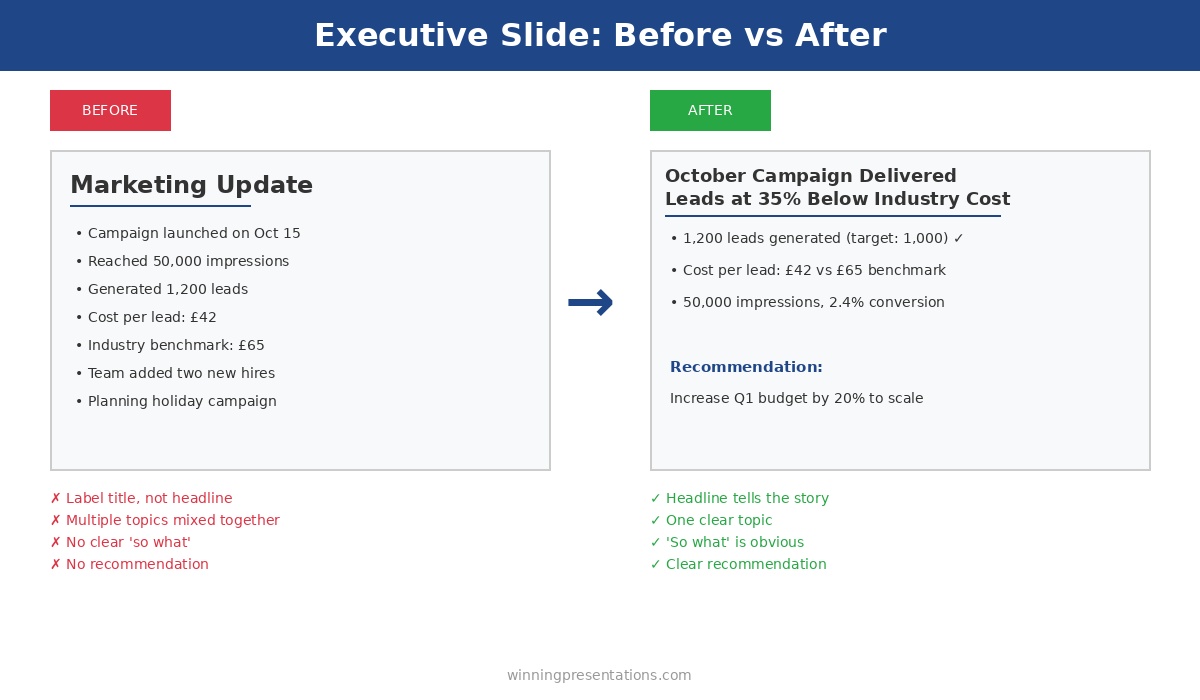
Executive slide before and after example - transforming a weak marketing update into a clear headline with recommendation

The same information, restructured for buy-in: vague labels become clear headlines with recommendations

Lesson 5: Address the Elephant in Your Executive Presentations

Every executive presentation has a weakness. A risk you’re downplaying, an assumption that might not hold, a question you’re hoping nobody asks.

Executives always find it. And when they do, your credibility takes a hit.

The executive presentations that get buy-in address the elephant proactively. They name the biggest concern and explain how it’s being managed — before anyone asks.

The pattern: Identify your executive presentation’s weakest point. Address it directly, early, with a clear mitigation plan. Turn a potential objection into evidence of thorough thinking.

What I’ve seen work: “The obvious question is timeline risk — we’re proposing an aggressive 6-month delivery. Here’s why we’re confident: we’ve already completed the architecture design, secured the technical lead, and identified no dependencies on other teams. If we do hit delays, we have a descoped Phase 1 that still delivers 70% of the value.”

Now the executive doesn’t need to probe for weaknesses in your executive presentation. You’ve shown you already know them.

Lesson 6: Make Executive Presentations Easy to Approve

I’ve seen 80-slide executive presentations. I’ve never seen an 80-slide presentation get buy-in.

More information doesn’t build confidence. It builds confusion and delays. Executives want enough information to decide, not all the information available in your executive presentation.

The pattern: For every piece of information in your executive presentations, ask: does this help them decide yes or no? If it’s “interesting background” or “might be useful,” cut it. Save it for the appendix or follow-up questions.

What I’ve seen work: The best executive presentations I’ve reviewed were 6-10 slides. They respected the audience’s time and focused relentlessly on the decision at hand. Executives could say yes in 15 minutes instead of deferring a 60-minute data dump.

The test: If your executive presentation takes more than 20 minutes to deliver, it’s too long. Cut until it hurts, then cut again.

Building an executive presentation this week?

The Executive Slide System includes 10 templates for every executive presentation type — QBRs, budget requests, board openers, strategic recommendations — plus 30 AI prompts to generate content in minutes. One client used the budget request template to secure approval in a single 15-minute meeting.

Lesson 7: Buy-In for Executive Presentations Starts Before the Meeting

This is the lesson that took me longest to learn: executive presentations that get buy-in usually have buy-in before the presentation happens.

The meeting is confirmation, not persuasion.

Experienced presenters socialise their ideas before the formal pitch. They have one-on-ones with key stakeholders, gather input that shapes the proposal, and build alignment so the executive presentation is a formality.

The pattern: Before any high-stakes executive presentation, identify the 2-3 people whose support you need. Meet with them individually. Ask for their input. Incorporate their feedback. When you present, they’re already invested in your success.

What I’ve seen work: A VP preparing a board presentation spent two weeks in pre-meetings. By the time he delivered his executive presentation, every board member had seen an early version and provided feedback. The presentation felt like a collaborative conclusion, not a surprise pitch. Approved unanimously.

The Meta-Lesson About Executive Presentations

Here’s what all 500+ executive presentations taught me: the audience isn’t “executives.” The audience is specific people with specific concerns, priorities, and decision-making styles.

A CFO reviewing executive presentations cares about ROI and risk. A CEO cares about strategy and competitive position. A board cares about governance and shareholder value. A COO cares about execution and resources.

The executive presentations that get buy-in are tailored to the actual people in the room — not a generic “leadership” audience.

The pattern: Before building any executive presentation, answer: Who exactly will be in the room? What do they each care about? What would make each of them say yes? Then build slides that address those specific concerns.

The Executive Presentation Buy-In Checklist

Before your next executive presentation, run through these questions:

Executive Presentation Buy-In Checklist

  1. ☐ Is my recommendation in the first 2 minutes?
  2. ☐ Have I shown the cost of doing nothing?
  3. ☐ Am I asking for ONE decision only?
  4. ☐ Have I referenced past success as evidence?
  5. ☐ Have I addressed the biggest objection proactively?
  6. ☐ Is the executive presentation under 20 minutes?
  7. ☐ Have I socialised this with key stakeholders beforehand?
  8. ☐ Have I tailored content to the specific people in the room?

If you can’t check every box, your executive presentation isn’t ready. Keep working until you can.

FAQs About Getting Buy-In on Executive Presentations

What if I don’t know who’ll be in the room for my executive presentation?

Ask. Email the meeting organiser: “Can you confirm who’ll be attending? I want to make sure I address the right priorities.” This also signals professionalism and preparation for your executive presentation.

How do I get pre-meetings with senior executives?

Position it as seeking input, not pitching: “I’m developing a proposal for [topic] and would value your perspective before the formal executive presentation. Can I have 15 minutes to walk you through the approach?” Most executives appreciate being consulted.

What if my executive presentation genuinely needs 30+ slides?

It doesn’t. You have 30+ slides of content — that’s different. Distill it to 10 slides for your executive presentation, put the rest in an appendix for reference, and offer to send the full deck afterward for anyone who wants detail.

How do I address objections without sounding defensive in executive presentations?

Frame it as thorough thinking, not defensiveness: “The question I’d ask if I were in your seat is [objection]. Here’s how we’re managing that risk…” You’re showing you’ve anticipated concerns in your executive presentation, not responding to criticism.

Your Next Executive Presentation

You probably have an executive presentation coming up. A budget request, a project proposal, a quarterly review, a board update.

Before you build another slide, step back and ask:

  • What’s the one decision I need from this executive presentation?
  • Who specifically will decide?
  • What would make them say yes?
  • What’s the biggest reason they’d say no — and how do I address it?

Answer those questions first. Then build your executive presentation. That order matters.

Executive presentations aren’t about impressing people with your analysis. They’re about making it easy for smart, busy people to say yes.

Make it easy, and they will

The Executive Slide System complete package - 10 PowerPoint templates, 30 AI prompts, and quick start guide for executive presentations

Get Templates for Executive Presentations That Get Buy-In

These lessons are built into The Executive Slide System — 10 PowerPoint templates structured for approval, plus 30 AI prompts to generate your content in minutes.

The same frameworks used to raise over £250 million in client funding. One client used these to turn a rejected proposal into a funded initiative.

GET INSTANT ACCESS → £39

10 templates • 30 AI prompts • Instant download • 30-day guarantee


Related: How to Create Executive Presentations That Get Approved in 2025 — the complete guide covering all 10 executive presentation types with structures and frameworks for buy-in.

01 Dec 2025
QBR presentation template - quarterly business review slide with metrics, wins, challenges, and next steps

Why Most QBR Presentations Bore Leadership (And How to Fix Yours)

Your QBR presentation is either building your career or stalling it.

There’s no middle ground. After 24 years presenting quarterly business reviews at JPMorgan Chase, PwC, Royal Bank of Scotland, and Commerzbank — and 16 years training executives on presentations — I’ve seen how quickly leadership forms opinions based on how you present your numbers.

A good QBR presentation demonstrates strategic thinking. A bad one makes leadership question whether you understand your own business.

Most QBR presentations are bad. Here’s why — and how to fix yours before the next quarter.

QBR presentation template - quarterly business review slide with metrics, wins, challenges, and next steps
A QBR presentation structure that keeps executives engaged

Why Most QBR Presentations Fail

The fundamental problem with most QBR presentations is that they report what happened instead of what it means.

Leadership doesn’t need you to read numbers off a slide. They can see the numbers. They need you to interpret them — to explain causation, context, and consequence.

“Revenue was £4.2M” is a data point.

“Revenue was £4.2M — 12% above target — driven by the Enterprise expansion we launched in July” is insight.

One informs. The other demonstrates that you understand your business. That’s the difference between a forgettable QBR presentation and one that builds your reputation.

The Three QBR Presentation Mistakes

Mistake 1: Leading with data instead of narrative.

When your first slide is a wall of numbers, you’re signalling that the next 30 minutes will be a data dump. Executives immediately disengage because they know they’ll hear the same information they already saw in the pre-read.

Your QBR presentation should lead with the story. What happened this quarter? Was it good or bad? Why? Then use data to support the narrative — not replace it.

Mistake 2: Hiding bad news (or burying it on slide 18).

Executives can smell spin from a mile away. When you lead with wins and bury challenges at the end of your QBR presentation, you lose credibility. They start wondering what else you’re hiding.

Worse: if they discover a problem you glossed over, they’ll never fully trust your quarterly reviews again.

Be direct. “We missed our customer retention target. Here’s why, and here’s what we’re doing about it.” That earns respect.

Mistake 3: No clear ask.

A QBR presentation isn’t just a report — it’s an opportunity. What do you need from leadership? Budget approval? Headcount? A decision on strategy?

If you walk out of a quarterly business review without having asked for something, you’ve wasted 30 minutes of executive time on a meeting that could have been an email.

The QBR Presentation Structure That Works

Here’s the quarterly business review structure I’ve used and taught for over two decades. It consistently keeps leadership engaged:

1. Headline Metrics (30 seconds)

Open your QBR presentation with 4-6 key numbers. Not 12. Not 20. The metrics that matter most.

Each metric should have three elements:

  • The number itself
  • The target or benchmark (so they know if it’s good or bad)
  • A visual indicator (green/amber/red, arrow up/down)

This takes one slide. Executives can see the health of the business in 10 seconds. That’s the point.

Example QBR headline metrics:

Metric Actual Target Status
Revenue £4.2M £3.8M 🟢
Gross Margin 42% 45% 🟡
New Customers 127 100 🟢
Customer Churn 8.3% 5% 🔴

Four numbers. Instant understanding. Now they’re ready to hear the story.

2. Performance Narrative (2-3 minutes)

This is where most QBR presentations fail — and where great ones shine.

Don’t explain what the numbers are. Explain why they are what they are.

“Revenue was up 12%” is reporting.

“Revenue was up 12%, driven by three factors: the Enterprise deal we closed in July contributed £400K; our pricing adjustment in August increased average deal size by 8%; and the marketing campaign generated 40% more qualified leads than Q2” is analysis.

The second version shows you understand causation. That’s what leadership wants to see in a QBR presentation.

Structure your narrative as:

  • Overall: Was it a good quarter or a bad quarter? Say it plainly.
  • What drove the results: 2-3 primary factors, with specifics.
  • What surprised you: Anything unexpected — good or bad.

3. Wins (2 minutes)

Specific achievements with impact quantified.

Not “We had some great wins this quarter.” That’s meaningless in a QBR presentation.

Instead:

  • “Closed £1.2M Enterprise deal with [Company] — largest in company history”
  • “Reduced customer onboarding time from 6 weeks to 2 weeks”
  • “Launched mobile app — 15,000 downloads in first month”

Each win should have a number attached. Numbers make wins credible. Without numbers, wins feel like spin.

Limit to 3-4 wins. More than that dilutes impact. Pick the ones that matter most to the business strategy.

4. Challenges (2 minutes)

This is where you build trust in your QBR presentation — or destroy it.

Be direct about what didn’t work. Then immediately pivot to what you’re doing about it.

Structure for each challenge:

  • The challenge (specific and honest)
  • Root cause (show you understand why it happened)
  • Mitigation (what you’re doing to fix it)
  • Timeline (when you expect improvement)

Example:

“Customer churn hit 8.3% this quarter — above our 5% target. Root cause: we identified that 60% of churned customers cited slow support response times. We’ve already hired two additional support staff, implemented a new ticketing system, and expect to see churn return to target by end of Q1.”

That’s accountability. Executives respect it.

What NOT to do in a QBR presentation:

  • “Churn was a bit elevated due to market conditions” — vague, externalises blame
  • “We’re looking into the churn issue” — no action, no timeline
  • Skip challenges entirely — destroys credibility

5. Next Quarter Focus (2 minutes)

Three priorities. Not seven. Three.

Each priority in your QBR presentation should have:

  • A specific outcome (not an activity)
  • A measurable target
  • An owner

Weak: “Continue to focus on customer retention”

Strong: “Reduce churn to 5% by end of Q1. Owner: Sarah. Key actions: New onboarding programme launches Jan 15, support SLA reduced to 4 hours.”

The strong version tells leadership exactly what you’ll deliver and who’s responsible. It gives them something concrete to check next quarter.

Want a ready-made QBR presentation template with this structure?

The QBR template is one of 10 executive presentations in The Executive Slide System, complete with AI prompts to generate your content in minutes. One client used these frameworks to turn a failing quarterly review into a promotion conversation.

The QBR Presentation Narrative Arc

Notice the structure follows a story:

  1. Setup: Here’s where we are (headline metrics)
  2. Context: Here’s how we got here (performance narrative)
  3. Highs: Here’s what went well (wins)
  4. Lows: Here’s what didn’t (challenges)
  5. Resolution: Here’s where we’re going (next quarter focus)

This is a story. Stories are engaging. Data dumps are not.

Executives stay engaged with your QBR presentation because they’re following a narrative, not watching you read numbers off slides.

10 executive presentation templates - QBR, budget request, board meeting, investor pitch, strategic recommendation slides
The QBR is one of 10 executive presentation types — each requires a different structure

Timing Your QBR Presentation

If you have 30 minutes:

  • Headline metrics: 2 minutes
  • Performance narrative: 5 minutes
  • Wins: 4 minutes
  • Challenges: 5 minutes
  • Next quarter focus: 4 minutes
  • Discussion/Q&A: 10 minutes

Notice: only 20 minutes of presentation. The rest is discussion.

That’s intentional. Executives want to ask questions, probe challenges, and discuss strategy. If you talk for 28 minutes and leave 2 minutes for questions, you’ve delivered a lecture, not a business review.

The 60/40 rule for QBR presentations: 60% presentation, 40% discussion. If you’re not hitting that ratio, you’re talking too much.

How to Handle Hard Questions in Your QBR

Good QBR presentations invite tough questions. Here’s how to handle them:

“Why did we miss the target?”

Don’t get defensive. Acknowledge the miss, explain root cause, describe what you’re doing about it. “You’re right, we missed by 15%. The primary driver was [X]. We’ve already started [Y] and expect to recover by [Z].”

“What would you do differently?”

This is a test. They want to see if you’ve reflected. Have an answer ready. “In hindsight, we should have [X] earlier. We’ve built that into our Q1 planning.”

“Is this team capable of delivering?”

Don’t take it personally. Answer with evidence. “We delivered [X] and [Y] this quarter despite [challenge]. I’m confident in the team, and I’m adding [resource] to address the gap in [area].”

“What’s the risk we miss again?”

Be honest. “There’s risk in [specific area]. We’re mitigating it by [action]. If [trigger] happens, we’ll [contingency].” Executives respect risk awareness more than false confidence.

QBR Presentation Checklist

Run through these questions before you present your quarterly business review:

QBR Pre-Flight Checklist

  1. ☐ Can leadership see overall business health in the first 30 seconds?
  2. ☐ Does every number have a target/benchmark for comparison?
  3. ☐ Have I explained why results happened, not just what happened?
  4. ☐ Are my wins specific and quantified?
  5. ☐ Have I been honest about challenges — with mitigation plans?
  6. ☐ Are next quarter priorities specific, measurable, and owned?
  7. ☐ Have I left time for discussion (at least 30% of the meeting)?
  8. ☐ Do I have an ask for leadership?

If you answer “no” to any of these, fix it before presenting your QBR.

The QBR Presentation That Changed My Perspective

Early in my career at JPMorgan, I watched a division head present a brutal quarter. Revenue down 20%. Major client lost. Two key hires had quit.

I expected him to spin it. He didn’t.

He opened with: “This was a bad quarter. We underperformed, and I’m accountable.” Then he spent 20 minutes explaining exactly what went wrong, why, and what he was doing to fix it. He ended with a specific ask for headcount to rebuild the team.

The CEO’s response? “Thank you for the honest assessment. Let’s get you those resources.”

That’s when I learned: QBR presentations aren’t about making yourself look good. They’re about giving leadership the information they need to make good decisions. Sometimes that means delivering bad news well.

Executives can handle bad quarters. What they can’t handle is being surprised — or worse, discovering you hid something.

FAQs About QBR Presentations

How long should a QBR presentation be?

For a 30-minute meeting, keep your QBR presentation to 8-12 slides. You want 60% presenting, 40% discussion. More slides means less time for the strategic conversation that makes quarterly reviews valuable.

Should I send my QBR presentation as a pre-read?

Yes, but send a condensed version. Include headline metrics and the performance narrative. Save wins, challenges, and next steps for the live discussion — that’s where you demonstrate strategic thinking.

What if my quarter was genuinely bad?

Lead with honesty. “This was a difficult quarter” followed by clear analysis of why and what you’re doing about it. Executives respect accountability. What destroys trust is discovering you minimised problems.

How do I handle a QBR when I’m new to the role?

Acknowledge it: “This is my first QBR in this role. I’ve spent [X weeks] understanding the business. Here’s what I’ve found.” Then present your analysis. Being new doesn’t excuse you from having a point of view.

What metrics should I include in my QBR presentation?

Include the 4-6 metrics leadership actually uses to evaluate business health. If you’re unsure, ask your manager before the QBR: “What numbers do you look at first?” Those are your headline metrics.

Transform Your Next QBR Presentation

Your next quarterly business review is an opportunity:

  • To demonstrate strategic thinking
  • To build trust through transparency
  • To secure resources for next quarter
  • To show leadership you understand your business

Don’t waste it on a data dump.

Lead with insight. Be honest about challenges. Ask for what you need.

That’s how QBR presentations become career accelerators instead of calendar fillers.

The Executive Slide System complete package - 10 PowerPoint templates, 30 AI prompts, and quick start guide for executive presentations

Get the QBR Template (Plus 9 More Executive Presentations)

Stop building quarterly business reviews from scratch. Get the QBR structure above as a ready-made PowerPoint template, plus AI prompts that generate your content in minutes.

The same frameworks my clients use to present at board level. One client used these to secure £2M in funding.

GET INSTANT ACCESS → £39

10 templates • 30 AI prompts • Instant download • 30-day guarantee


Related: How to Create Executive Presentations That Get Approved in 2025 — the complete guide covering all 10 executive presentation types, including the QBR structure with AI prompts.