
Every executive slide you create gets judged in three seconds.
That’s how long leadership spends deciding whether your slide is worth reading — or skipping. After reviewing thousands of executive slides across 24 years in corporate banking at JPMorgan Chase, PwC, and Royal Bank of Scotland, I’ve found that the same six problems kill presentations over and over.
The good news: you can catch all of them in 60 seconds.
Here’s the executive slide test I run before anything leaves my desk. My clients have used these same standards to present slides that helped raise over £250 million in funding.

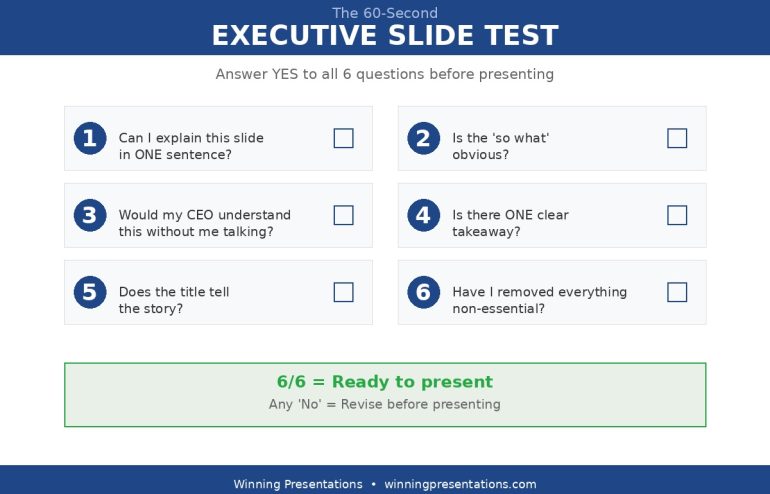
The 60-Second Executive Slide Test
Six questions. Answer “yes” to all six, or revise before presenting.
1. Can I explain this executive slide in ONE sentence?
This is the clarity test.
If you need two sentences to explain what a slide is about, the slide is trying to do too much. Split it or simplify it.
I once watched a director present a “Project Update” slide that covered timeline, budget, risks, team changes, and next steps. Five topics, one slide. The executive’s response: “What’s the headline here?”
There wasn’t one. That’s the problem.
The fix: Before you add anything to an executive slide, write one sentence describing what it communicates. If you can’t write that sentence, you don’t have a clear slide yet.
Examples:
- Weak: “This slide shows our Q3 performance across several dimensions including revenue, costs, and headcount, with some notes on challenges.”
- Strong: “This slide shows Q3 revenue beat target by 12%.”
The strong version might need supporting slides for costs and headcount. That’s fine. One clear message beats three muddy ones.
2. Is the “so what” obvious on this executive slide?
This is the relevance test.
Every executive slide should answer an unspoken question: why am I looking at this?
Data without interpretation is just noise. “Revenue was £4.2M” tells me a number. “Revenue was £4.2M — 15% above target, driven by Enterprise expansion” tells me what it means.
Executives don’t have time to figure out why something matters. That’s your job. If the “so what” isn’t obvious within three seconds, you’ve failed.
The fix: Add the implication to every data point. Don’t just show the number — show what it means for the business, the project, or the decision at hand.
Examples:
- Weak: “Customer churn: 8.3%”
- Strong: “Customer churn: 8.3% — above 5% threshold, requires immediate action”
3. Would my CEO understand this executive slide without me talking?
This is the standalone test.
Here’s something most people don’t think about: your slides will get forwarded. The executive you present to will send them to their boss, their peers, their team. Those people won’t have you there to explain.
Your executive slide needs to communicate without a voiceover.
This doesn’t mean cramming in more text. It means the text you include must be self-explanatory. No jargon that requires context. No acronyms without definitions. No charts that need narration to interpret.
The fix: Imagine emailing this slide to someone who wasn’t in the room. Would they understand it? If not, what’s missing?
Test it: Show the slide to a colleague for 10 seconds. Ask them what it’s about. If they can’t tell you, it doesn’t stand alone.
4. Is there ONE clear takeaway from this executive slide?
This is the focus test.
Multiple messages = no message.
When you put three key points on an executive slide, the audience remembers zero. When you put one point on a slide, they remember one. The maths is simple.
I know it feels efficient to pack information together. It’s not. It’s confusing. Executives are scanning while half-listening to you and thinking about their next meeting. Give them one thing to take away, and they might actually take it.
The fix: Identify the single most important thing you want the audience to remember. Make that the headline. Everything else is supporting evidence.
The discipline: If you have three key points, you have three slides. Accept it.
5. Does the title tell the story?
This is the headline test — and it’s where most executive slides fail.
“Q3 Financial Results” is a label, not a title. It tells me what category of information I’m about to see. It tells me nothing about what I should think or do.
“Q3 Revenue Up 12% Despite Market Headwinds” is a headline. It delivers the message before I read anything else. If I’m scanning a 30-slide deck, I can get the story just from the titles.
This is how executives actually read presentations. They scan titles, look for red flags, and only dig into detail when something catches attention. If your titles are labels, you’re invisible.
The fix: Rewrite every title as a complete sentence that communicates the key message. The title should make sense even if the audience reads nothing else on the executive slide.
Examples:
- Label: “Project Status” → Headline: “Project On Track for March Launch”
- Label: “Q3 Hiring Update” → Headline: “Q3 Hiring Complete — Team at Full Capacity”
- Label: “Budget Analysis” → Headline: “Budget Request: £250K for Q1 Platform Upgrade”
6. Have I removed everything non-essential?
This is the discipline test.
Every element on your executive slide should earn its place. Every bullet point, every data label, every logo in the corner. If it doesn’t contribute to your one message, it’s noise.
This is hard because it feels like deleting things is losing value. It’s not. It’s adding clarity. The stuff you remove wasn’t helping — it was competing for attention with the stuff that matters.
The fix: Go through every element and ask: “Does this help communicate my one key message?” If the answer is no, delete it.
Common offenders:
- Decorative images that don’t convey information
- Logos on every slide (once at the start is enough)
- Data points that don’t support the main message
- Bullet points that repeat what the title already said
- “Agenda” or “Overview” slides that waste time
Want this checklist as a printable PDF?
The “Before You Present” cheat sheet is included in The Executive Slide System — the same templates and prompts my clients use to present at board level. One client used these frameworks to secure £2M in funding last quarter.
How to Test Every Executive Slide in 60 Seconds
Don’t try to run all six questions in your head. Print this list or keep it on a sticky note by your monitor.
For every executive slide:
- Finish the slide
- Step away for 2 minutes (get coffee, check email)
- Come back with fresh eyes
- Run through all six questions
- Fix any “no” answers before moving on
This takes 60 seconds per slide. For a 10-slide deck, that’s 10 minutes of quality control. It will save you from the “what’s the point of this slide?” question that derails presentations.
What Executives Are Really Thinking
These six tests map directly to what leadership thinks when reviewing your executive slides:
| Your Test | What the Executive Is Thinking |
|---|---|
| Can I explain this in one sentence? | “What is this about?” |
| Is the “so what” obvious? | “Why should I care?” |
| Would my CEO understand this? | “Can I forward this to my boss?” |
| Is there ONE clear takeaway? | “What do I need to remember?” |
| Does the title tell the story? | “Can I skim this deck?” |
| Have I removed everything non-essential? | “Is this going to waste my time?” |
When you pass all six tests, you’ve built an executive slide that answers every question before they ask it.
Real Example: Executive Slide Before and After
Here’s how the test works in practice.
BEFORE — The typical executive slide:
Title: “Marketing Update”
- Campaign launched on Oct 15
- Reached 50,000 impressions
- Generated 1,200 leads
- Cost per lead: £42
- Industry benchmark: £65
- Team added two new hires
- Planning holiday campaign
Running the test:
- One sentence? No — covers campaign performance, team changes, and future plans.
- “So what” obvious? Partially — benchmark comparison hints at success, but it’s buried.
- Standalone? No — “Campaign” and “holiday campaign” need context.
- One takeaway? No — at least three different topics.
- Title tells story? No — “Marketing Update” is a label.
- Non-essential removed? No — team hires and future plans don’t belong with campaign metrics.
Score: 0/6. This executive slide needs work.
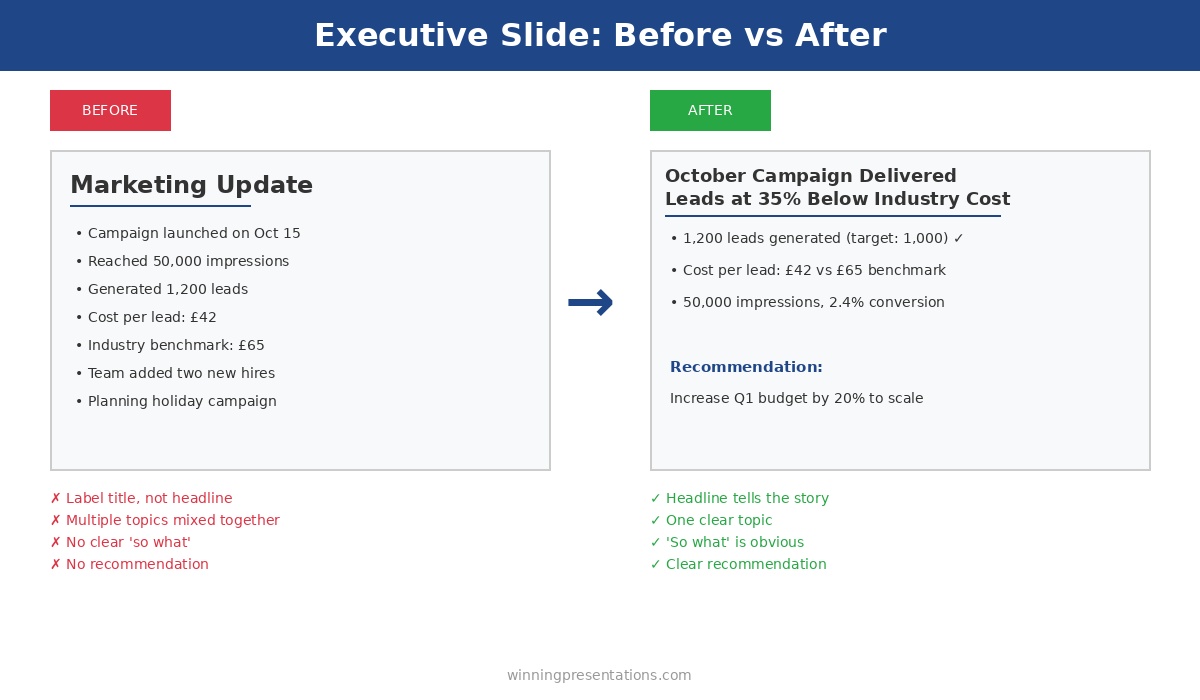
AFTER — The revised executive slide:
Title: “October Campaign Delivered Leads at 35% Below Industry Cost”
- 1,200 leads generated (target: 1,000) ✓
- Cost per lead: £42 vs. £65 industry benchmark
- 50,000 impressions, 2.4% conversion rate
- Recommendation: Increase Q1 budget by 20% to scale results
Running the test again:
- One sentence? Yes — “Our campaign outperformed on cost efficiency.”
- “So what” obvious? Yes — we beat the benchmark, so we should do more.
- Standalone? Yes — all terms are clear.
- One takeaway? Yes — the campaign worked, scale it up.
- Title tells story? Yes — headline delivers the key message.
- Non-essential removed? Yes — team hires and holiday planning are separate slides now.
Score: 6/6. This executive slide is ready.
Print This Executive Slide Checklist
Here’s the test in a format you can print or screenshot:
The 60-Second Executive Slide Test
Answer “yes” to all six before presenting
- ☐ Can I explain this slide in ONE sentence?
- ☐ Is the “so what” obvious?
- ☐ Would my CEO understand this without me talking?
- ☐ Is there ONE clear takeaway?
- ☐ Does the title tell the story?
- ☐ Have I removed everything non-essential?
What Happens When You Skip the Executive Slide Test
I’ll tell you exactly what happens, because I’ve seen it hundreds of times.
You present a slide. An executive asks a clarifying question. You answer. They ask another question. You realise you’re explaining things that should have been on the slide in the first place. The meeting runs long. The decision gets deferred. You leave thinking “that could have gone better.”
It could have. Sixty seconds of review would have caught the problem.
The executives I’ve worked with at JPMorgan, PwC, and Royal Bank of Scotland didn’t get to those positions by tolerating unclear communication. They have no patience for slides that waste their time. And they shouldn’t.
Your job is to make their job easier. The 60-second test is how you do it.
FAQs About Executive Slides
How many bullet points should an executive slide have?
Three to five maximum. If you have more than five bullets, you’re trying to say too much. Split the content across multiple slides or cut what’s non-essential.
Should I use complete sentences in bullet points?
Fragments are fine for bullets, but your title should always be a complete sentence that communicates the key message. Bullets support the title — they don’t replace it.
How do I know if my executive slide is too busy?
Apply the squint test: squint at your slide from arm’s length. If you can’t identify the main message and structure, it’s too busy. Simplify until the hierarchy is obvious.
What’s the ideal number of slides for an executive presentation?
Fewer than you think. For a 30-minute meeting, aim for 8-12 slides maximum. That’s about 2-3 minutes per slide, which leaves time for discussion. Executives prefer fewer, clearer slides over comprehensive data dumps.
Your Next Executive Slide
Open your last presentation. Pick one slide — any slide. Run the test.
I’d bet money at least one question comes back “no.”
Fix it. Then do the next slide. By the time you’ve done 10 slides, the test will be automatic. You’ll start catching problems while you’re still building, not after you’re done.
That’s when your executive slides start getting approved instead of questioned.

Get the Complete Executive Slide System
This checklist is part of a complete toolkit: 10 PowerPoint templates, 30 AI prompts, and the printable “Before You Present” cheat sheet.
Used by professionals at investment banks, consultancies, and Fortune 500 companies.
Instant download • Lifetime updates • 30-day money-back guarantee
Related: How to Create Executive Presentations That Get Approved in 2025 — the complete guide covering all 10 executive presentation types with structures and AI prompts.